Allwinda94
Members
-
Joined
-
Last visited
Everything posted by Allwinda94
-
I do understand there is a problem, but i only see red font with random highlighting and it is even somewhat funny. Seriously talking, I was not able to finish reading TS post due to coloring issue. There is a lack of troubleshooting info and most likely unless this info is provided (Browser\Version\Addons\3rd pt. apps) no meaningful troubleshooting is to be able to be provided.
-
 Honestly "new" features aint new - you can force it on previous versions like 3.71
- 1,915 comments
- 242 reviews
-
-
I was thinking about this siren lately, even implementation gonna be quite static due to specifity of "customization\randomness\however you call it" of siren sound output, if you might understand what i mean
-
Gosh, i honestly want to ask for release date, yet I am willing to wait any amount of time so you guys can make your code base pretty. So far I got just one question now for devs. Will be the feature of random nearby Police cars on streets joining up the ongoing pursuit be implemented upon release?
-
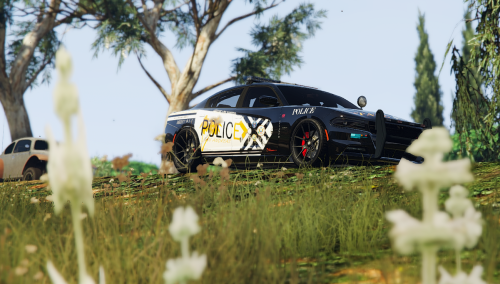 Not here to bark, but it is rather looks like rave hippies decaled car, not legitimate police vehicle.
- 3 comments
- 7 reviews
-
-

- 1
-
-
Crashingkilling lcpdfr script all time, but not the game itself(still playable), here is logpiece. Looks like you need to clean up your references too(watch 3rd line in code) [ERROR - 10:49:11 PM] [Main] CRITICAL ERROR DURING MAINLOOP! REPORT THIS ISSUE AT LCPDFR.COM BY INCLUDING THIS LOGFILE. [ERROR - 10:49:11 PM] [] System.NullReferenceException: Object reference not set to an instance of an object. at f.a.c(Object A_0) in c:UsersLukeGoogle DriveC DevelopmentCallouts (Build)CalloutsMurder.cs:line 146 at LCPD_First_Response.Engine.Timers.DelayedCaller.Process() in d:GTA IVLCPDFRSVNbranchesLCPDFR Ambient ActionLCPD First ResponseLCPD First ResponseEngineTimersDelayedCaller.cs:line 150 at LCPD_First_Response.Engine.Main.() in d:GTA IVLCPDFRSVNbranchesLCPDFR Ambient ActionLCPD First ResponseLCPD First ResponseEngineMain.cs:line 266 [ERROR - 10:49:11 PM] [ExceptionHandler] f+a.c(Object[] A_0) L_0000 LCPD_First_Response.Engine.Timers.DelayedCaller.Process() L_0000 LCPD_First_Response.Engine.Main.() L_011b Error hash: 2304A941C31AED2838D0D94BD959B610050D8A07