


maverick07r6
Members
-
Joined
-
Last visited
Everything posted by maverick07r6
-
I figured out the issue, the unit identifier i chose was '3-9-0-3' . The "0" was considered an empty string. Once I set it to '3903' the issue was resolved.
-
RagePluginHook.log Error Initializing speech engine. Everything has been set up via your documentation. I noticed this in the RPH log: [01/18/2021 6:32:42 PM.061] LSPD First Response: GrammarPolice [GrammarHandler] SpeechRecogitionEngine initialization failed! [01/18/2021 6:32:42 PM.061] LSPD First Response: GrammarPolice [GrammarHandler] ERROR: 'phrase' cannot be an empty string. [01/18/2021 6:32:42 PM.061] Parameter name: phrase [01/18/2021 6:32:42 PM.062] LSPD First Response: GrammarPolice [GrammarHandler] TRACE: at System.Speech.Internal.Helpers.ThrowIfEmptyOrNull(String s, String paramName) [01/18/2021 6:32:42 PM.062] at System.Speech.Recognition.Choices.Add(String[] phrases) [01/18/2021 6:32:42 PM.062] at GrammarPolice.GrammarStuff.Builder.BuildGrammar() [01/18/2021 6:32:42 PM.062] at GrammarPolice.Handlers.GrammarHandler.InitializeSpeechRecognitionEngine() [01/18/2021 6:32:42 PM.062] at GrammarPolice.Handlers.GrammarHandler.Start() [01/18/2021 6:32:42 PM.062] LSPD First Response: GrammarPolice [GrammarHandler] Language setting: en-US Please Help!
-
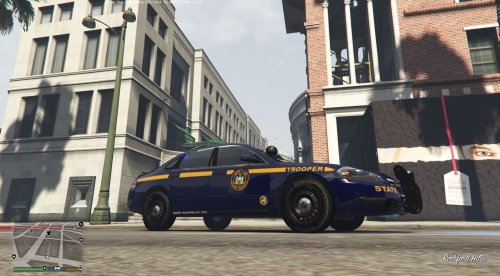 This is an accurate New York State Police Slicktop Impala template I created based on my local NYSP units. The template is designed for use on Bxbugs123's Unmarked 2014 Chevrolet Impala. I added a couple features on this template, the Thruway Authority logo (small) and the NYSP web address on the lower side rockers, just to spice it up a bit.
 -
just started the new LSPDFR update, having fun with it but noticed that when I aim my gun at a perp, the auto-aim immediately targets the closet cop. This wasn't an issue in the previous version... Am I missing an easy fix for this?
-
Exactly what I was thinking, I'd like to use the in-game upgrading system, basically force the game to see the police interceptor as a regular one, same for the Buffalo S...
-
Do you know what file that would be, or have a link to the info? I currently use an in game trainer to spawn vehicles, change weather, etc... but it doesn't have the parts mod option. I'm also running a ton of mods, so basically I'm afraid to add or change any of that as i've finally got everything playing well together.
-
Anyone know of a way to modify a police vehicle file to allow entry into LSC? I was playing around in vehicles.meta, but not sure if this would be the right place. Any ideas?
-
 me neither... same problem, updated ragehook version and correct folder. Help!
- 44 comments
- 11 reviews
-
Bump...Same issue here
-
-
Man, I'm REALLY diggin' the help i'm getting here...lol
-
Hi Guys, Almost every time I try to turn on my lights or siren the game freezes for about 30 seconds, audio loops but still plays. All my cars do this, only stops when I turn on the express mode, does it again after turning express mode off. I do not have any other mods installed besides LCPDFR 1.0d and ELS V8. Tried a fresh GTAIV install with ELS 7.0 and still does it there. Any ideas?
-
same problem, any fix yet??
-
Same problem here, have not yet found a fix...

