


badseed
Members
-
Joined
-
Last visited
Everything posted by badseed
-
I saw the initial homepage came back up. Now, it looks like the forums are back online. License still isn't validating so, hopefully they get that sorted soon. I work IT security so, I know there are lots of moving parts to recovering after an outage. Especially if DNS re-directs are being implemented amongst other items in the playbook. Good to see progress, though. Any idea what they are using for status updates? X, Discord, Youtube, other? I was expecting to see something on the main zmodeler3.com landing page or the forums but, sadly, nothing posted yet.
-
I use traffic policer (The latest revision from Sparky(?)), presently, for some ambient call-outs. It works fine - no crashes [Ambient Event Chances] //This is the minimum time before a new event can take place. E.g. when an event is created, the next event won't be created until x seconds after the first one. //The time is in seconds. //Maximum=200 NextEventTimer=200 //This is the number of events to be created before the timer is set. //E.g. if this is set to 2, the timer set above will only start counting down once 2 ambient events have been created consecutively. //Minimum is 1. NumberOfAmbientEventsBeforeTimer=1 //These values are the chances of an ambient event being created: the lower the number, the bigger the chance. Think of it as a '1 in x' chance. //To disable an ambient event, set its chance to 0. DrunkDriver=140 MobilePhone=90 Speeder=60 UnroadworthyVehicle=0 MotorcyclistWithoutHelmet=0 StreetRace=280 StolenVehicle=220 DrugDriver=140 //NoLightsAtDark only occurs during nightly hours (20:00-07:00). NoLightsAtDark=110 NoBrakeLights=150 BrokenDownVehicle=0 BurnoutWhenStationary=190 RevEngineWhenStationary=190 [Callouts] //You can disable inidivual callouts here. You can set a callout to 'true' or 'false', where true enables it and false disables it. OwnerWantedEnabled=false DrugsRunnersEnabled=false DriverUnderTheInfluenceEnabled=false //High number = more frequent. Low number = less frequent. Valid numbers range from 1 to 6. 1 = rare, 6 = often. Use whole numbers, so NOT 1.5 etc. OwnerWantedFrequency=3 DrugsRunnersFrequency=2 DriverUnderTheInfluenceFrequency=2 //Set this to true or false accordingly to display & play dispatch caution messages DispatchCautionMessages=true
-
@Maramat Thanks so much for providing that update. Glad to hear he's ok - but also sad to hear it might be a week before we are back up (WAG). Short term solution for him would be placing the validation/ license instances behind Cloudflare and let them handle DDoS mitigation. Though, I'm sure he knows this is a valid option.
-
Thanks for confirming. Its been down about 24 hours or so. He's usually pretty attentive to things - Hope everything is ok. Definitely a bummer, though. I have several things I was working on and now I'm stopped.
-
Software license isn't validating and the webpage goes to a generic hosting error saying the site is down. Is this a "me" problem or an "Oleg" problem? Thanks!
-
Greetings! I'll be brief, so as to not put anyone to sleep! Like many of you (maybe), I like to change the NPC public safety vehicles around depending on my mood. I was thinking a quick and painless way to do this would be to have separate (custom) DLC packs. Say, DLC1 has all Fords in it... maybe DLC2 has all Dodge and so on. To accomplish what I'm trying to do; Do I have to eliminate all references to police, police2,sheriff,sheriff2, etc from the OEM handling, carcols, carvariations and vehicles.meta (in //%GTAV%/mods/update/update.rpf/*.*) so that the game will use the lines in my "custom" DLCs? ..or, will the game prefer to pull those lines from the "custom" DLCs that the vehicles models live in? I read some other posts but I wasn't able to clearly see a topic like this one. Thanks for any insight!
-
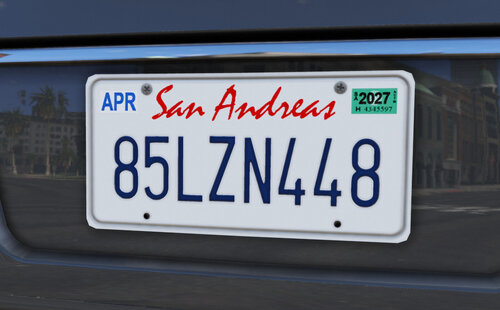 I was unable to get it to work with v.3504, manual install in both \patchday27ng and \patchday28ng
 -
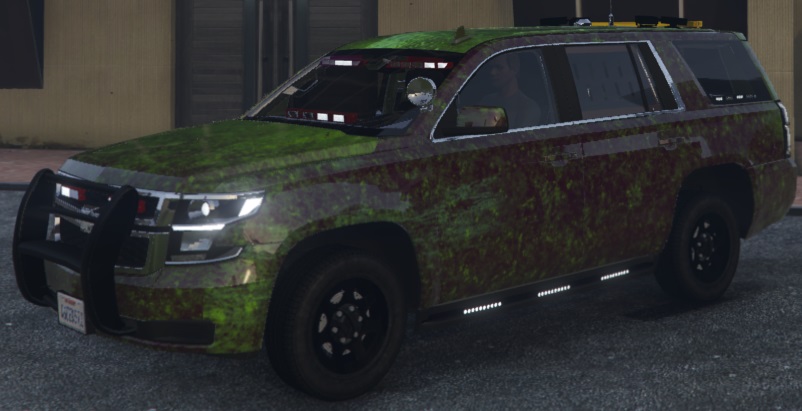
I'm having an issue with textures on an imported vehicle... specifically, the 2020 Tahoe. This is a new install and is pretty barebones. I have a modified visual settings file, ELS and I'm using Albo's DLC utility. Other vehicles load just fine... except this one (also, note the ELS lights function but, are not the proper colors - the other side is amber'ish). I've tried 2 different versions from 2 different authors and the other one is a weird purple color (no, I don't have that visuals mod which seems to cause this as well). Anybody seen anything like this? Any ideas on how to solve it? Thanks!
-
 Great work on this! I really appreciate the time you take to build these great plugins and to help folks that have problems! There are 2 things I am missing after reading through all the plugin documentation and 29 pages here :) 1 is no big deal - 2 drives me crazy 1. Siren comes on automatically when I hit ELS lightstage 3. Once I tap "<my siren mapping>" it stays off for the rest of the session and that is fine - just wondering if there is a way to mute it from the start. 2. Dual siren (siren6) shuts off when I change tones. Any way to force it to run all the time (something like the "Snd_SrnTonX" siren control in ELS? <Sirens> <Siren1 SirenType="Primary">propcall</Siren1> <Siren2 SirenType="Secondary">ms4000yelp</Siren2> <Siren3 SirenType="Secondary">mchylo</Siren3> <Siren4 SirenType="Horn">c30horn</Siren4> <Siren5 SirenType="Secondary">o90hilo</Siren5> <Siren6 SirenType="ForcedOnly">rumblerwail</Siren6> </Sirens> Any ideas? Thanks again
- 853 comments
- 108 reviews
