



GravelRoadCop
-
Joined
Everything posted by GravelRoadCop
-
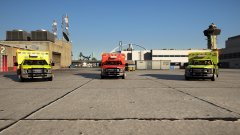
From the album: GravelRoadCop
Now available for download : Paramedic, LSIA and SOBER unit. All in 4k quality. -
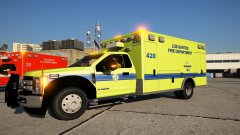
From the album: GravelRoadCop
Now available for download : Paramedic, LSIA and SOBER unit. All in 4k quality. -
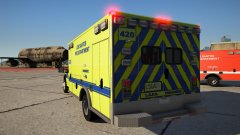
From the album: GravelRoadCop
Now available for download : Paramedic, LSIA and SOBER unit. All in 4k quality. -
From the album: GravelRoadCop
Now available for download : Paramedic, LSIA and SOBER unit. All in 4k quality. -
From the album: GravelRoadCop
Now available for download : Paramedic, LSIA and SOBER unit. All in 4k quality. -
From the album: GravelRoadCop
Now available for download : Paramedic, LSIA and SOBER unit. All in 4k quality. -
From the album: GravelRoadCop
Now available for download : Paramedic, LSIA and SOBER unit. All in 4k quality. -
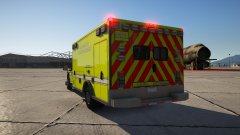
From the album: GravelRoadCop
Now available for download : Paramedic, LSIA and SOBER unit. All in 4k quality. -
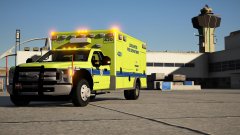
From the album: GravelRoadCop
Now available for download : Paramedic, LSIA and SOBER unit. All in 4k quality. -
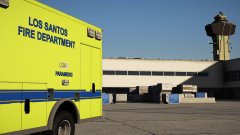
From the album: GravelRoadCop
Now available for download : Paramedic, LSIA and SOBER unit. All in 4k quality. -
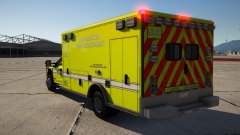
From the album: GravelRoadCop
Now available for download : Paramedic, LSIA and SOBER unit. All in 4k quality. -
-
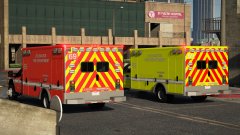
From the album: GravelRoadCop
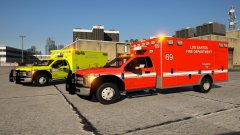
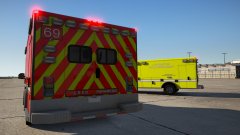
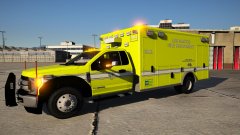
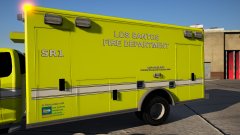
Work in progress but here are the first two skins based on the LAFD ambulances. The skins are fictional so it's not 100 % accurate. The lime green version isn't for the airport, but I plan on making the LSIA ambulance after I finish engine LSIA texture first. I will also change the unit numberings, the 69 is just placeholder for now. What are your thoughts though ? -
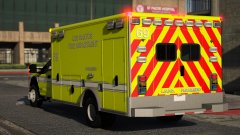
From the album: GravelRoadCop
Work in progress but here are the first two skins based on the LAFD ambulances. The skins are fictional so it's not 100 % accurate. The lime green version isn't for the airport, but I plan on making the LSIA ambulance after I finish engine LSIA texture first. I will also change the unit numberings, the 69 is just placeholder for now. What are your thoughts though ? -
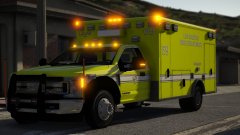
From the album: GravelRoadCop
Work in progress but here are the first two skins based on the LAFD ambulances. The skins are fictional so it's not 100 % accurate. The lime green version isn't for the airport, but I plan on making the LSIA ambulance after I finish engine LSIA texture first. I will also change the unit numberings, the 69 is just placeholder for now. What are your thoughts though ? -
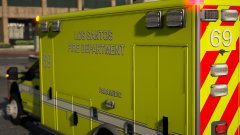
From the album: GravelRoadCop
Work in progress but here are the first two skins based on the LAFD ambulances. The skins are fictional so it's not 100 % accurate. The lime green version isn't for the airport, but I plan on making the LSIA ambulance after I finish engine LSIA texture first. I will also change the unit numberings, the 69 is just placeholder for now. What are your thoughts though ? -
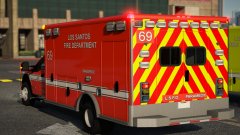
From the album: GravelRoadCop
Work in progress but here are the first two skins based on the LAFD ambulances. The skins are fictional so it's not 100 % accurate. The lime green version isn't for the airport, but I plan on making the LSIA ambulance after I finish engine LSIA texture first. I will also change the unit numberings, the 69 is just placeholder for now. What are your thoughts though ? -
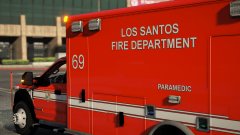
From the album: GravelRoadCop
Work in progress but here are the first two skins based on the LAFD ambulances. The skins are fictional so it's not 100 % accurate. The lime green version isn't for the airport, but I plan on making the LSIA ambulance after I finish engine LSIA texture first. I will also change the unit numberings, the 69 is just placeholder for now. What are your thoughts though ? -
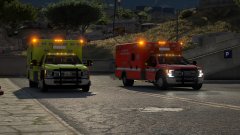
From the album: GravelRoadCop
Work in progress but here are the first two skins based on the LAFD ambulances. The skins are fictional so it's not 100 % accurate. The lime green version isn't for the airport, but I plan on making the LSIA ambulance after I finish engine LSIA texture first. I will also change the unit numberings, the 69 is just placeholder for now. What are your thoughts though ? -
His conduct was unacceptable, period. He swore to uphold the law and the criminal justice system and he was unprofessional in doing this. I understand the mindset and the mentality of these kids who grow up in these sorts of neighborhood, and while the action of this police officer does teach a lesson to this punk, it is still unprofessional, and it's not the enforcement nor the training the state hired him to act on. The kid might respect the cop from thereon after this beating, but it still shatters the credibility of community policing in other cities that has been affected by this video. Social Media is a very dangerous platform.
-
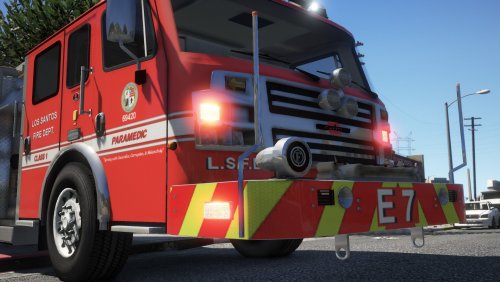 Yes, over this weekend. For the engine model and maybe ladder. I've included the edited light files, it will work for all models. Already beaten you to the punch. I've included the light files for all models in this update.
- 27 comments
- 4 reviews
-
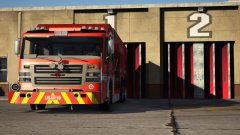
From the album: GravelRoadCop
Finished the skin for the Rosenbauer heavy rescue model from medic4523's Fire & EMS Pack . Based on LAFD US&R 88. Try it here : -
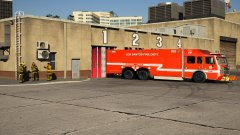
From the album: GravelRoadCop
Finished the skin for the Rosenbauer heavy rescue model from medic4523's Fire & EMS Pack . Based on LAFD US&R 88. Try it here : -
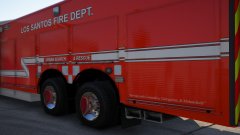
From the album: GravelRoadCop
Finished the skin for the Rosenbauer heavy rescue model from medic4523's Fire & EMS Pack . Based on LAFD US&R 88. Try it here : -
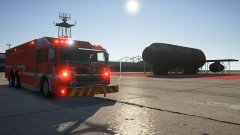
From the album: GravelRoadCop
Finished the skin for the Rosenbauer heavy rescue model from medic4523's Fire & EMS Pack . Based on LAFD US&R 88. Try it here :


