
GravelRoadCop
Members
-
Joined
Files posted by GravelRoadCop
-
-- Federal Signal Touchmaster Siren by Gravelroadcop --
1.0.0 12/5/2023
ABOUT :
Immerse yourself in the authentic sounds of California law enforcement with the Legendary Federal Signal Touchmaster Siren for GTA 5. This modification introduces the iconic siren, renowned for its distinctive Wail, Yelp, Ultra, and Futura tones and the famous sweep tone. Transform the streets of Los Santos into a true reflection of California law enforcement with this immersive and realistic siren experience, providing an authentic atmosphere to your virtual adventures.
With these siren tones, your police vehicles in Los Santos will not only look the part but sound the part as well. The high-quality, seamless audio ensures an immersive and authentic experience as you patrol the streets, enforce the law, and respond to emergencies.
Note: Please ensure you have the appropriate vehicle models and modifications to use these siren tones effectively. Safety first – obey traffic laws and regulations while using these sirens in the game. Enjoy the realism and take your role as a Los Santos police officer to the next level with the Federal Signal Touchmaster Tones mod.
Download it today and respond Code 3.
-----INSTALLATION INSTRUCTIONS -----
- Open 'OpenIV' and go to your GTA V Directory.
- In 'OpenIV', go to the 'x64' folder, then audio > sfx > resident.rpf
- Inside Resident.rpf should be 16 .awc files. Locate 'VEHICLES.AWC'
- Right click on it, and select 'EXTRACT TO WAVE (.WAV)' AND 'EXPORT TO OPENFORMATS (.OAC)' to an empty folder on your desktop.
- Using your desired siren trait names, rename any of the siren wav. files, and drag them to the vehicle.awc folder to replace the stock siren tones.
- Using 'OpenIV', click EDIT and then select ' Import OpenFormats', select your vehicles.oac to import the new sirne tones.
- Respond Code 3 !
IF YOU WISH TO USE OTHER SIRENS TONES OTHER THAN STOCK TONES, YOU WILL NEED TO REFER TO YOUR SIREN HASHTAG DICTIONARY AND USE THE NAMES FOR YOUR DESIRED TONES. MAKE SURE THE VEHICLE FOLDER DOES NOT EXCEED 16.132kb OR IT WILL MUTE THE SOUND DICTIONARY.
IF YOU USE THE RATING/REVIEW SYSTEM TO REPORT ISSUES/BUGS, I WILL IGNORE IT AND YOU WILL BE REPORTED.
CREDITS:
- Federal Signal Corps. for the original siren tones
- Gravelroadcop for editing them.
You may use this mod as long as you follow these terms:
• Don't redistribute without my permission, across all gaming platform.
• Don't edit any file and redistribute it without my permission, and cannot be used for other games other than GTA V.
• I am not responsible for any damage that may be caused to your PC or game directory during a) the installation b) usage or c) removal of this mod. You are responsible for backing up your files!
• If you want to include this mod in a pack, please contact me. Clan and private packs are an exception, as long as they stay 'private'. Correct credits must be given at ALL times.
- 1,155 Downloads
- 1 Comments
Updated -
🌟 RDE 4.0 Ultimate Emergency Lighting Visual Overhaul 11/20/2023 🌟
Immerse yourself in a visually enhanced experience as I introduce a comprehensive overhaul of the emergency lighting system, featuring realistic flash patterns, brighter lights, headlight wig-wags, and authentic Whelen & Federal Signal Corps flash patterns to Rebalanced Dispatch Enhanced for Grand Theft Auto V
While the lighting isn't 100% true to every detail, it comes remarkably close, offering you an experience that mirrors the dynamic and diverse emergency services present in Los Santos City, based on inspiration from it's real-life counterpart, Los Angeles.
🌟 What's New: Real-world Light Patterns and Packages 🌟
🔵 Authentic Light Patterns: Say goodbye to generic and unrealistic emergency lighting. I've meticulously recreated the light patterns used by emergency vehicles in the real world. Watch as your favorite units now exhibit accurate and visually stunning lighting sequences that reflect the quality of the Rebalanced Dispatch Enhanced mod.
🔴 Say goodbye to dim and lackluster lighting. This overhaul introduces brighter and more impactful emergency lights, ensuring that every vehicle stands out in the virtual cityscape. Whether it's the brilliance of a police cruiser or the intensity of a ambulance, you'll be captivated by the heightened visibility.
🔵 Lore-Friendly: Witness the transformation of your favorite emergency vehicles as they now showcase a lighting setup that aligns with the distinct characteristics of Los Angeles emergency services. Although I strive for accuracy, achieving 100% precision can be challenging. This mod is a strikingly close representation that significantly enhances your gameplay.
🔴 Headlight Wig-Wags: Take your emergency lighting experience to the next level with the addition of headlight wig-wags. Watch as vehicles dynamically flash their headlights, adding an extra layer of realism to your encounters with emergency services in Los Santos.
🔵 Watch your virtual Los Santos come alive with emergency vehicles that mirror the vibrant and bustling streets of Los Angeles. The improved lighting not only adds a layer of realism to your gameplay but also contributes to the overall immersion of your virtual metropolis.
Upgrade your emergency services with the Realistic Emergency Lighting Overhaul for Rebalanced Dispatch Enhanced. Dive into the action with a heightened sense of realism, where every siren, strobe, and flash contributes to an immersive and believable game world. Download now and elevate your emergency response experience to new heights!
Please note that this update is a work in progress. While there are still several vehicles left on our to-do list, the majority have already undergone the transformation. I encourage you to share your thoughts, suggestions, and feedback.
🌟 Installation Instructions: 🌟
Prerequisites:
Ensure you have a clean, up-to-date installation of Grand Theft Auto V.
Step 1: Install Rebalanced Dispatch Enhanced 4.0
Download Rebalanced Dispatch Enhanced 4.0 from https://www.gta5-mods.com/misc/realism-dispatch-enhanced.
Follow the installation instructions provided by the mod author.
Confirm that Rebalanced Dispatch Enhanced 4.0 is working correctly in your GTA V game.
Step 2: Download Ultimate Emergency Lighting Visual Overhaul
Extract the downloaded file to a location of your choice.
Step 3: Install Ultimate Emergency Lighting Visual Overhaul
Open OpenIV and navigate to mods\update\x64\dlcpacks\rde\dlc.rpf\
Drag & Drop carcols.meta from the "UltimateEmergencyLights" folder to the path above.
Step 4: Activate the game and respond code 3.
- 1,498 Downloads
- 4 Comments
Updated -
-- Federal Signal Smart Siren SSP3000B (also included with FS Pathfinder controller) Siren by Gravelroadcop --
1.0.0 10/30/2023
ABOUT:
Bring the iconic sounds of the Los Angeles Police Department to the streets of Los Santos with the Federal Signal Platinum (or Pathfinder) Smart Siren Tones mod. This comprehensive mod adds the renowned siren tones to your GTA 5 experience, ensuring that your police vehicles roar with authenticity and authority.
Wail: The classic and unmistakable wail tone used by the LAPD. Whether you're chasing down a suspect or responding to an emergency, the Wail tone will strike fear into the hearts of Los Santos criminals.
Yelp: Switch to the Yelp tone for quick and agile maneuvering through traffic. Perfect for weaving in and out of the city's bustling streets as you race to the scene.
Priority: When it's time to take charge and clear the way, the Priority tone ensures that all traffic on the road knows to make way for law enforcement. Make your presence known and establish dominance with this commanding tone.
Powercall: When things get intense, the Powercall tone demands attention. Activate this tone and let everyone know that you mean business. It's time to get the job done, no matter the circumstances.
Regular and Rumbler Versions: This mod offers both regular and rumbler versions of each siren tone. The regular version provides high-quality, pure sound with loud volume for a classic experience. The rumbler version adds an extra dimension to your siren, using vibrations to enhance the auditory impact. Feel the power of your siren as it rumbles through your vehicle.
With these siren tones, your police vehicles in Los Santos will not only look the part but sound the part as well. The high-quality, seamless audio ensures an immersive and authentic experience as you patrol the streets, enforce the law, and respond to emergencies.
Note: Please ensure you have the appropriate vehicle models and modifications to use these siren tones effectively. Safety first – obey traffic laws and regulations while using these sirens in the game. Enjoy the realism and take your role as a Los Santos police officer to the next level with the Federal Signal Pathfinder Smart Siren Tones mod.
Also, the best part of it all? It's F.R.E.E. Unlike others who charge money for the same siren tones in this pack. No siren mod should be behind a paywall.
Download it today and respond Code 3.
-----INSTALLATION INSTRUCTIONS -----
- Open 'OpenIV' and go to your GTA V Directory.
- In 'OpenIV', go to the 'x64' folder, then audio > sfx > resident.rpf
- Inside Resident.rpf should be 16 .awc files. Locate 'VEHICLES.AWC'
- Right click on it, and select 'EXTRACT TO WAVE (.WAV)' AND 'EXPORT TO OPENFORMATS (.OAC)' to an empty folder on your desktop.
- Using your desired siren trait names, rename any of the siren wav. files, and drag them to the vehicle.awc folder to replace the stock siren tones.
- Using 'OpenIV', click EDIT and then select ' Import OpenFormats', select your vehicles.oac to import the new sirne tones.
- Respond Code 3 !
IF YOU WISH TO USE OTHER SIRENS TONES OTHER THAN STOCK TONES, YOU WILL NEED TO REFER TO YOUR SIREN HASHTAG DICTIONARY AND USE THE NAMES FOR YOUR DESIRED TONES. MAKE SURE THE VEHICLE FOLDER DOES NOT EXCEED 16.132kb OR IT WILL MUTE THE SOUND DICTIONARY.
IF YOU USE THE RATING/REVIEW SYSTEM TO REPORT ISSUES/BUGS, I WILL IGNORE IT AND YOU WILL BE REPORTED.
CREDITS:
- Federal Signal Corps. for the original siren tones
- Gravelroadcop for editing them.
You may use this mod as long as you follow these terms:
• Don't redistribute without my permission, across all gaming platform.
• Don't edit any file and redistribute it without my permission, and cannot be used for other games other than GTA V.
• I am not responsible for any damage that may be caused to your PC or game directory during a) the installation b) usage or c) removal of this mod. You are responsible for backing up your files!
• If you want to include this mod in a pack, please contact me. Clan and private packs are an exception, as long as they stay 'private'. Correct credits must be given at ALL times.
- 3,044 Downloads
- 7 Comments
Updated -
ABOUT : Modern Siren Pack is a sound modification that introduces current generation real-world siren tones to GTA V, giving you a realistic emergency driving atmosphere. This modification will restructure the discontinued American Siren Pack modification and evolve into a larger scale siren modification for Grand Theft Auto V. The sound pack aims to introduce all known siren brands from around the world, and to allow you to choose the siren tones you want to have. The mod also aims to provide you with a smoother and easier installation experience. Modern Siren Pack is compatible with Emergency Lighting System V by Lt.Caine & Siren Mastery by Albo1125. The best part about this mod? It's F.R.E.E. Yup, I don't charge a single dime for this mod, unlike many other greedy "content creators' out there. For the love of god, don't pay $6 for a siren pack when this one is free ... FEATURES : The siren pack is in ongoing development, with limited and doctored/unedited siren tones. The siren pack will offer over 8 different Siren manufacture brands including but not limited to: Whelen Engineering, Federal Signal Corporation, Code 3 PSE, Feniex, Sound Off Signal, Rontan, Carson and Star/SVP. Modern Siren Pack will also include several foreign siren tones that are used in other countries. Some siren brands will come with four standard tones ( Wail, Yelp, Priority, Hi-Lo/Misc. Tones, ) including air horn. The siren tones in the pack will have a maintained level of volume, and quality assurance to give you the experience you want to have, especially by getting attention of other drivers on the road while responding code 3. Some siren brands are versatile for Fire/Rescue - EMS roles.
IMPORTANT NOTE : Modern Siren Pack Alpha is your chance to experience the mod as it evolves throughout its development process. It is a work in progress and therefore contains a variety of bugs. I strongly advise you to expect the following bugs before you report it to me: volume level differences, some are quiet whereas others are louder. Not all siren models will have complete siren tones set regarding their real-life counterparts. Changes will occur, and I will omit some. By using Modern Siren Pack, you understand what Alpha Pack means and are interested in taking part in the ongoing development cycle. Sirens provide an essential function of an effective audio/visual warning system. However, sirens are only short range secondary devices. The use of a siren does not ensure that all drivers can or will abide by or react to an emergency warning signal, especially at high rates of speeds or long distances. The operator of the vehicle must never take the right of way for granted, and it is the operator’s responsibility to proceed safely. Thank you for supporting the Modern Siren Pack. --- " 132 & in uhhhhhhhhhhhhh, i got him at gunpoint. Cover is code 3. " If you are interested in supporting Modern Siren Pack, please follow/monitor this topic for future updates : http://www.lcpdfr.com/forums/topic/66424-modern-siren-pack/ An excerpt from ELS's user guide, page 28 :
As of September 13th, 2018, it is now possible to assign additional siren strings to ELS :
Firetruck Siren:
"RESIDENT_VEHICLES_SIREN_FIRETRUCK_WAIL_01" - Firetruck Primary
"RESIDENT_VEHICLES_SIREN_FIRETRUCK_QUICK_01" - Firetruck Secondary
Police Bike Siren:
"RESIDENT_VEHICLES_SIREN_WAIL_03" - Police Bike Primary
"RESIDENT_VEHICLES_SIREN_QUICK_03" - Police Bike Secondary
Sheriff (Granger) Siren:
"RESIDENT_VEHICLES_SIREN_WAIL_04" - Sheriff (Granger) Primary
"RESIDENT_VEHICLES_SIREN_QUICK_04" - Sheriff (Granger) Secondary
^ These two are not working as of 9/13/2018
FIB Siren:
"RESIDENT_VEHICLES_SIREN_WAIL_02" - FIB Primary
"RESIDENT_VEHICLES_SIREN_QUICK_02" - FIB Secondary
Ambulance Siren:
"RESIDENT_VEHICLES_SIREN_WAIL_01" - Ambulance Primary
"RESIDENT_VEHICLES_SIREN_QUICK_01" - Ambulance Secondary
MANUAL INSTALLATION :
Make a new folder somewhere on your desktop, name it anything Move Both the Vehicle folder and vehicle.oac file out of this .rar pack into the folder you just created on the desktop Open 'OpenIV' and go to your GTA V Directory. In 'OpenIV', go to the 'x64' folder, then audio > sfx > resident.rpf ( it is advised that you use your mod folder instead of vanilla ) Inside Resident.rpf should be 16 .awc files. Import openformats, navigate to the folder you put the Modern Siren Pack 'vehicles' folder and the 'vehicles.oac' in and select the 'Vehicles.oac' save and you're good to go. Respond Code 3 ! OIV INSTALLATION : OIV INSTALLATION :
1) Run OpenIV
2) Select Tools > Package Installer (Located on the toolbar at the top)
3) Locate 'Modern Siren Pack.OIV'
4) Select 'Open'
5) Choose 'MODS folder' to install in.
6) Respond Code 3.
Special thanks to @Albo1125 @FirstThirtyMinutes for the tutorial videos : IF YOU WISH TO USE OTHER SIRENS TONES OTHER THAN STOCK TONES, YOU WILL NEED TO REFER TO YOUR SIREN HASHTAG DICTIONARY, AND USE THE NAMES FOR YOUR DESIRED TONES. MAKE SURE THE VEHICLE FOLDER DOES NOT EXCEED 15.7MB OR IT WILL MUTE THE SOUND DICTIONARY.
IF YOU USE THE RATING/REVIEW SYSTEM TO REPORT ISSUES/BUGS, I WILL IGNORE IT AND YOU WILL BE REPORTED. CREDITS: - Federal Signal Smart Siren - Edited by -- Gravelroadcop/LEDesigns 2015-2017
- Federal Signal Smart Siren 3000P - Raw materials provided by NOTIVAN, edited by GravelRoadCop 2018
- Federal Signal Unitrol 80k - Edited by -- Gravelroadcop/LEDesigns 2015-2017
- Federal Signal Unitrol Touchmaster Siren - Edited by -- Gravelroadcop/LEDesigns 2015-2017
- All Whelen tones -- Edited by -- Gravelroadcop/LEDesigns 2015-2017
- Code 3 Mastercom B Siren -- Edited by --Gravelroadcop/LEDesigns 2015-2017
- Code 3, PSE. -- Original Tones ( V-Con, Mastercom B, RLS, Sprinter, Xcel and Banshee)
- Code 3 RLS -- Quinn Dickinson
- Federal Signal Corps. - Original Tones
- Whelen Engineering - Original Tones
- Galls - Original Tones
- Signal Vehicle Products - Original Tones
- OpenIV: www.openiv.com/
- Whelen Cencom Sapphire - Whelen Engineering
- Motorola Astro Spectra Siren - Motorola Solutions You may use this mod as long as you follow these terms:
• Don't redistribute without my permission.
• Don't edit any file and redistribute it without my permission.
• I am not responsible for any damage that may be caused to your PC or game directory during a) the installation b) usage or c) removal of this mod. You are responsible for backing up your files!
• If you want to include this mod in a pack, please contact me. Clan and private packs are an exception, as long as they stay 'private'. Correct credits must be given at ALL times.
- 422,343 Downloads
- 221 Comments
Updated -
-- Motorola Spectra System 9000 Siren by Gravelroadcop --
1.0.0 8/09/2022
ABOUT :
Motorola Spectra System 9000 Siren, famously used by large agencies throughout the United States, including Los Angeles Fire Department, Seattle Police, Fire and EMS as well as many other organizations. Known for its simple yet commanding tones, it is one of the most unique sirens available on the market today. This modification includes both the manual tone, unlike most other similar modifications.
There are five in-game siren tones available in this pack, all of which are high quality, loud, and loop seamlessly.
- WAIL
- YELP
- HI-LO
- MANUAL
- AIRHORN
Download it today and respond Code 3.
** SPECIAL INSTRUCTION TO USE MANUAL TONE **
I recommend you use the manual tone for the AMBULANCE slot.
File Name: AMBULANCE_WARNING
ELS Config Name: VEHICLES_HORNS_AMBULANCE_WARNING
<ManTone1 AllowUse="true" AudioString="VEHICLES_HORNS_AMBULANCE_WARNING" />
-----INSTALLATION INSTRUCTIONS -----
- Open 'OpenIV' and go to your GTA V Directory.
- In 'OpenIV', go to the 'x64' folder, then audio > sfx > resident.rpf
- Inside Resident.rpf should be 16 .awc files. Locate 'VEHICLES.AWC'
- Right click on it, and select 'EXTRACT TO WAVE (.WAV)' AND 'EXPORT TO OPENFORMATS (.OAC)' to an empty folder on your desktop.
- Using your desired siren trait names, rename any of the Motorola Spectra System 9000 Siren, and drag them to the vehicle.awc folder to replace the stock siren tones.
- Using 'OpenIV', click EDIT and then select ' Import OpenFormats', select your vehicles.oac to import the new sirne tones.
- Respond Code 3 !
IF YOU WISH TO USE OTHER SIRENS TONES OTHER THAN STOCK TONES, YOU WILL NEED TO REFER TO YOUR SIREN HASHTAG DICTIONARY, AND USE THE NAMES FOR YOUR DESIRED TONES. MAKE SURE THE VEHICLE FOLDER DOES NOT EXCEED 16.132kb OR IT WILL MUTE THE SOUND DICTIONARY.
IF YOU USE THE RATING/REVIEW SYSTEM TO REPORT ISSUES/BUGS, I WILL IGNORE IT AND YOU WILL BE REPORTED.
You may use this mod as long as you follow these terms:
• Don't redistribute without my permission, across all gaming platform.
• Don't edit any file and redistribute it without my permission, and cannot be used for other games other than GTA V.
• I am not responsible for any damage that may be caused to your PC or game directory during a) the installation b) usage or c) removal of this mod. You are responsible for backing up your files!
• If you want to include this mod in a pack, please contact me. Clan and private packs are an exception, as long as they stay 'private'. Correct credits must be given at ALL times.
- 945 Downloads
- 3 Comments
Updated -
-- CODE 3 PSE. MASTERCOM 'B' MODEL SIREN --
UPDATE 2.0.0 8/09/2022
ABOUT :
This is the Code 3 PSE. Mastercom 'B' Model Siren. There are many emergency service agencies around the world that use the siren model. Among the police services using this siren are the Alaska State Troopers, the Toronto Police Service, Calgary Police Service, and many others. In contrast to most other similar siren modifications, this includes a short and long version of the manual tone.
FEATURES
- An updated and improved WAIL, YELP, PRIORITY, MANUAL and AIRHORN tones.
- The new short and long version of the manual siren tone can be used in the ambulance slot when using ELS.
- Tones: WAIL, YELP, PRIORITY, PRIORITY 2, HI-LO, MANUAL AND AIRHORN.
** SPECIAL INSTRUCTION TO USE MANUAL TONE **
I recommend you use the manual tone for the AMBULANCE slot.
File Name: AMBULANCE_WARNING
ELS Config Name: VEHICLES_HORNS_AMBULANCE_WARNING
<ManTone1 AllowUse="true" AudioString="VEHICLES_HORNS_AMBULANCE_WARNING" />
Thank you for your continuing support and respond Code 3.
-----INSTALLATION INSTRUCTIONS -----
- Open 'OpenIV' and go to your GTA V Directory.
- In 'OpenIV', go to the 'x64' folder, then audio > sfx > resident.rpf
- Inside Resident.rpf should be 16 .awc files. Locate 'VEHICLES.AWC'
- Right click on it, and select 'EXTRACT TO WAVE (.WAV)' AND 'EXPORT TO OPENFORMATS (.OAC)' to an empty folder on your desktop.
- Using your desired siren trait names, rename any of the Code 3 PSE Mastercom Siren tones, and drag them to the vehicle.awc folder to replace the stock siren tones.
- Using 'OpenIV', click EDIT and then select ' Import OpenFormats', select your vehicles.oac to import the new sirne tones.
- Respond Code 3 !
REFER TO YOUR SIREN HASHTAG LIST, AND USE THE NAMES FOR YOUR DESIRED SIREN SLOTS. MAKE SURE THE VEHICLE FOLDER DOES NOT EXCEED 16.132KB OR IT WILL MUTE THE SOUND DICTIONARY.
IF YOU USE THE RATING/REVIEW SYSTEM TO REPORT ISSUES/BUGS, I WILL IGNORE IT AND YOU WILL BE REPORTED.
CREDITS:
- Code 3 Mastercom B Siren -- edited by --Gravelroadcop 2015-2022
- Code 3, PSE. -- Original Tones (Mastercom B)
- 2022 Siren Hash Names -- Trooper tigas778
You may use this mod as long as you follow these terms:
• Don't redistribute without my permission, across all gaming platform.
• Don't edit any file and redistribute it without my permission, and cannot be used for other games other than GTA V.
• I am not responsible for any damage that may be caused to your PC or game directory during a) the installation b) usage or c) removal of this mod. You are responsible for backing up your files!
• If you want to include this mod in a pack, please contact me. Clan and private packs are an exception, as long as they stay 'private'. Correct credits must be given at ALL times.
s.- 4,183 Downloads
- 4 Comments
Updated -
SoundOff Nergy 400 Series Siren by Gravelroadcop 2/12/2022 NEW
I have added dual tones to the pack, including : dual yelp, dual yelp/piercer and a shorter wail tone for the ambulance slot that can be activated as secondary tone to pair along with primary wail.
About this modification :
100 watt siren with dual-tone capability using ELS to deliver siren tones with extreme traffic moving capability for Grand Theft Auto V.
Available tones :
Wail, Yelp ( mono and dual ), Priority ( mono and dual ), Hi-lo, Alert and Air-horn.
*** IMPORTANT ***
If your resident.rpf is too large and you get 0 in game sounds then use the muted/dead air files to trim the file size down a bit.
https://www.lcpdfr.com/downloads/gta5mods/audio/23508-muteddead-air-files-for-vehicles-folder/
- 3,850 Downloads
- 8 Comments
Updated -
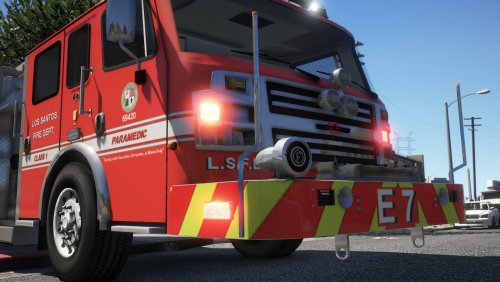
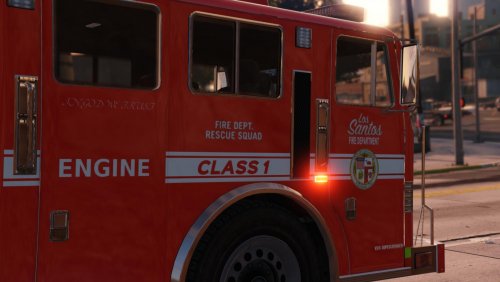
L.S.F.D Liveries by Gravelroadcop 4/15/2018 This pack allows you to use L.A.F.D inspired liveries for the Rosenbauer's model. I also have included edited light files to remove the blue lights with red instead. I will include more textures in the future so make sure you subscribe if you want to see future updates to this pack for the other models from medic4523's Fire & EMS Pack . About this modification : Realistic liveries based on LAFD realm. 2k and 4k quality. Removes blue lights with red instead.
Available textures :
LSFD Engine ( 2k) LSFD US&R ( 2k and 4k ) LSFD EMS, LSIA EMS and SOBER Unit ( Special ) ( 4k)
INSTALLATION:
1. Download medic4523's Fire & EMS Pack [ELS] 1.0.2 From Here:
http://www.lcpdfr.com/files/file/18949-fire-ems-pack-els/
2. Locate and install the Rosenbauer Engine model into your OpenIV as per his installation instructions.
3. Find "firetruk.ytd" in your directory and double click it.
4. Select "Import" from the top left corner.
5. Install my LSFD liveries and my red lights png files from my mod's pack.
6. Click Save. Have fun.
Redistribution : You may use this mod as long as you follow these terms: • Don't redistribute without my permission.
• Don't edit any file and redistribute it without my permission.
• I am not responsible for any damage that may be caused to your PC or game directory during a) the installation b) usage or c) removal of this mod. You are responsible for backing up your files!
• If you want to include this mod in a pack, please contact me. Clan and private packs are an exception, as long as they stay 'private'. Correct credits must be given at ALL times.
Credits : @medic4523 Fire & EMS Pack [ELS] 1.0.2 @GravelRoadCop Textures, decals and liveries.- 965 Downloads
- 27 Comments
Updated -
Federal Signal Smart Siren SS2000SM by Gravelroadcop 12/23/2017 At the time of releasing this, this is the highest quality of the Federal Signal Smart Siren 22000SM available to the community. The purity of the tones wouldn't be available if it wasn't for @nertervern, who recorded the tones using his own personal SS2000SM and professional audio recording tools. He donated the sirens to me and I was able to cut & edit them for Grand Theft Auto V. About this modification : Purest sound quality of all available Federal Signal Smart Siren mods in the LSPDFR community. Please note that the sirens will not sound 'natural.' If you want the sirens to sound like they are post-processed from the siren speaker, then extract the siren tones from the "natural" folder. Available tones : Wail, Yelp, Priority, Ambulance and Air-horn.
To apply this siren to any other emergency vehicle slots, you will need to refer to an attached notepad file entitled " List ( READ THIS ! )." Inside the note will contain a list of siren hashtags that you can use to rename preexisting tones to a different slot. Installation : Before starting, always make sure to create backups before overwriting any original game files. To prevent this from happening, use the "mod" folder method through OpenIV. - Somewhere on your desktop, create a new folder ( or refer to your modded siren folder that contains the vehicle.oac.) Name it anything. - Open 'OpenIV' - In 'OpenIV', go to the 'x64' folder, then audio > sfx > resident.rpf ( Make sure you are using the "mod" folder method.) - Inside Resident.rpf should be 16 .awc files. - Click Edit - Right click on vehicles.awc and export to openformats somewhere on your desktop. ( If you already have a siren mod installed, just use the vehicle folder it came with.) - Drag all the SS2000 siren tones inside the vehicles folder that you just created. - Go back to OpenIV, go to the 'x64' folder, then audio > sfx > resident.rpf - CLICK EDIT - NEW - Import OpenFormats - Navigate to the folder you put the 'vehicles' folder and the 'vehicles.oac' into, and select the modded 'Vehicles.oac'. Proceed to click OK. - Enjoy your new Smart Siren SS2000 tones ! IMPORTANT NOTE : This siren pack is compatible with SirenMastery. Redistribution : You may use this mod as long as you follow these terms: • Don't redistribute without my permission.
• Don't edit any file and redistribute it without my permission.
• I am not responsible for any damage that may be caused to your PC or game directory during a) the installation b) usage or c) removal of this mod. You are responsible for backing up your files!
• If you want to include this mod in a pack, please contact me. Clan and private packs are an exception, as long as they stay 'private'. Correct credits must be given at ALL times.
Credits : Federal Signal Corps. for original siren tones. @nertervernfor recording the tones using his own personal SS2000SM siren. Sirens edited and optimized by Gravelroadcop.- 25,785 Downloads
- 83 Comments
Updated -
Improved Spotlight and LED
========================================================
This mod allows you to experience correct searchlight coloring and brightness, along with increased emergency LED brightness during daylight and evening, loaded by a HD corona template. This pack will also have a custom carcol file to enhance emergency lighting for non-els vehicles. ========================================================
** SPECIAL THANKS TO THE LCPDFR AND GTA5-MOD COMMUNITIES FOR THEIR SUPPORT, POSITIVE REVIEWS AND SHOWCASING THIS MOD ON YOUTUBE. IT MEANS A LOT, THANK YOU GUYS. OVER 60,000 DOWNLOADS AND OVER 180,000 VIEWS ( BOTH ON LCPDFR AND GTA5-MODS WEBSITE COMBINED! )
======================================================== SEEN ON MANY POPULAR YOUTUBE CHANNELS SUCH AS : Jeff Favignano
Bay Area Buggs
RANGERSCOPE ( MOUNTIES GAMING ) AND MANY, MANY OTHERS. ========================================================
---PERMISSIONS--- You may use this mod as long as you follow these terms:
• Don't redistribute without my permission. ( ONLY TO BE HOSTED ON LCPDFR.COM AND GTA5-MODS.COM)
• Don't edit any file and redistribute it without my permission.
• I am not responsible for any damage that may be caused to your PC or game directory during a) the installation b) usage or c) removal of this mod. You are responsible for backing up your files!
• If you want to include this mod in a pack, please contact me. Clan and private packs are an exception, as long as they stay 'private'. Correct credits must be given at ALL times.
======================================================== CREDITS :
- Gravelroadcop, author of this mod.
- VisualV
- Spotlight mod - alexguirre IF I MISSED ANYBODY, LET ME KNOW. ======================================================== What's new ? - Updated to work with VisualV latest version
- New HQ corona texture for graphics.ytd, improved over the older version.
- Custom carcol file made by me, featuring real world patterns on firetruck, ambulance and Police sirensetting 1 slot.
- Carcol also have tweaked headlight coloring to match the proper color temperature chart.
- Increased Bloom brightness for emergency lights
- New color values for the spotlight
- Misc. setting tweaks ========================================================
FEATURES - Custom carcol file for non-els vehicles.
- realistic searchlight brightness/color
- Headlight, brake lights, turn signals, reverse light and plate light have increased brightness. ** UPDATED **
- Red interior light. ** UPDATED **
- Brighter emergency lights ** UPDATED **
- Realistic new corona improving all lights to look more high definition. * NEW *
- Improved emergency lights reflection texture, now appears brighter when reflecting off objects. * NEW *
- Custom LED/Corona settings for alexguirre's spotlight mod
======================================================== INSTALLATION 1. Using OpenIV, replace the visualsettings.dat in GTA V/update/update.rpf/common/data with the new one supplied in this download. 2. replace the graphics.ytd in GTA V/update/update.rpf/x64/textures ========================================================
BACKUP ( MIGHT BE OUTDATED ) :
Here are the graphics & visualsettings backup. Remember to always create a backup. https://www.dropbox.com/s/6u2cs2cdtb32l3w/graphics.ytd %26 visualsettings backup.rar?dl=0 I AM NOT TO BE HELD RESPONSIBLE IF YOU MESS UP YOUR INSTALLATION. ========================================================
SPOTLIGHT MOD LINK : https://www.gta5-mods.com/scripts/spotlight ======================================================== OTHERS : - IF YOU DON'T WANT THE INDICATOR LIGHTS TO BE ALWAYS ON, TWEAK THE FOLLOWING VALUES TO THIS. IF YOU ARE USING POLICE CAR MODS, YOU PROBABLY SHOULDN'T TOUCH THIS. car.indicator.day.emissive.on 500.00
car.indicator.night.emissive.on 500.00
car.indicator.day.emissive.off 0.000
car.indicator.night.emissive.off 0.000 ========================================================
- There is a fix for all Orange lights on Staniers, just install that "Amber lights and Clear Lightbar" mod.You need to replace the files inside the .ytd files. The tutorial from FirstThirtyMinutes is very helpfull. https://www.youtube.com/watch?v=rYWbyPj7Fso (You can find the mod in the description as well) And you maybe need to replace it in multiple files (i needed to do it in Patchday3ng,Patchday5ng and x64e) It works for the sheriff,the undercover car and the normal one.
======================================================== - SPECIAL THANKS TO LauraXo FOR MAKING THIS REPORT : I've included a link with a report comparing the two files. One contained a clean (but out of date) visualsettings.dat file while the other was the modified file. https://www.dropbox.com/s/nrbazvoeobw3gj3/visualsettings.dat.txt?dl=0 The file is very simple to read.
In between the = signs contains the line number, followed by the original value, you can then compare it to the value directly under it which will be the modified value.
- 116,490 Downloads
- 246 Comments
Updated -
!!!! Always make sure you backup your files, I'm not responsible for any corrupt files !!!
IF YOU USE THE RATING/REVIEW SYSTEM TO REPORT ISSUES, I WILL IGNORE AND REPORT YOU !!! USE THE COMMENT SECTION.
-- American Siren Pack V.8.0.5 by GravelRoadCop/LEDesigns 3/28/2016
Author's Note :
In order to accommodate the sirens for FBI, Fire Department and Granger slots, I had to remove an audio file named 0x1AE3EF45, x17E9AF5D and 0x1AE3EF45 from the sound dictionary to allow the extra space for the EQ2B/Q2B, Dual Sirens, and other lengthy sirens to work. The 0x17E9AF5D is a train track sound, so you hear it play when the train passes you. Unfortunately, if I do not remove it, the sirens will not work as it will exceed the 15.7mb limit imposed. You will have the backup files provided in case you wish to revert to default settings but this will make the sirens mod not to work. You have been advised !!
DO NOT EXCEED VEHICLE FOLDER SIZE OVER 15.7 MB OR IT WILL MUTE THE DICTIONARY. I ADVISE YOU TO NOT MESS WITH THE FBI AND SHERIFF GRANGER SIRENS BEFORE YOU REGRET IT. ALSO, DO NOT USE ANY OF THE FEDERAL SIGNAL EQ2B OR Q2B SIREN MIXED WITH SVP SA-441 MAGNUM DUAL SIRENS AS THEY ARE LARGE SIZED TRACKS AND THEY WILL MUTE THE SOUND DICTIONARY. YOU ARE FINE USING ONE OF EITHER FOR AS LONG IT DOES NOT EXCEED YOUR SOUND BANK OVER 15.7MB
( Version 8.0.5 Is not seen in this video )
VERSION 8.0.5 3/28/2016
WHAT'S NEW/INCLUDED ? ( 8.0.5):
This isn't a major update, but rather a few tweaking with 1 new siren model introduced to the mod. The next version will contain many more new siren varibles to choose from, It is just not ready to be released yet.
- Changed out the Federal Signal Smart Siren with improved Code 3 Mastercom B siren tones. The Fed Sig Smart Siren was moved to the granger slot, which means it will work for Sheriff2.
- Better and LOUDER air horn for the Mastercom B Siren, ready to clear traffic on your command !
- The EQ2B has been removed from the Ambulance Slot, and replaced with SVP-SA-441 Magnum Dual Siren Tones.
- The Whelen Tones that only works with the FIB Slots has been re-worked on and it sounds a lot more better than it's previous version. I hope you will like them !
IF YOU USE THE RATING/REVIEW SYSTEM TO REPORT ISSUES, I WILL IGNORE AND REPORT YOU !!!
Special Note :
If you want to change a siren tone for a specific slot, you need to refer to the "List "note that offers all of the names that you can copy and paste when renaming siren tones. For example, if you want to change the federal signal smart siren tones to code 3 mastercom tones, go to the code 3 mastercom folder, find the tones, rename them to the proper vehicle sound dictionary name provided in the list notepad, and then drag the new tones into the vehicle folder, and lastly update it with openIV.
THE FOLLOWING EXISTING SIRENS HAVE BEEN AMPLIFIED IN VOLUME OR MAY HAVE REPORTED BUGS/ISSUES:
- Newly improved Code 3 Mastercom B Wail, Yelp, Priority and Air horn tones.
- Improved Whelen 295SLASA6 Wail and Yelp ( I changed it from Whelen 295SL100 to Whelen 295SLSA6 Tones
YOU MAY USE SOME OF THE SIREN TONES FOR OTHER EMERGENCY SERVICES FLEET, HERE ARE A LIST THAT WILL WORK IF YOU RENAME IT : * IMPORTANT NOTE, THE VEHICLE FOLDER SIZE MUST NOT GO OVER 15.7mb OR IT WILL MUTE THE SOUND DICTIONARY IN-GAME !!!!!
( Note, this list does not contain a full siren list available in the mod or always accurate. )
- Motorola Astro Spectra Siren - FIRE, AMBULANCE, POLICE PRIMARY, POLICE BIKE, AND GRANGER.
- Federal Signal Unitrol 80K Siren - FIRE, AMBULANCE, POLICE PRIMARY, POLICE BIKE, AND GRANGER.
- Whelen X-ecutor Siren - FIRE, AMBULANCE, POLICE PRIMARY, POLICE BIKE, AND GRANGER.
- Code 3 Mastercom B Siren - FIRE, AMBULANCE, POLICE PRIMARY, POLICE BIKE, AND GRANGER.
- Whelen 295SL100 - FIRE, AMBULANCE, POLICE PRIMARY, POLICE BIKE, FBI AND GRANGER
- Whelen Cencom - FIRE, AMBULANCE, POLICE PRIMARY, POLICE BIKE, FBI AND GRANGER
- Federal Signal PA300 - FIRE, AMBULANCE, POLICE PRIMARY, POLICE BIKE, AND GRANGER
- Whelen WS2100 - FIRE, AMBULANCE, POLICE PRIMARY, POLICE BIKE, FBI AND GRANGER
- Code 3 Mastercom B Siren - FIRE, AMBULANCE, POLICE PRIMARY, POLICE BIKE, AND GRANGER
- EQ2B/Q2B - FIRE TRUCK AND AMBULANCE
- Federal Signal PA40000 - FIRE, AMBULANCE, POLICE PRIMARY, POLICE BIKE, AND GRANGER
- Federal Signal Smart Siren - FIRE, AMBULANCE, POLICE PRIMARY, POLICE BIKE, AND GRANGER
- Federal Signal Unitrol Omega - FIRE, AMBULANCE, POLICE PRIMARY, POLICE BIKE, AND GRANGER
- Federal Signal Unitrol Touchmaster Delta - FIRE, AMBULANCE, POLICE PRIMARY, POLICE BIKE, AND GRANGER
- Whelen Motorcyle Siren WS320 - POLICE BIKE
- SVP SA-441 Magnum dual siren - AMBULANCE
- Tomar 940L - FIRE, AMBULANCE, POLICE PRIMARY, POLICE BIKE, AND GRANGER
AMERICAN SIREN PACK DEFAULT SIREN TONES
CURRENT VERSION : V 8.0.5 3/28/2016
THE FOLLOWING LIST SHOWS WHAT SIRENS ARE CURRENTLY INSTALLED IN THE VEHICLE FOLDER. IF YOU WISH TO RENAME ANY OTHER TONES, USE THIS DICTIONARY.
0x0EA58C7C - Generic Bullhorn - CODE 3 MASTERCOM B SIREN * UPDATED *
0x013F5FE7 - PoliceB Main - Motorcyle Siren Whelen WS320E
0x17DDFB5C - PoliceB Secondary - Motorcyle Siren Whelen WS320
0x0A8960B6 - FIB Primary - Whelen Whelen 295SLASA6 * UPDATED *
0x0A49B203 - FIB Secondary - Whelen Whelen 295SLASA6* UPDATED *
0x0D329446 - Police Primary - CODE 3 MASTERCOM B SIREN * UPDATED *
SIREN_2 - Police Secondary - CODE 3 MASTERCOM B SIREN * UPDATED *
POLICE_WARNING - CODE 3 MASTERCOM B SIREN * UPDATED *
0x0E0DA7BC - Granger Primary - FEDERAL SIGNAL SMART SIREN * UPDATED *
0x16E74B3E - Granger Secondary - FEDERAL SIGNAL SMART SIREN * UPDATED *
0x1C98C4D5 - Ambulance Primary - SVP SA-441 Magnum dual siren * UPDATED *
0x144C8602 - Ambulance Secondary - SVP SA-441 Magnum dual siren * UPDATED *
AMBULANCE_WARNING - N/A
0x037CC595- Fire Horn - GROVER AIR HORN
0x159C9182 - Fire Primary - MOTOROLA ASTRO SPECTRA
0x161768E7 - Fire Secondary - MOTOROLA ASTRO SPECTRA
INSTALLATION ( IT HAS BEEN UPDATED TO WORK WITH THE LATEST OPEN IV VERSION ):
Make a new folder somewhere on your desktop, name it anything
Move Both the Vehicle folder and vehicle.oac file out of this .rar pack into the folder you just created on the desktop
Open 'OpenIV' and go to your GTA V Directory.
In 'OpenIV', go to the 'x64' folder, then audio > sfx > resident.rpf
Inside Resident.rpf should be 16 .awc files.
Import openformats, navigate to the folder you put the american siren pack 'vehicles' folder and the 'vehicles.oac' in and select the 'Vehicles.oac'
save and you're good to go. Happy Code 3 !
CREDITS:
- Federal Signal Smart Siren - Edited by -- Gravelroadcop/LEDesigns 2015-2016
- Federal Signal Unitrol 80k - Edited by -- Gravelroadcop/LEDesigns 2015-2016
- Federal Signal Unitrol Touchmaster Siren - Edited by -- Gravelroadcop/LEDesigns 2015-2016
- All Whelen tones -- Edited by -- Gravelroadcop/LEDesigns 2015-2016
- Code 3 Mastercom B Siren -- Edited by --Gravelroadcop/LEDesigns 2015-2016
- Code 3, Inc. -- Original Tones
- Federal Signal Corps. - Original Tones
- Whelen Engineering - Original Tones
- OpenIV: http://openiv.com/
- DaveDoppler for the Usage License
- Whelen Cencom Sapphire - Whelen Engineering
- Motorola Astro Spectra Siren - Motorola Solutions
You may use this mod as long as you follow these terms:
• Don't redistribute without my permission.
• Don't edit any file and redistribute it without my permission.
• I am not responsible for any damage that may be caused to your PC or game directory during a) the installation b) usage or c) removal of this mod. You are responsible for backing up your files!
• If you want to include this mod in a pack, please contact me. Clan and private packs are an exception, as long as they stay 'private'. Correct credits must be given at ALL times.
- 120,834 Downloads
- 316 Comments
Updated -
-- CODE 3 PSE. REMOTE LIGHTED SIREN --
CURRENT VERSION : V 1.0.0 10/30/2016 The Code 3 PSE. Remote Lighted Siren ( RLS ) for Grand Theft Auto : V. The siren model is versatile and is used across all applications ( Police, EMS and Fire ) around the world. San Francisco Fire Department, Toronto Police Service, Calgary Police Service, etc. use this siren. The tones are almost identical to the Code 3 Mastercom B Siren, but the pitch is different. About this modification : - A siren modification that replaces the default siren tones to Code 3 PSE. Remote Lighted Siren ( RLS ) tones.
- Available tones : Wail, Yelp, Priority, Hi-Lo, Manual, HyperYelp and Air-horn.
- High Quality, Loud and minimal reverb effect. To apply this siren to any other emergency vehicle slots, you will need to refer to an attached notepad file entitled " List ( READ THIS ! )." Inside the note will contain a list of siren hashtags that you can use to rename prexisting tones to a different slot. Important Note : I am deaf in real life. I require the use of hearing aids. When I edit the raw siren tones, the volume level is set so that it's loud enough for myself. If you find them quiet, it is because you have natural hearing and I don't, so you will need to amplify the volume using a editing program yourself. Thank you for your understanding. Installation : Before starting, always make sure to create backups before overwriting any original game files. To prevent this from happening, use the "mod" folder method through OpenIV. - Somewhere on your desktop, create a new folder ( or refer to your modded siren folder that contains the vehicle.oac.) Name it anything. - Open 'OpenIV' - In 'OpenIV', go to the 'x64' folder, then audio > sfx > resident.rpf ( Make sure you are using the "mod" folder method.) - Inside Resident.rpf should be 16 .awc files. - Click Edit - Right click on vehicles.awc and export to openformats somewhere on your desktop. ( If you already have a siren mod installed, just use the vehicle folder it came with.) - Drag all the Code 3 RLS siren tones inside the vehicles folder that you just created. - Go back to OpenIV, go to the 'x64' folder, then audio > sfx > resident.rpf - CLICK EDIT - NEW - Import OpenFormats - Navigate to the folder you put the 'vehicles' folder and the 'vehicles.oac' into, and select the modded 'Vehicles.oac'. Proceed to click OK. - Enjoy your new Code 3 PSE. RLS Siren tones ! IMPORTANT NOTE : This siren pack is not compatible with SirenMastery. Redistribution : You may use this mod as long as you follow these terms: • Don't redistribute without my permission.
• Don't edit any file and redistribute it without my permission.
• I am not responsible for any damage that may be caused to your PC or game directory during a) the installation b) usage or c) removal of this mod. You are responsible for backing up your files!
• If you want to include this mod in a pack, please contact me. Clan and private packs are an exception, as long as they stay 'private'. Correct credits must be given at ALL times. Credits : - Code 3 PSE. for original siren tones.
- Sirens edited and optimized by Gravelroadcop.- 886 Downloads
- 3 Comments
Updated -
-- [GTA V] Los Santos Fire Department, Engine Apparatus Rejuvenated ( Fictional design )
CURRENT VERSION : V 1.0.0 9/26/2016 --
About this modification :
- A re-designed texture mapping for the vanilla fire truck, the new changes will help amplify firefighter safety at the scene and during response driving.
- Cleaned up the chrome/metallic look on the Pump panel, ladder frame, and couplers.
- Re-colored pump connectors,
- New roller shutters texture, in red,
- Whelen light textures
- Hi-Visibility chevron stripes.
- Bright red engine body, not LSFD or LAFD lore friendly.
- Custom Whelen carcol light patterns.
( VIDEO DOES NOT SHOW CURRENT SKIN VERSION )
BONUS FILES :
- Motorola Astro Spectra Siren - The siren famously used by the Los Angeles Fire Department. Wail & Yelp only.
- G-Xtreme Firefighting PPE - Re-textured firefighters with realistic brands seen in real world. This is not LAFD/LSFD lore friendly.
Before starting, always make sure to create backups before overwriting any original game files. To prevent this from happening, use the "mod" folder method through OpenIV.
INSTALLING :
To install the firetruck :
With OpenIV, go to MODS > UPDATE > X64 > DLCPACKS > PATCHDAY8NG > DLC.RPF > X64 > LEVELS > GTA5 > VEHICLES.RPF and drag all four firetruck files from the mod into this path.
To install the custom Carcol file :
IMPORTANT CALLOUT - THE CARCOL CONTAINS TWO DIFFERENT CUSTOM FLASH PATTERNS USED BY WHELEN ENGINEERING. THE PATTERNS WILL BE VISIBLE ON SIREN SETTINGS 1, 2, FIRETRUCK AND AMBULANCE. THE POLICE BIKE IS STILL WIP SO YOU WILL NOTICE MISSING LIGHTS. IF YOU ARE USING BXBUGS LIGHTSETTING, YOU WILL SEE BLUE/BLUE LIGHTS IN THIS ONE. IT DEPENDS ON WHAT MODELS YOU HAVE INSTALLED, SOMETIMES IT WILL LOOK GREAT, OTHER TIMES IT MIGHT LOOK CLUSTERED. MAKE A BACKUP OF YOUR CARCOL FILE BEFORE USING MINE, YOU HAVE BEEN WARNED !
With OpenIV, go to MODS > UPDATE > UPDATE.RPF > X64 > DATA and drag the carcol file in this path.
To install the siren tones :
- Somewhere on your desktop, create a new folder ( or refer to your modded siren folder that contains the vehicle.oac.) Name it anything.
- Open 'OpenIV'
- In 'OpenIV', go to the 'x64' folder, then audio > sfx > resident.rpf ( Make sure you are using the "mod" folder method.)
- Inside Resident.rpf should be 16 .awc files.
- Click Edit
- Right click on vehicles.awc and export to openformats somewhere on your desktop. ( If you already have a siren mod installed, just use the vehicle folder it came with.)
- Drag all the Motorola Astro siren tones inside the vehicles folder that you just created.
- Go back to OpenIV, go to the 'x64' folder, then audio > sfx > resident.rpf
- CLICK EDIT - NEW - Import OpenFormats
- Navigate to the folder you put the 'vehicles' folder and the 'vehicles.oac' into, and select the modded 'Vehicles.oac'. Proceed to click OK.
- Enjoy your new Motorola Siren tones !
To Install the firefighter PPE :
Place the S_M_Y_FIREMAN_01.YTD in the following dictionary path using OPENIV :
UPDATE > x64 > DLCPACKS > PATCHDAY10NG > DLC.RPF > X64 > MODELS > CDIMAGES > PATCHDAY10NG > S_M_Y_FIREMAN_01.YTD
Redistribution :
You may use this mod as long as you follow these terms:
• Don't redistribute without my permission.
• Don't edit any file and redistribute it without my permission.
• I am not responsible for any damage that may be caused to your PC or game directory during a) the installation b) usage or c) removal of this mod. You are responsible for backing up your files!
• If you want to include this mod in a pack, please contact me. Clan and private packs are an exception, as long as they stay 'private'. Correct credits must be given at ALL times.
Credits :
- Firetruck - Rockstar Games
- UV Mapped Firetruck - GlitchGamer
- fire_sign_1, firetruck_detail and firetruck_lights edited by Gravelroadcop
- Motorola - Original Siren Tones.
- Sirens edited and optimized by Gravelroadcop.
- G-Xtreme Firefighting gear edited by Gravelroadcop
- 945 Downloads
- 14 Comments
Updated -
GRAVELROADCOP / LEDESIGNS 2016 1/23/2016
!!!! Always make sure you backup your files, I'm not responsible for any corrupt files !!!
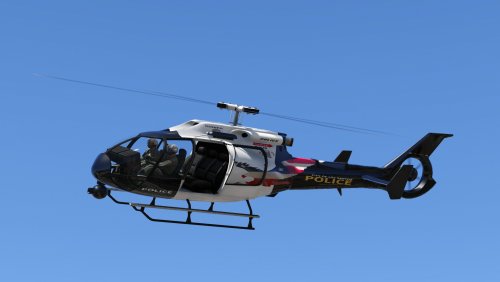
Fictional Los Santos Police Department Frogger Helicopter, replacing the vanilla Police Maverick.
Bugs :
- One side of the helicopter has mirrored texture, nothing i can do about this until someone decides to make a UV map of the frogger.
- SWAT does not rappel from helicopter.
INSTALLATION :
Using OpenIV, Drag the new files in the following dictionary path and click edit to save once finished :
UPDATE - X64 - DLCPACKS - PATCHDAY8NG - DLC.RPF - X64 - LEVELS - GTA5 - VEHICLES.RPF
Credit :
GRAVELROADCOP - LEDesigns
YOU DO NOT HAVE MY PERMISSION TO USE THIS FOR YOUR PERSONAL MODS UNLESS YOU HAVE PERMISSION, ASK ME FIRST !
- 5,285 Downloads
- 11 Comments
Updated -
GRAVELROADCOP 1/22/2016
!!!! Always make sure you backup your files, I'm not responsible for any corrupt files !!!
This is not allowed to be re uploaded to other websites without my permission.
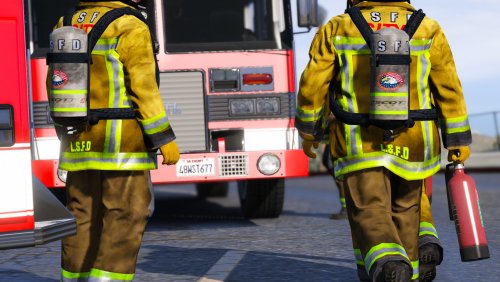
Realistic Los Santos Firefighters Bunker Gear/SCBA
FEATURES
- A mix of clean and dirty bunker gear / SCBA ( to stimulate it went through fires)
- Hi-Vi Flashlight
- Hi-Visibility Chevron stripes applied to all bunker gear.
- Nylon strap material
- Updated SCBA to Scott Safety SCBA tank
INSTALLATION :
Place the S_M_Y_FIREMAN_01.YTD in the following dictionary path using OPENIV, Edit mode enabled :
UPDATE > x64 > DLCPACKS > PATCHDAY3NG > DLC.RPF > X64 > MODELS > CDIMAGES > PATCHDAY3NG > S_M_Y_FIREMAN_01.YTD
Click Edit Mode again to save it.
Credit :
GravelRoadCop - LEDesigns
YOU DO NOT HAVE MY PERMISSION TO USE THIS FOR YOUR PERSONAL MODS UNLESS YOU HAVE PERMISSION, ASK ME FIRST !
- 1,166 Downloads
Updated -
!!!! Always make sure you backup your files, I'm not responsible for any corrupt files !!!
-- American Federal Signal Corporation EQ2B-Q2B Siren pack by GravelRoadCop/LEDesigns 12/05/2015
*** THE FIRST SOUND MOD OF IT'S KIND FOR GRAND THEFT AUTO 5 ***
Author's Note ** IMPORTANT ** :
In order to accommodate the sirens for lengthy siren tracks, i had to remove an audio file named 0x17E9AF5D and 0x1AE3EF45 from the sound dictionary to allow the extra space for the EQ2B/Q2B sirens to work. The 0x17E9AF5D is a train track sound, so you hear it play when the train passes you. Unfortunately, if I do not remove it, the sirens will not work as it will exceed the 15.7mb limit imposed. You will have the backup files provided in case you wish to revert to default settings but this will make the sirens mod not to work. You have been advised !!
DO NOT EXCEED VEHICLE FOLDER SIZE OVER 15.7MB OR IT WILL MUTE THE DICTIONARY.
Features :
- 4 EQ2B tracks to choose, 1 yelp and 3 wail tracks. 1 of the wail tracks is a full wail loop, and the other 2 is a manual coast track.
- 5 Q2B tracks to choose, all of the tracks contains different coast tones, and 1 full screaming wail ( my favorite ! )
I recommend you to use the EQ2B yelp, and select the screaming Q2B wail for a full firefighting response experience ! If you don't like the high pitch wail, choose the manual tones as it will be softer on your ears.
IMPORTANT NOTE :
In order to install the sirens, you must proceed to a folder entitled " GO TO THIS FOLDER 1st before installing " Inside it will contains the backup folder and dead air folder. You must install the dead air files in the vehicle folder ( instructions below ) before you install the sirens !!!
INSTALLATION:
Make a new folder somewhere on your desktop, name it anything.
Open 'OpenIV' and go to your GTA V Directory.
In 'OpenIV', go to the 'x64' folder, then audio > sfx > resident.rpf
Inside Resident.rpf should be 16 .awc files. Click edit, Find "Vehicles.awc" and right click it, select " export to openformats" in a folder you created on your desktop.
Navigate to the newly created folder that contains "vehicles" folder and the "vehicles.oac" -- INSTALL THE DEAD AIR FILES, THEN SELECT YOUR DESIRED EQ2B/Q2B TRACKS AND TRANSFER THE CUSTOM TONES INTO THE VEHICLES FOLDER
* note * If you are using other siren mods, it will be fine for as long you transfer the new tones in whatever vehicles folder and vehicles.oac you saved. IT WILL BE AVAILABLE IN AMERICAN SIREN PACK V7 SO USE IT INSTEAD IF YOU WANT TO HAVE MANY OTHER CUSTOM TONES.
Go back to OpenIV, 'x64' folder, then audio > sfx > resident.rpf, CLICK EDIT
Import openformats, navigate to the folder you put the 'vehicles' folder and the 'vehicles.oac' with the new EQ2B/Q2B tones and select the 'Vehicles.oac'
save and you're good to go. Happy Code 3 !
CREDITS:
- Federal Signal EQ2B - Edited by -- Gravelroadcop/LEDesigns 2015
- Federal Signal Q2B - Edited by -- Gravelroadcop/LEDesigns 2015
- Federal Signal Corps. - Original Tones
- EQ2B Source - Rafael Fernandez ( Youtube )
- Q2B Source - fmartinjr ( Youtube )
- DaveDoppler for the Usage License
You may use this mod as long as you follow these terms:
• Don't redistribute without my permission.
• Don't edit any file and redistribute it without my permission.
• I am not responsible for any damage that may be caused to your PC or game directory during a) the installation b) usage or c) removal of this mod. You are responsible for backing up your files!
• If you want to include this mod in a pack, please contact me. Clan and private packs are an exception, as long as they stay 'private'. Correct credits must be given at ALL times.
- 1,286 Downloads
- 4 Comments
Updated -
GravelRoadCop / LEDESIGNS 2015 11/25/2015
!!!! Always make sure you backup your files, I'm not responsible for any corrupt files !!!
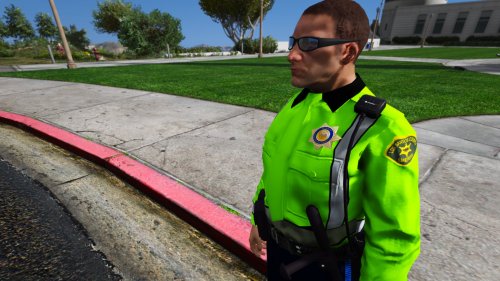
Los Santos Sheriff Department Fictional Deputy Uniform, 2k resolution.
FEATURES
- All of the texture resolutions are 2000x2000, high quality.
- Hi-Visibility Jacket for traffic safety
- High Quality shoulder patch, and badge.
What is left to do :
- Re-texture the campaign hat.
Recommendations :
To have the duty belt seen in the screenshots, i recommend you to download OfficerL6's Improved and Realistic belt mod found here :
http://www.lcpdfr.com/files/file/8801-improvedrealistic-belt2k-textures/
INSTALLATION :
Using OpenIV, go to :
UPDATE > x6E > MODELS > CDIMAGES > COMPONENTPEDS_S_M_Y.RPF
Enable the edit mode, find the following files : s_m_y_sheriff_01.ytd and open it, then drag the new sheriff texture contents from the mod .rar into the file, then click save. Happy Code 3 !
Credit :
GravelRoadCop - Uniform edits, including the front badge
Shoulder Patch - http://gtarg.wikia.com/wiki/Los_Santos_County_Sheriff_Department
You may use this mod as long as you follow these terms:
• Don't redistribute without my permission.
• Don't edit any file and redistribute it without my permission.
• I am not responsible for any damage that may be caused to your PC or game directory during a) the installation b) usage or c) removal of this mod. You are responsible for backing up your files!
• If you want to include this mod in a pack, please contact me. Clan and private packs are an exception, as long as they stay 'private'. Correct credits must be given at ALL times.
- 977 Downloads
- 4 Comments
Submitted -
!!!! Always make sure you backup your files, I'm not responsible for any corrupt files !!! -- Whelen LED Texture by GravelRoadCop/LEDesigns 11/01/2015 The purpose of this modification is to replace Rockstar's stock Ambulance and Firetruck light texture with my modified texture pack that will allow you to have brighter LED lights and realistic LED products. This also allows you to have a correct lighting package on the firetruck, eliminating the side amber lights with red lights and also replacing the forward blue lights with white lights. Installation, Using OpenIV, Drag the new files in the following dictionary path and click edit to save once finished : AMBULANCE : x64e - gta5-vehicles.rpf - ambulance.ytd ( OPEN THIS FILE, THEN DRAG THE NEW ambulance_lights_new TEXTURE INTO THIS FILE, THEN SAVE IT)
Note : If you are using a modded ambulance, you can do the same thing, just find it's ambulance.ytd, open it and use my custom texture to replace it's stock texture, then save. FIRETRUCK : x64e - gta5-vehicles.rpf - firetruk.ytd and firetruk+hi.ytd OPEN BOTH FILES, DRAG THE NEW firetruck_lights TEXTURE TO REPLACE BOTH OLD firetruck_lights TEXTURE, THEN SAVE IT. DONE, EASY AND SIMPLE. ENJOY THE NEW LIGHTS !! credits : WHELEN - WHELEN TEXTURE GRAVELROADCOP - EDITING TEXTURES BXBUGS123 - INSPIRATION FOR EDITING TEXTURES You may use this mod as long as you follow these terms:
• Don't redistribute without my permission.
• Don't edit any file and redistribute it without my permission.
• I am not responsible for any damage that may be caused to your PC or game directory during a) the installation b) usage or c) removal of this mod. You are responsible for backing up your files!
• If you want to include this mod in a pack, please contact me. Clan and private packs are an exception, as long as they stay 'private'. Correct credits must be given at ALL times.- 302 Downloads
- 3 Comments
Submitted -
-- Motorola XTS 5000 Chirp and Dispatch alert tone by DrunkPolice/LEDesigns 7/21/2015
!!!! Always make sure you backup your files, I'm not responsible for any corrupt files !!!
https://www.youtube.com/watch?v=v7dC1MQGV5k&feature=youtu.be
Realistic dispatch and officer radio tones replacing LSPDFR stock tones.
INSTALLATION:
Go to your GTA V main dictionary
Find your LSPDFR folder, open it, then go in Police Scanner folder
Inside police scanner folder is a folder called 'RESIDENT'
Navigate to the Motorola Dispatch Tones rar and drag the files to the above dictionary path. Click 'Ok' to replace.
---- Backup files included if you are not happy with it. ----
CREDITS:
- Dispatch and XTS 5000 Chirp -- DrunkPolice/LEDesigns 2015
- Motorola Solutions
- LSPDFR
LET ME KNOW IF THERE ARE ANY ISSUES, UNKNOWN IF BUGS MAY ARISES.
PLEASE LEAVE A REVIEW !!!!
- 3,149 Downloads
- 2 Comments
Updated