


Poker9
Members
-
Joined
-
Last visited
Everything posted by Poker9
-
Ah I see, I will try different DirectX versions and see if that makes a difference. I have had playthroughs where I did not use the 3D laptop, but I still experienced the crash. Windows and drivers are updated, Elevated Privileges, Anti-Virus exclusion, no OCs on PC. I have also been encountering a bug with Police Menu where the 3D laptop's background screen disappears and the ped images disappear with a placeholder rainbow instead. This will only happen much later in my playthroughs though, possibly memory related as time goes on? 16Gb Ram usually runs at 12 with LSPDFR. Would this suggest anything for the DirectX crash? Will respond later with different DirectX results. Thank you for your help!
-
I have been having some trouble with my LSPDFR lately. Sometimes I will be able to play for an hour and a half and sometimes I'll happen 5-minutes in. I have provided my log below. I do have a considerable enough number of scripts/plugins installed but I can't pinpoint which one may be the possible culprit. I understand that this may indicate a problem within my mods folder. I have tried renaming my mods folder to _mods but still experienced this crashing. The only mod that I have installed is the POLICE MENU mod. The directions were very simple and clear so I am pretty confident this could not be user error. I have also reinstalled my GTA V along with installing it on a different drive (I don't even know if the latter would make a difference but let's go with it). Police Menu also doesnt seem to be getting much complaints about crashing recently. Outside of LSPDFR I have smooth drives and Gun Recoil 1.5b within my scripts folder. I also have installed the HeapAdjuster, Gameconfig and PackLimitAdjuster file in hopes of it will do something. Any advice? ). Crash Log.txt
-
of course. Hopefully that's good.
-
Sadly no luck. Without running it as an admin, I did get a different message though. Instead of "Insufficient privilege's or slow system" Instead got Insufficient privilege's or bad anti-virus". But running RPH as an admin doesn't prompt this message. But it still CTD.
-
Only one is TrainerV.asi which is the simple native one.
-
No rage closes itself down and prompts a crash report along with Rockstar's error message too. I have taken a screen recording and im waiting for it to upload to youtube. But the game just loads and then CTD.
-
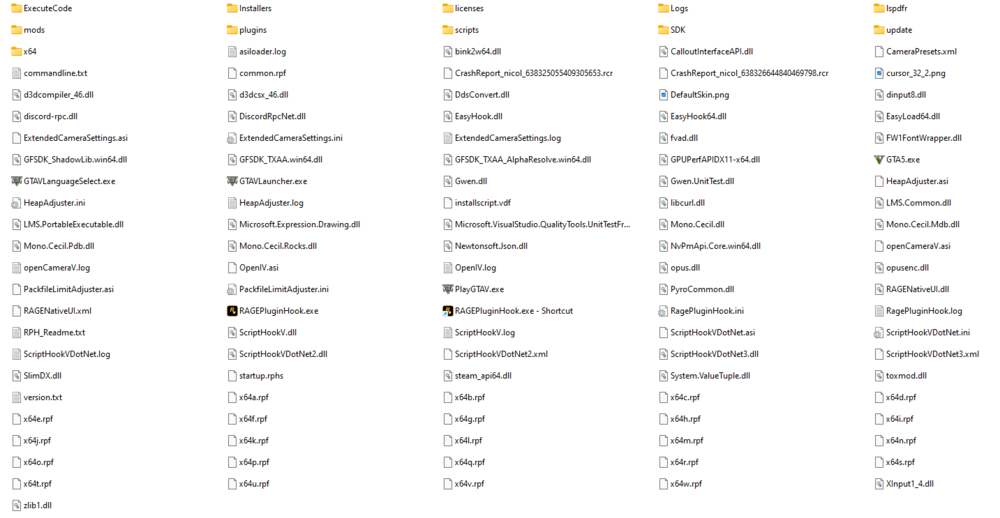
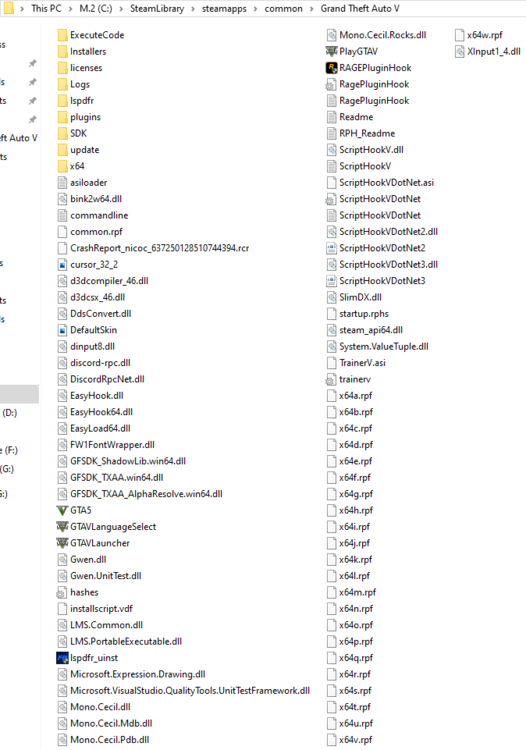
I think this is it. It was in the main directory. RagePluginHook.log
-
Thanks for the replies. I don't have any mods installed currently that requires a mods folder, nor do I plan on installing any mods that require it.
-
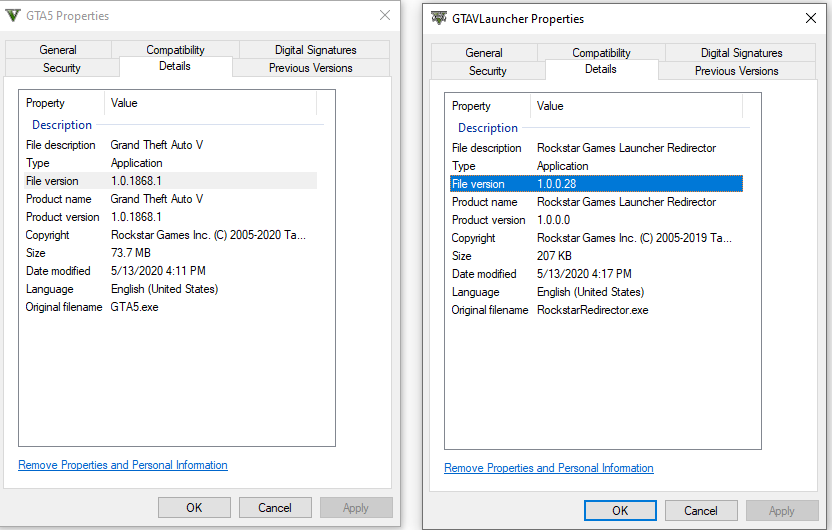
I do only have one GTA installed. I verified and it all came back good. I also looked at the version of my GTA5.exe and it says "1.0.1868.1"? GTA launcher is 1.0.0.28 ^And that was pre-integrity check.
-
Oh...um...how do I update it? Its on steam?
-
I installed LSPDFR about 3 days ago. I downloaded some of albo's mods and a few other plugins. Worked great. Had to delete some mods though because they were too troublesome (LSDPFR+😡) But either way the game worked great. A day later, no changes to any files, I start up ragehook only for the game to keep crashing on loading screen. "Insufficient permissions or slow system" message. I ran as an admin but it still crashed. I removed all the plugins, still no luck. I don't have any antivirus and my system definitely isn't slow. So I uninstalled the game. So now, currently, I have scripthook simple native trainer and scripthookdotnet in my GTA directory. But the game still crashes. What is the cause? and of course LSPDFR 4.7 is in my game directory.
-
I love the new custom models but I want to change mine. I don't know how to get back to the character selection screen. When I go into the police department I only get police locker and garage. I thought maybe switching to a main GTA V character and walking into the dept. would be a good solution but turns out with LSPDFR I cant even switch to a main character anymore 🙃
-
I don't know what happened but it seems to of fixed itself for now. SNT still installed.
-
No, but I have now noticed that if I get into another car, it will not blink. But after 5-10 minutes it'll start blinking. Let me try it without SNT.
-
 Can we have a link to a recommended gameconfig.xml file then. I have way too much RAM than I need but it still seems to crash. Also SirenMastery seems to crash sometimes when I open Computer+. Other times its just LSPDFR that crashes when I open Computer+. Most of the time it doesn't crash but it will crash here and there and restarting my game is very annoying. This is the first time im hearing of a gameconfig.xml file and allocating more memory to the plugins so hopefully this works 😋
- 1,743 comments
- 172 reviews
-
No graphics mods. Always left. Flashing.
-
I don't have any mods that I think would allow me to use blinkers. Only Albo1125's mods and Tacco callouts + small very specific nothing to do with cars mods. Even quitting my game, shutting down my computer, or changing cars. Any reason why? At first I suspected it was Simple native trainer doing some weird stuff with keybinds but I cannot find any evidence.
-
Just idling my computer is using 6Gb of RAM, main culprit is Edge, although I do close edge when I want to start playing and Creative Cloud along with Antimalware Service Exectubale, im guessing buying another 6GB of ram is worth it?
-
I just realized, are we going to have to install ragehookplugin or because 0.4 is gonna be released VERY recently its already going to come with a compatible ragehookplugin and latest?
-
^
-
Bro someone posted a s.s and I posted mine just to warn others of fakes and to show a baby can do it but okay.
-
If I didn't only do it in 10 seconds ill look convincible. But lets stop throwing shade and start getting hyped 😡
-
That's exactly my point?
-
Could just be Inspect Element, photoshop seems like overkill just to change a number.
-


