
Jedahdiah
Members
-
Joined
-
Last visited
Everything posted by Jedahdiah
-
From the album: Jed's Models
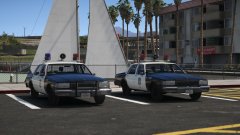
Two more units with the Mars Skybolt light bar. As simple as it comes; it's sporting the new LSPD livery I put together today and comes with the standard extras (spotlights and rambar). It's again a non-ELS vehicle. I have one more unit in the works... -
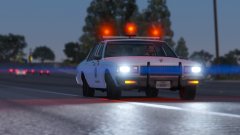 It was only a placeholder for the time being, but if your okay with it then I might do.
 -
Man, that would be awesome. I'll drop you a line. Thanks!
-
From the album: Jed's Models
This vehicle is pretty much ready for release, there's still a small light bar collision issue but it's not noticeable. The speaker is now an extra too on this model. This is is a non-ELS model. I'll be working on the rest of the vehicles in due time, and I'll be adding a few other liveries too once I get around to it. Whether or not this will be a single release or a pack release I don't know yet. I guess I should start a thread for the vehicles. I don't know, wait and see I guess. -
 Ah, okay. I'll get on that... although the cops might be too hot or too cold but at least they have funky jams ;P
 -
From the album: Jed's Models
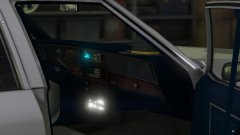
Working on the interior equipment for the 1990 Caprice. Not accurate but tried to keep it within the time period. The interior contains: Lojack, Radio, Siren controls, shotgun, sheriffs hat and speaker. The cage has been changed from an extra to permanent. The trunk contains: first aid kit, two traffic cones and a duffle bag. The roof now has two antennas, one being for the Lojack. The extras for the vehicle are: rambar (PB 200), spotlights (down), spotlights (up). Credit to all of the people who made the stuff. I merely stuck it together. -
From the album: Jed's Models
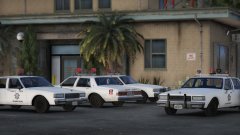
The Los Santos Sheriff Department's fleet of 1990 Chevy Caprice with four different light bar versions. I'll probably rebuild these from scratch before I release them. -
 I might do, if I can work out some of the kinks
 -
From the album: Jed's Models
Just experimenting with this one. -
From the album: Jed's Models
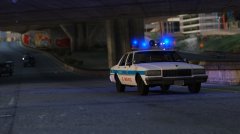
Los Santos Police Department Caprice Found a decent carcols files that has blue rotors and flashes. Gives superb environmental lighting too. The sirensettings for this car (police) and police2 use the vanilla sirensettings though. Got something in the works that uses the modded carcols though... -
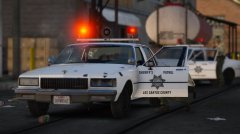
From the album: Jed's Models
Testing the vehicle collisions. Still can't get light bar collisions right. -
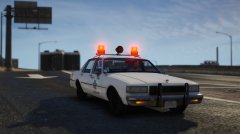 I'll edit it down and give it a go. I'll let you know how it goes. Thanks man, much appreciated! Might have to release this then... if I can work out the kinks ;)
 -
-
From the album: Jed's Models
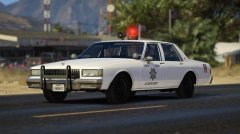
Los Santos Sheriff Caprice en-route to a 10-99. -
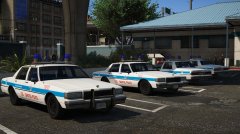
From the album: Jed's Models
Experimenting with the Mars Skybolt Lightbar. Still haven't figured out adding the dishes to the wheels... always looks weird in-game. -
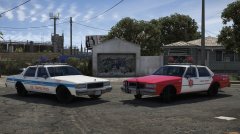
From the album: Jed's Models
Los Santos Police Department and Blaine County Sheriff's Department -
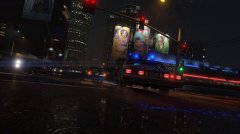
From the album: Jed's Models
In pursuit of an armed suspect (blue ingot) on a wet night through downtown L.S. -
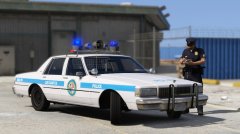
From the album: Jed's Models
Just a fictional 1990 LSPD Caprice. My first model I've ever built. Comes with three extras (rambar, cage and spotlights). Non-ELS. Uses Lundys 1990 Chevrolet Caprice 9C1 Police Package. -
-
 Just re-added the INI from the latest patch. Still no change. Attached my RageHookPlugin Log for you too Albo (: [Edit: 10:55] Turns out my anti-virus was blocking the new RageNativeUI and so I was stuck on a previous version. Just deleted it, unblocked the new one (included in this mod) on my antivirus software and replaced. @Raiden1978 try that. Sorry for the inconvenience @Albo1125! (Removed Log too)
- 3,646 comments
- 306 reviews
-
-

- 2
-
-
@Albo1125 I found this too, the key bind doesn't allow you to mimic the stopped car. I've tried changing the binds and it's not the key, even to where the 'follow me' and the 'mimic' key binds are swapped to rule out a faulty key on my keyboard. 'Follow me' works fine, it just seems to be the 'mimic' just doesn't work. Fantastic work by the way, keep it up!
- 3,646 comments
- 306 reviews