
OfficerDiceman
Members
-
Joined
-
Last visited
Everything posted by OfficerDiceman
-
Okay, seems as though a complete reinstall of everything worked... Sorry for wasting everyone's time!
-
Update: I completely removed my mods folder from my GTA directory. Hind sight, I could've just renamed it as opposed to place it in a different drive, but here we are. I also disabled my antivirus, as I have seen people having issues with that. Still a crash to desktop without a crash file to show for it. Frustration!! I can load into the game via Rage just fine, but when I input "LoadPlugin LSPDFR" in the command line, the game crashes to desktop. My next course of action would probably reinstall GTA from scratch and try again. I have uninstalled LSPDFR and reinstalled 4 times now, no change. Reinstalled and verified the latest version of ScriptHookv and RagePluginHook, as well as verified all of the files within the Steam install folder. Attached is my Rage file again (updated of course), though it still only shows the loading plugin and that is that. Only things installed in GTA at the moment: ELS HeapAdjuster PackfileLimitAdjuster LSPDFR TrainerV Real RAGE V Graphics enhancer ReShade BrakeLightsPlus RagePluginHook.log
-
Yet another person posting about LSPDFR crashing... I know... I'm having an issue where LSPDFR crashes me to desktop on load. I can run Rage without an issue (disabled LSPDFR on launch) and have mods installed with no issue. The issue starts when I load the LSPDFR plugin via the Rage command line. Instant crash to desktop without a log to be found. I have uninstalled and reinstalled LSPDFR. I do not have any other plugins running/installed. I didn't have an issue yesterday, which is the puzzling part.. I did install the EMF mod to replace all vehicles by using OpenIV with the Gameconfig, Packfile Limit Adjuster, and Heap Limit Adjuster . After I started getting other crashes, I promptly uninstalled the EMF and verified my game files, and everything ran great, except launching LSPDFR. My Rage log ends with "Loading plugin from path: D:\SteamLibrary\steamapps\common\Grand Theft Auto V\Plugins\LSPD First Response.dll" which is why I am leaning towards an issue with LSPDFR itself. Any suggestions? If there is something I could be missing, please let me know. I'm not exactly the brightest bulb in the crayon box if you know what I mean. I attached the two logs I could find within my GTA main directory, though I'm not sure if they are of any help. Thanks for taking the time to read yet another person having issues.. ScriptHookV.log RagePluginHook.log
-
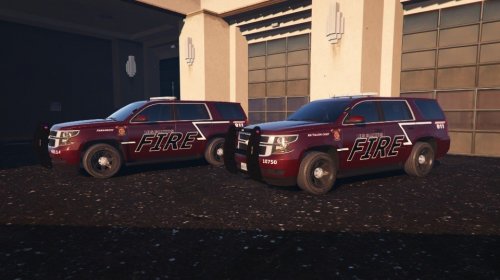 Theres a medical kit in the passenger seat of the vehicle. The vehicle was originally created as a police vehicle, I just did a texture for it. Though the texture may work on other 2015 Tahoes. I haven't checked to see if they do.
 -
This is a retexture for the 2015 Tahoe released in the LSPD CAR PACK from TAHOE17. Additionally, I added a retexture of the emerglights to give you a red lightbar. I apologize for the low quality pictures. Still a WIP, so if you have any suggestions, let me know!
-
-
-
-
-
-
-
-
-
The blue rims are not my fault. The game automatically made the rims blue. You can use the trainer to change them or you can do it through the carcols.dat permanently.
-
2010 Ford F150 Police Unit Ford F150 base model-Original Model: form Google SketchUp user, Converted by TarteXs for GTA IV Axixtech Commander-corleone Whelen ION-Lccop Whelen Liberty SX_DEV-KevinDV Stealth Lightbar-Made by Foward Texturing by Trewq34 Whelen Talon-Modeled & converted for GTA IV by Bxbugs123 Main textures made by Bxbugs123 & Lt.Caine SecurCOM Antennas-Priman Template and placement of parts- OfficerCon15 THANK YOU TO ALL WHO SUPPLIED UNLOCKED PARTS FOR THIS VEHICLE *PLEASE do not judge me for the skin. I BSed the hell out of it in about 3 minutes so I could upload the file. DO NOT UPLOAD/REDISTRIBUTE/OR EDIT WITHOUT MY PERMISSION Edits for personal use are permitted
-
It did come with a handling line but the vehicle was for a different placement. Like a landstalker or something.
-
Hey there guys. I have a slight problem. I downloaded a couple mods for the polpatriot.wft folder in GTA IV. whenever I drive the models, the front suspension pops out of the hood. Is this a handling line I need to fix or is this an issue with the model? I've added a screen to show what I mean if you didn't understand what I meant. I'm not the best at explaining things Also, if anyone can help me figure out the blue rims on that model and how to change them, Id appreciate it. OfficerCon15
-
You are the bomb dude. Thank you so much!!!
-
Hey guys!! I have no idea how to make a template for a vehicle... I looked at a post on LCPDFR on how to map and design my own template, but it was way too confusing. Can I get some help with this? A video would be helpful. Is there any better way to explain it than pictures? I tried to do it and I got lost 1/8th of the way through the tutorial. If anyone could point me in the direction of a video explaining it, I will give you my first born child. Thanks, OfficerCon15
-
Hey guys!! I have no idea how to make a template for a vehicle... I looked at a post on LCPDFR on how to map and design my own template, but it was way too confusing. Can I get some help with this? A video would be helpful. Or if you'd like to do it, I can send you the files. Anything that will help me in anyway. PLEASE!!! The model is a Ford F-150. If anyone could help in any way, I will put you in the credits. Everyone. lol Thanks, OfficerCon15
-
So I did some editing around and decided to just change the rear lightbar. I remapped everything. The front red lights dont work still but I can just live with that. I have run into another problem though... When I spawn the vehicle, you cant enter the vehicle through the door. And the player sits in the windshield. Any suggestions to fix this?
-
So I took your advice and changed the names. Its starting to work a little better but I have a new problem that has risen. The lights on the tail end have moved to the hood area. NOT what I was looking for. Do I need to move files around? Rename other files and merge? Or just delete them and try again? Thanks. Ill try that. I tried renaming them and they worked slightly better. On the model, all the lights are individuals. Im trying to make them work as one. They're all copies of each other though.
-
I am relatively new at modding and I have run into a problem... I am creating a vehicle that displays multiple lights. Unfortunately, some of these lights are very dim or don't work at all. Please help!!! I would really like to release the model but I need everything to work 100%. Or at least 90% lol The rear lights and the under lights are connected to the secondary lights. -only the red light is bright, blue light is dim. -only the rear window lights work, not the rear bumper lights. The front grill lights are connected to the warning light pattern. -only the outside blue lights work, not the red inner lights -blue outer lights are extremely dim. ZModeler hierarchy: extra_9 -extra9 --extra_9L0 extra_7 (no need for an extra 8) -extra7 --extra_7_L0 extra_1 -extra_1L0 extra_2 -extra_2L0 extra_2_L1 extra_2_L2 extra_3 -extra_3_L0 extra_3_L1 extra_3_L2 extra_4 -extra_4_L0 extra_5 -extra5 --extra_5_L0 extra_5_L1 extra_6 -extra6 --extra_6_L0 extra_6_L1 I need help!!!!
-
GTA Vs Declasse Granger 3000X with a Whelen Liberty SX-DEV lightbar Special thanks to all involved in making this possible: Rockstar for providing us with the model. SkylikeGTRFreak for converting and unlocking the model Lt. Caine for the prisoner divider and the wheels And Yard1 for supplying the LCPD ELS pack to LCPDFR, for your liveries, your UV mapping and modifying to LCPD ELS version! Any problems with the model should be reported to me, as the base models should run perfectly on your computer. DO NOT UPLOAD/REDISTRIBUTE/OR EDIT WITHOUT MY PERMISSION Edits for personal use are permitted
-
I must say, I am always kind of skeptical when downloading packs because they usually crash my computer and most of them I just flat out dont like, but you my friend have created an amazing piece of work. It runs beautifully on my computer and it looks very well! One suggestion I have is add a charger to it too ;) but otherwise excellent job 10/10
- 19 comments
- 8 reviews