


Scaild
Members
-
Joined
-
Last visited
Everything posted by Scaild
-
Thanks 🙂 But fortunately mods are working, just UI isn't 🙂
-
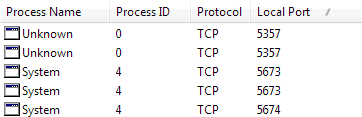
Unfortunately there is't single line with port 5454 😞
-
Hi, I have the very same problem. Watch dog error and running game is not detected. Where I can find log? I found only ModManager.log, but there is nothing about running mod manager UI exe. 2019-12-27 17:16:49.3616|TRACE|ModManager.Core.UnmanagedHost|Loading 2019-12-27 17:16:49.4086|INFO|?????????????????????????????????????????|Parsing mods file P:\Program Files\Rockstar Games\Grand Theft Auto V\lml\mods.xml 2019-12-27 17:16:49.4086|INFO|?????????????????????????????????????????|Done parsing mods file P:\Program Files\Rockstar Games\Grand Theft Auto V\lml\mods.xml 2019-12-27 17:16:49.4086|TRACE|????????????????????????????????????????|Some data files might appear in reversed load order 2019-12-27 17:16:49.4086|TRACE|ModManager.Core.UnmanagedHost|Loaded
-
PS4 works in clean GTAV and also worked in 0.3, so there has to be a way 😄

