


SGT Rick Wishaw
Members
-
Joined
-
Last visited
Everything posted by SGT Rick Wishaw
-
I'm thinking that you are replacing every vehicle in the game with cars that are a high quality (as in 2K or 4K quality) than they previously were. All these 4K textures are too much for the game to handle so is bugs out. I might be wrong though.
-
Make sure you have the latest RagenativeUI installed.
-
Google is an amazing thing... Close Grand Theft Auto V Locate the installation directory of Grand Theft Auto V (Default location: "C:\Program Files\Rockstar Games\Grand Theft Auto V") Run the PlayGTAV.exe The launcher should download all the data needed for the latest update. Try that, I have the steam version so don't know if that'll work or not. Let me know, good luck.
-
So it says the version you have installed is version 877, but the most update to date version is version 1290. Sounds like you need to update your version of GTA to the most recent update.
-
http://www.lcpdfr.com/forums/forum/65-forum-franã§ais/
-
Have you installed any custom cars? Might be that you've done it incorrectly or a file isn't where it is meant to be. Remove the folder where you have installed the cars and see what happens.
-
Can you load GTA 5 without RPH though the .exe in the directory?
-
Sounds like it's an issue with the vehicle.meta file. Does the vehicle that you've downloaded come with one? Maybe try deleting your mods folder and then installing just that one vehicle, see how that works?
-
Did you believe this was real and thats why you don't find it funny?
-
Hi all. Following the recent, horrific incident at Stoneman Douglas High school in Parkland Florida, I came across this article. https://rochdaleherald.co.uk/2017/11/15/donald-trump-calls-for-a-ban-on-schools-after-latest-us-school-shooting/ Obviously this is a fake article and someone just trying to make light heartness of the situation, but it really does seem like the thing that Trump would do, and think that it was a great idea! Just thought I would share it with you all for a little laugh. Thanks folks.
-
Stupid reply but... Have you changed the .xml files to match the correct police vehicle?
-
Take a look at this thread that I was part of. http://www.lcpdfr.com/forums/topic/74674-solved-extreme-texture-loss/
-
Hi welcome to the community. Try following these instructions to play LCPDFR. First you need to download the actual mod itself. Take all the files from that download and drop them into your GTA 5 directory (Where the .exe file file is and other files/folders). http://www.lcpdfr.com/downloads/gta5mods/g17media/ Next you need to go to the rage plugin hook site and download the latest version of that. Drag and drop all the files from that into the GTA 5 directory just like you did with the LCPDFR files. https://ragepluginhook.net/Downloads.aspx Open using the Rage Plugin .exe file that is now in your GTA 5 directory and go through the menus. Make sure you check 'Load all plugins'. This give give you stock, vanilla LCPDFR. Have a play about with it and see what you think. To install different vehicles: Download whichever vehicle or pack you would like. You will be replacing police1, police2, police & police4. There are also sheriff1, sheriff2, fbi1, fbi2, pranger, ambulance & firetruck (those are all the ones I change (I think!)). After download the files you need to get a program called OpenIV. https://www.gta5-mods.com/tools/openiv Open this program, click windows for GTA 5, then edit near about the top right of the page. Click into the following files: update>x64>dlcpacks>patchday13 I always use patchday13, just because it's always worked for me. Can't remember by memory what files to click into next but after patchday13, you need to find vehicles.rpf (I'll confirm how to do this when I have access to my PC) Click at the top of the page 'copy to mods folder'. Next drag all the police files into the vehicles folder you have open in OPENIV. If it's an ELS compatible vehicle, you obviously need to download the ELS script from the site. The vehicles will have .xml files to go with the corresponding police vehicle. You can drag them into the correct folder from OpenIV. Go to ELS> pack default. You can delete anything that is in the folder and replace them with the .xml files. Watch this video to get to know how to use all the ALE controls.
-
Hi everyone. So when I open the RPH console, I try to change the default key to open the console in GTA which is F4. I try to change to it another key like F6 but it never works, it always just changes back to F4. Anyone else having this issue or am I doing something wrong? Thanks.
-
Not sure what plugin for ped management is but for the drugalyzer and breathalyzer, it's Left ShiftKey + O for one and Left ControlKey + O for the other. That's the default controls. P.S That's the letter O not the number zero...
-
Hi team. I've been searching the site for skins for both the vehicles mentioned above but cannot find skins that fit both the vehicles from the same texture pack. I'm reaching out to my LSPD:FR friends to help me out! I'm looking for a sheriff skin for both the 2014 Chevy Caprice and the 2011 Ford Expedition, that is all. The vehciles are from the LSMPD Pack that I have linked below. Thanks.
-
To install different vehicles: Download whichever vehicle or pack you would like. You will be replacing police1, police2, police & police4. There are also sheriff1, sheriff2, fbi1, fbi2, pranger, ambulance & firetruck (those are all the ones I change (I think!)). After download the files you need to get a program called OpenIV. https://www.gta5-mods.com/tools/openiv Open this program, click windows for GTA 5, then edit near about the top right of the page. Click into the following files: update>x64>dlcpacks>patchday13 I always use patchday13, just because it's always worked for me. Can't remember by memory what files to click into next but after patchday13, you need to find vehicles.rpf (I'll confirm how to do this when I have access to my PC) Click at the top of the page 'copy to mods folder'. Next drag all the police files into the vehicles folder you have open in OPENIV. If it's an ELS comparable vehicle, you obviously need to download the ALE script from the site. The vehicles will have .xml files to go with the corresponding police vehicle. You can drag them into the correct folder from OpenIV. Go to ELS> pack default. You can delete anything that is in the folder and replace them with the .xml files. Watch this video to get to know how to use all the ALE controls.
-
So can't see your PC specs with that link. To install LSPDFR, download it from the now section of the site. Take all the files from that download and drop them into your GTA 5 directory (Where the .exe file file is and other files/folders). http://www.lcpdfr.com/downloads/gta5mods/g17media/ Next you need to go to the rage plugin hook site and download the latest version of that. Drag and drop all the files from that into the GTA 5 directory just like you did with the LCPDFR files. https://ragepluginhook.net/Downloads.aspx Open using the Rage Plugin .exe file that is now in your GTA 5 directory and go through the menus. Make sure you check 'Load all plugins'. This give give you stock, vanilla LCPDFR. Have a play about with it and see what you think.
-
I'm sure you can adjust your health in one of the menus from the simple trainer.
-
There were a few files that were still there from when I had it installed before, deleted them and the issue is gone. Thanks!
-
https://imgur.com/a/DNq6W
-
When I play through the game, after a few minutes, half the screen is filled with text. It says something to do with sherriff3 and/or other add-on vehicles and there being an error with it or something. I do not have any add-on vehicles though!
-
@Kallus You have any ideas on this buddy?
-
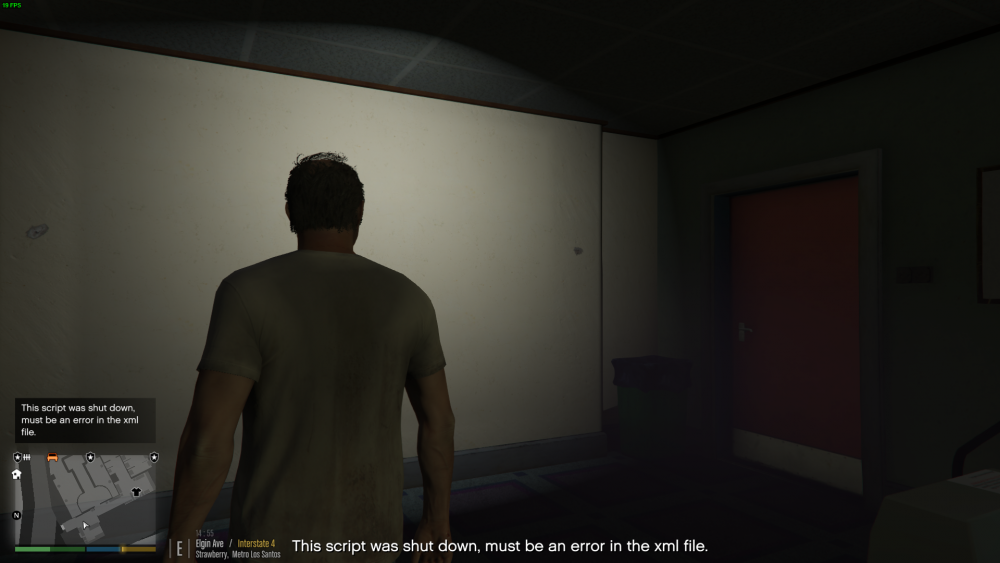
Hey folks. Looking for some help here. This issue seems to have just come out the blue. I cannot remember if I have installed a new script that would make this happen so hopefully you guys can help me. Whenever I press the INS key on my keyboard (above the delete button), this comes up: Anyone else having this issue or know how to fix it. Or even know how to locate the supposed XML file that is causing the issue. Thanks.
-
Hi folks. Is there a fuel script that will work with LSPDFR? Thanks.


