ConsKrypt
Members
-
Joined
-
Last visited
Files posted by ConsKrypt
-
DO NOT REDISTRIBUTE THIS SKIN WITHOUT WRITTEN PERMISSION FROM MYSELF.
YOU DO NOT HAVE THE RIGHTS NOR PERMISSION TO USE MY SKINS IN PART OR IN FULL TO CREATE YOUR OWN FOR REDISTRIBUTION.
PLEASE RESPECT THE FACT THAT WE WORK HARD ON CREATING THESE FOR EVERYONE TO USE, ALL FOR FREE.
CLANS/STREAMERS CLAUSE:
Requirements
NOTE: SOME TRAINERS FORCE PEARL TOP COATS, THIS WILL AFFECT HOW THE LIVERY DISPLAYS, PLEASE KEEP THIS IN MIND.
Installation
Navigate to mods/x64e.rpf/levels/gta5/vehicles.rpf with OpenIV
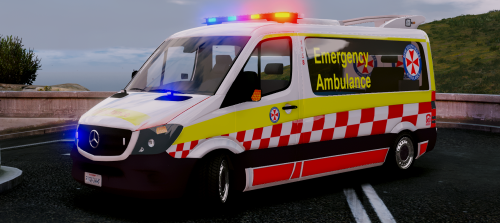
Locate 'ambulance.ytd' and open it.
Find 'sprinter_sign_1' and replace it with the skin file included.
Click save, then launch GTA and enjoy. DO NOT REDISTRIBUTE THIS SKIN WITHOUT WRITTEN PERMISSION FROM MYSELF.
YOU DO NOT HAVE THE RIGHTS NOR PERMISSION TO USE MY SKINS IN PART OR IN FULL TO CREATE YOUR OWN FOR REDISTRIBUTION.
PLEASE RESPECT THE FACT THAT WE WORK HARD ON CREATING THESE FOR EVERYONE TO USE, ALL FOR FREE.
CLANS/STREAMERS CLAUSE:
Spoiler
YOU ARE PERMITTED TO USE THIS SKIN IN CLANS AND ON STREAMS SO LONG AS CREDIT IS GIVEN AND REMAINS UNALTERED,
PLEASE CONTACT ME FIRST ABOUT THIS.
You must also have permission from the model authors to use within a clan environment, without their permission this clause is rendered invalid for clan use.
YOU ARE NOT PERMITTED TO ALTER THIS SKIN IN ANYWAY SHAPE OR FORM AND SHARE YOUR EDITS,
ALL EDITED SKINS MUST REMAIN PRIVATE WITHIN YOUR COLLECTION ONLY.
Anyone found to be in breach of this agreement will be contacted by me and/or the model authors about the issue either by asking to remove all content that is not permitted to be used or a legal firm may contact you about the matter if you refuse to co-operate with the requests given.
Requirements
NOTE: SOME TRAINERS FORCE PEARL TOP COATS, THIS WILL AFFECT HOW THE LIVERY DISPLAYS, PLEASE KEEP THIS IN MIND.
Installation
Navigate to mods/x64e.rpf/levels/gta5/vehicles.rpf with OpenIV
Locate 'ambulance.ytd' and open it.
Find 'sprinter_sign_1' and replace it with the skin file included.
Click save, then launch GTA and enjoy.- 1,078 Downloads
Submitted -
DO NOT REDISTRIBUTE THIS SKIN WITHOUT WRITTEN PERMISSION FROM MYSELF.
YOU DO NOT HAVE THE RIGHTS NOR PERMISSION TO USE MY SKINS IN PART OR IN FULL TO CREATE YOUR OWN FOR REDISTRIBUTION.
PLEASE RESPECT THE FACT THAT WE WORK HARD ON CREATING THESE FOR EVERYONE TO USE, ALL FOR FREE.
CLANS/STREAMERS CLAUSE:
Requirements
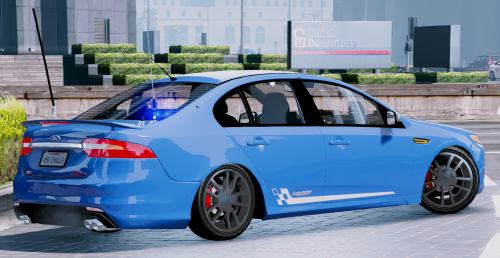
[NSWPF] [ELS] Unmarked FG-X by @Moose
THERE ARE TWO VERSIONS INCLUDED, A LIGHT AND A DARK VERSION SO YOU CAN CHOOSE YOUR OWN VEHICLE COLOURS WITH A TRAINER OF YOUR OWN CHOICE.
NOTE: SOME TRAINERS FORCE PEARL TOP COATS, THIS WILL AFFECT HOW THE LIVERY DISPLAYS, PLEASE KEEP THIS IN MIND.
Installation
Navigate to mods/update/x64/dlcpacks/patchday3ng/dlc.rpf/x64/levels/gta5/vehicles.rpf with OpenIV
Locate 'fbi.ytd' and open it.
Find 'xr6_sign_1' and replace it with the skin of choice from one of the files included.
Click save, then launch GTA and enjoy.- 60 Downloads
Submitted -
DO NOT REDISTRIBUTE THIS SKIN WITHOUT WRITTEN PERMISSION FROM MYSELF.
YOU DO NOT HAVE THE RIGHTS NOR PERMISSION TO USE MY SKINS IN PART OR IN FULL TO CREATE YOUR OWN FOR REDISTRIBUTION.
PLEASE RESPECT THE FACT THAT WE WORK HARD ON CREATING THESE FOR EVERYONE TO USE, ALL FOR FREE.
CLANS/STREAMERS CLAUSE:
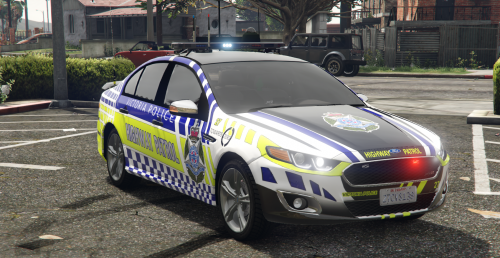
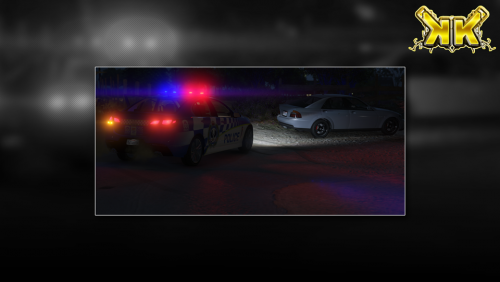
Victorian Police Force - State Highway Patrol
Click the Spoiler to see what the real State Highway Patrol vehicles early retirement.
Requirements
Will be updated to recommend a VICPOL setup once @Macgregor has released his VICPOL version.
[NSWPF] Unmarked Ford FG-X XR6Turbo [ELS] by @MooseYTY [RECOMMENDED] It is recommended due to being a 'slick top' as this is how the real vehicle was. [NSWPF] Highway Patrol Ford FG-X XR6 Turbo [ELS] By @MooseYTY [NSWPF] Highway Patrol Ford XR8 by @MooseYTY [VICPOL] FG-X XR6 Turbo by @Macgregor
Installation
Assuming that you already have the one of the above already installed.
- Use OpenIV and navigate to Mods / update / x64 / patchday3ng / dlc.rpf / levels / gta5 /vehicles.rpf (ensure you have 'EDIT MODE' enabled)
- Find sheriff.ytd and open it in the texture viewer by double clicking on it
- Find xr6_sign_1, highlight it and you should be able to click the Replace button up the top right.
(this will now open a dialog where you can navigate to this replacement skin after downloading)
- Select this replacement skin and press on save.
- Launch GTA and enjoy.
- 137 Downloads
- 4 Comments
Updated -
DO NOT REDISTRIBUTE THIS SKIN WITHOUT WRITTEN PERMISSION FROM MYSELF.
YOU DO NOT HAVE THE RIGHTS NOR PERMISSION TO USE MY SKINS IN PART OR IN FULL TO CREATE YOUR OWN FOR REDISTRIBUTION.
PLEASE RESPECT THE FACT THAT WE WORK HARD ON CREATING THESE FOR EVERYONE TO USE, ALL FOR FREE.
CLANS/STREAMERS CLAUSE:
This VICPOL livery is based off a real Highway Patrol livery, however due to the vehicle being vastly different in shape and type I had decided to make small customisation to how the livery looked.
Still holding mostly true to the real thing which I would say about 80% authentic as the style goes.
The vehicle in question this livery was loosely based upon:
As you can see there are some major similarities to the real livery and this VICPOL Highway Patrol skin, so in a sense I did keep it semi-authentic so it shouldn't look too out of place if you use it in your VICPOL squad.
Requirements
NSWPF Highway Patrol Ford Falcon FGX XR8 by Moose
Installation
Assuming that you already have the one of the above already installed.
NOTE:
Some vehicles support multi liveries even if it only has one installed by default,
take note of what the default livery is called (usually something like 'carname_sign_1'),
rename the skin within to 'carname_sign_2' and use a trainer to choose your new livery.
Navigate to mods / x64 / dlcpacks / patchday3ng / levels / gta5 / vehicles.rpf with OpenIV Locate 'police2.ytd' and open it. Find 'xr8_sign_1' and replace it with the skin included. Click save, then launch GTA and enjoy.- 217 Downloads
- 4 Comments
Updated -
DO NOT REDISTRIBUTE THIS SKIN WITHOUT WRITTEN PERMISSION FROM MYSELF.
YOU DO NOT HAVE THE RIGHTS NOR PERMISSION TO USE MY SKINS IN PART OR IN FULL TO CREATE YOUR OWN FOR REDISTRIBUTION.
PLEASE RESPECT THE FACT THAT WE WORK HARD ON CREATING THESE FOR EVERYONE TO USE, ALL FOR FREE.
CLANS/STREAMERS CLAUSE:
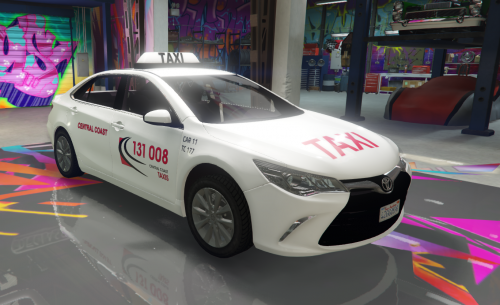
Australia Wide Taxis - Skin pack
Requirements
- NSW 2015 Toyota Camry Taxi by Mrfui
Included in this pack:
Australia Wide Taxis - Central Coast, NSW Skin Australia Wide Taxis - Bathurst, NSW Skin Australia Wide Taxis - Brisbane, QLD Skin Australia Wide Taxis - Perth, WA Skin Australia Wide Taxis - Melbourne, VIC Skin Australia Wide Taxis - Adelaide, SA Skin
Installation
Navigate to mods/x64e.rpf/levels/gta5/vehicles.rpf with OpenIV
Locate 'taxi.ytd' and open it.
Find 'Camry_sign_1' and replace it with the skin of choice from one of the files included.
Click save, then launch GTA and enjoy.- 677 Downloads
- 6 Comments
Updated -
DO NOT REDISTRIBUTE THIS SKIN WITHOUT WRITTEN PERMISSION FROM MYSELF.
YOU DO NOT HAVE THE RIGHTS NOR PERMISSION TO USE MY SKINS IN PART OR IN FULL TO CREATE YOUR OWN FOR REDISTRIBUTION.
PLEASE RESPECT THE FACT THAT WE WORK HARD ON CREATING THESE FOR EVERYONE TO USE, ALL FOR FREE.
CLANS/STREAMERS CLAUSE:
Requirements
Only ONE of these models are required.
KEY: ELS: Emergency Lighting System, AFP: Aussie Flash Patterns
[ELS] [NZPOL] Highway Patrol VF SS by Donzzy [RECOMMENDED] [ELS] [NSWPF] General Duties VF Evoke by MooseYTY [AFP] [VICPOL] General Duties VF Evoke by Macgregor
Installation
Assuming that you already have the one of the above already installed.
This version comes with two variants, a solid blue and transparent backgrounds for you to choose which one you would like in game.
NOTE:
Some vehicles support multi liveries even if it only has one installed by default,
take note of what the default livery is called (usually something like 'carname_sign_1'),
rename the skin within to 'carname_sign_2' and use a trainer to choose your new livery.
Navigate to mods/update/x64/dlcpacks/patchday3ng/dlc.rpf/levels/gta5/vehicles.rpf with OpenIV
Locate 'police2.ytd'(or whichever police slot you've replaced) and open it.
Find 'evoke_sign_1' and (if VF SS by Donnzy replace 'vfss_sign_1' also) replace it with 'SAPOL_TrafficServices(HWP).png' or the solid variant that is included.
Click save, then launch GTA and enjoy.- 113 Downloads
- 5 Comments
Updated -
DO NOT REDISTRIBUTE THIS SKIN WITHOUT WRITTEN PERMISSION FROM MYSELF.
YOU DO NOT HAVE THE RIGHTS NOR PERMISSION TO USE MY SKINS IN PART OR IN FULL TO CREATE YOUR OWN FOR REDISTRIBUTION.
PLEASE RESPECT THE FACT THAT WE WORK HARD ON CREATING THESE FOR EVERYONE TO USE, ALL FOR FREE.
CLANS/STREAMERS CLAUSE:
New South Wales Government - Traffic Emergency Patrol | Mercedes Sprinter Edition (Realistic)
Requirements
- Metropolitan Police Mercedes Sprinter [K9 Sector] by BritishGamer88
Installation
Assuming that you already have the above already installed correctly.
Use OpenIV and navigate to Mods / x64e / levels / gta5 /vehicles.rpf (ensure you have 'EDIT MODE' enabled) Find policet.ytd and open it in the texture viewer by double clicking on it Find 'car_sign_1' and replace it with the skin file 'NSWGov_TEP.png' that is included. Find 'cage_mesh' and replace it whit the skin file 'blank.png' that is included. Find 'cage_metal' and replace it whit the skin file 'facades.png' that is included. Find 'plates' and replace it whit the skin file 'plates.png' that is included. Find 'side-light' and replace it whit the skin file 'side-light.png' that is included. Click save, then repeat steps for 'policet+hi.ytd'. Launch GTA and enjoy.- 110 Downloads
Submitted -
DO NOT REDISTRIBUTE THIS SKIN WITHOUT WRITTEN PERMISSION FROM MYSELF.
YOU DO NOT HAVE THE RIGHTS NOR PERMISSION TO USE MY SKINS IN PART OR IN FULL TO CREATE YOUR OWN FOR REDISTRIBUTION.
PLEASE RESPECT THE FACT THAT WE WORK HARD ON CREATING THESE FOR EVERYONE TO USE, ALL FOR FREE.
CLANS/STREAMERS CLAUSE:
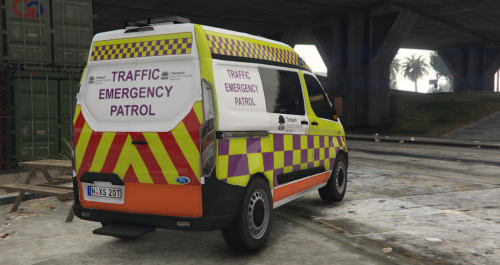
New South Wales Government - Traffic Emergency Patrol | Ford Transit Edition
(Skin was remade to fit this vehicle shape as its intended vehicle is a Mercedes Sprinter)
Requirements
- [ELS] 2015/16 Metropolitan Police Ford Transit Custom Station Van by Bleep999
Installation
Assuming that you already have the one of the above already installed.
- Use OpenIV and navigate to Mods / x64e / levels / gta5 /vehicles.rpf (ensure you have 'EDIT MODE' enabled)
- Find policet.ytd and open it in the texture viewer by double clicking on it
- Find 15_Plates, highlight it and you should be able to click the Replace button up the top right. (replace with Plates.png)
- Find PqtSRTE, highlight it and you should be able to click the Replace button up the top right. (replace with Ford_Transit_custom_RMS_EMERGENCY.png)
(this will now open a dialog where you can navigate to this replacement skin after downloading)
- Select this replacement skin and press on save.
- Launch GTA and enjoy.
- 90 Downloads
Submitted -
DO NOT REDISTRIBUTE THIS SKIN WITHOUT WRITTEN PERMISSION FROM MYSELF.
YOU DO NOT HAVE THE RIGHTS NOR PERMISSION TO USE MY SKINS IN PART OR IN FULL TO CREATE YOUR OWN FOR REDISTRIBUTION.
PLEASE RESPECT THE FACT THAT WE WORK HARD ON CREATING THESE FOR EVERYONE TO USE, ALL FOR FREE.
CLANS/STREAMERS CLAUSE:
New South Wales Police Force - General Duties [ BW 15 ] (Brisbane Water, Central Coast)
Requirements
Either of the below models will work with this skin.
- [ ELS ] NSW Police General Duties Holden Evoke by MooseYTY
- NSW Police General Duties Holden Evoke by MooseYTY
Installation
Assuming that you already have the one of the above already installed.
- Use OpenIV and navigate to Mods / update / x64 / patchday3ng / levels / gta5 /vehicles.rpf (ensure you have 'EDIT MODE' enabled)
- Find police2.ytd and open it in the texture viewer by double clicking on it
- Find evoke_sign_1, highlight it and you should be able to click the Replace button up the top right.
(this will now open a dialog where you can navigate to this replacement skin after downloading)
- Select this replacement skin and press on save.
- Launch GTA and enjoy.
- 201 Downloads
- 2 Comments
Updated -
DO NOT REDISTRIBUTE THIS SKIN WITHOUT WRITTEN PERMISSION FROM MYSELF.
YOU DO NOT HAVE THE RIGHTS NOR PERMISSION TO USE MY SKINS IN PART OR IN FULL TO CREATE YOUR OWN FOR REDISTRIBUTION.
PLEASE RESPECT THE FACT THAT WE WORK HARD ON CREATING THESE FOR EVERYONE TO USE, ALL FOR FREE.
CLANS/STREAMERS CLAUSE:
New South Wales Police Force - General Duties [ TL 36 ] (Tuggerah Lakes, Central Coast)
Requirements
- [ ELS ] 2017 Ford Police Interceptor Utility By Him1250
- Realism Dispatch Enhanced By delapitated ( OPTIONAL | NOT REQUIRED - YOU CAN REPLACE A STOCK MODEL BY RENAMING THE MODEL FILES TO SUIT.)
Installation
Assuming that you already have the vehicle installed as an addon using RDE
- Use OpenIV and navigate to Mods / update / x64 / dlcpacks / rde / dlc.rpf / x64 / levels / gta5 / vehicles / rdevehicles.rpf (ensure you have 'EDIT MODE' enabled)
- Find police5.ytd and open it in the texture viewer by double clicking on it
- Find 2016FPI_sign_1, highlight it and you should be able to click the Replace button up the top right.
(this will now open a dialog where you can navigate to this replacement skin after downloading)
- Select this replacement skin and press on save.
- Launch GTA and enjoy.
- 36 Downloads
Updated -
This is just another skin that is an attempt to have more Australian compainies roaming throughout the world for those who wish to make it feel a tad closer to home.
Requirements
You will need either this or this version (recommended) of the Ford Ranger and replace pranger as per instructions included.
OpenIV and a basic understanding of file structure.
How to install
Run OpenIV and navigate to mods / x64e.rpf / levels / gta5 / vehicles.rpf
You will need to replace files within both pranger.ytd and pranger_hi.ytd
Open 'pranger.ytd' find "plate's" and click on replace up in the top right, this will now show you a dialog, navigate to these files you have downloaded and select "plate's.png"
now whilst still in 'pranger.ytd', find "car_sign_1" and replace that. feel free to replace all other "car_sign_1-5" with the skin too if you do not wish to have one of the originals show up from time to time.
now click on save.
The next part is exactly the same as above except the ytd file. Open 'pranger_hi.ytd' and repeat the steps above.
Once you're happy with it, run GTA and spawn the vehicle with the name pranger
- 179 Downloads
Updated -
Another reskin for Mrfuis taxi, this time some love for the ACT.
Requirements
- NSW 2015 Toyota Camry Taxi by Mrfui
Installation
Assuming that you already have the Taxi installed as a replacement
- Use OpenIV and navigate to Mods / x64e.rpf / levels / gta5 / vehicles.rpf
- Find taxi.ytd and open it in the texture viewer by double clicking on it
- Find Camry_sign_1, highlight it and you should be able to click the Replace button up the top right.
(this will now open a dialog where you can navigate to this replacement skin after downloading)
- Select this replacement skin and press on save.
- Launch GTA and enjoy.
- 272 Downloads
Updated -
This is just another skin that is an attempt to have more Australian companies roaming throughout the world for those who wish to make it feel a tad closer to home.
I recommend that you also download my NRMA skin as it will replace skin slot 1 and this Mobile Speed Camera skin will reside in skin slot 2.
There is also an aussie style euro numberplate available with the NRMA skin which you can find here.
Requirements
You will need either this or this version (recommended) of the Ford Ranger and replace pranger as per instructions included.
OpenIV and a basic understanding of file structure.
How to install
Run OpenIV and navigate to mods / x64e.rpf / levels / gta5 / vehicles.rpf
You will need to replace files within both pranger.ytd and pranger+hi.ytd
now whilst in 'pranger.ytd', find "car_sign_2" and replace that. feel free to replace all other "car_sign_1-5" with the skin too if you do not wish to have one of the originals show up from time to time.
now click on save.
The next part is exactly the same as above except the ytd file. Open 'pranger+hi.ytd' and repeat the steps above.
Once you're happy with it, run GTA and spawn the vehicle with the name pranger
- 111 Downloads
Updated