Stealth22
Friends of LSPDFR
-
Joined
-
Last visited
Files posted by Stealth22
-
Traffic Control for GTA V
Copyright (C) 2018 Stealth22. All rights reserved.
Any unauthorized modification, reverse engineering, or distribution (including re-uploading of any kind) is strictly prohibited.
Requirements
You must have version 0.63 (or newer) of RAGE Plugin Hook. You must have a fully legal, non-pirated version of GTA V.
Automatic Installation
- Extract the ZIP archive; ensure that setup.exe and Traffic Control.msi are both in the same folder
- DON'T run Traffic Control.msi unless you know what you're doing
- Run setup.exe, and ensure that the installation directory detected matches the main/root folder of your GTA V install directory
- If setup.exe is unable to detect your GTA V directory, or fails in some other fashion, start Traffic Control.msi, AND SELECT YOUR GTA V PATH AS THE INSTALL DIRECTORY
Manual Installation
- Copy the TrafficControl.dll and TrafficControl.ini files into the Plugins folder of your GTA V directory.
- Copy the Stealth.Common.dll and RAGENativeUI.dll files into your main/root GTA V directory.
Features
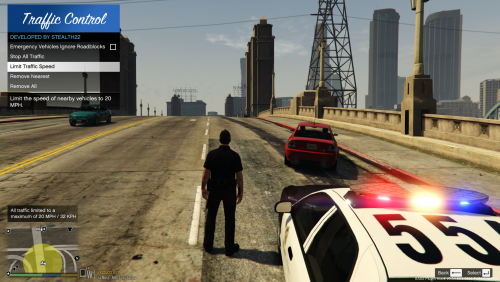
- Stop or slow down all traffic within a certain radius of the player, in order to close a road for investigative purposes, or for safety reasons during a traffic stop
- Multiple "roadblocks" or "speed zones" can be placed
- Roadblocks will remain in place until removed by the player
- A (beta) setting to allow any emergency vehicles to drive through "roadblocks"/"stop zones" can be enabled in the INI file ("Stop Traffic" orders only; speed restrictions are not affected)
- The above setting can also be changed on-demand through the new in-game menu
[NEW!] - Traffic Control now includes a new in-game menu, powered by RAGENativeUI!
[NEW!] - Keyboard shortcuts can now be changed in the INI file!
[NEW!] - Keyboard shortcuts can be disabled, if desired (to use the in-game menu exclusively)
[NEW!] - Integration with Police SmartRadio!
Usage
- Press the menu keybind (CTRL + F10 by default) to open the Traffic Control menu; use the menu options to place/remove roadblocks
- Alternatively, you can use the shortcut keys (see the INI file) to place/remove roadblocks
- Keyboard shortcuts can be disabled through the INI file, if you wish to only use the in-game menu
Forum Thread
http://www.lcpdfr.com/forums/topic/51961-rel-traffic-control-beta-close-off-the-road-while-you-investigate-and-clear-a-scene/
- 338,385 Downloads
- 338 Comments
Updated -
Stealth.Common DLL
This is a required support library for all of my RPH/LSPDFR plugins. It is normally included with every release of each of my plugins.
However, if you have, by chance, downloaded an older release that includes an outdated version of this library, you may receive an error message when running newer versions of my plugins.
This library does not do anything by itself, and it is not an RPH, or LSPDFR plugin.
Do not attempt to install this file into your "Plugins" or "Plugins\LSPDFR" directory.
You should only download this file if you are receiving an error message that says your copy of the Stealth.Common DLL is out of date.
Please continue to install my plugins as you always have; the latest versions of my plugins will normally INCLUDE this library already!!
Installation
You must have one of my plugins installed. Stealth.Common is merely a support library, and does nothing on it's own. This DLL is not an RPH or LSPDFR plugin Do not install this file unless you are receiving an error message that says your copy of the Stealth.Common DLL is out of date Please continue to install my plugins as you always have; the latest versions of my plguins will normally include this library already! Had enough of me saying the same thing over and over? Well, here it is once more. Don't install this unless--- alright, you get the point.
If you absolutely have to install this file, here's how... Simply copy the file into the root level of your Grand Theft Auto V install directory Yes, overwrite the old one. It's okay, your computer is not going to explode. Yes, that's it. You're done. You're still here? Okay...umm...do a happy dance while you wait for GTA V to start up?
PLEASE DO NOT POST ANY REVIEWS ON THIS FILE!
THIS FILE HAS BEEN UPLOADED SEPARATELY ONLY FOR CONVENIENCE.
IN ORDER TO MAINTAIN FAIRNESS ON THE LCPDFR.COM REVIEW SYSTEM, PLEASE DO NOT POST ANY REVIEWS ON THIS FILE.
IN ADDITION TO THE ABOVE, PLEASE CONTINUE TO POST COMMENTS/REQUESTS FOR SUPPORT IN THE THREAD FOR THE RESPECTIVE PLUGIN.
I WILL NOT BE CHECKING THIS COMMENT THREAD ON A REGULAR BASIS, SO REQUESTS FOR SUPPORT IN THIS FILE'S COMMENT THREAD WILL LIKELY GO UNANSWERED.
- 7,484 Downloads
- 7 Comments
Updated -
ALPR+
ALPR+ is a plugin that I have been thinking about for a while now, but just never got around to writing it. After publishing major updates for both Code 3 Callouts and LSPDFR Computer+, I now have had some more time to devote to this.
ALPR+ is intended to model a real life ALPR (automated license plate recognition) system used by many police departments across the United States, as well as in Canada and other countries around the world. There are many different types of systems out there, and I must admit, I am not really familiar with the intricacies of any of them. However, I've done my best to make this plugin as realistic as possible.
The concept of ALPR+ was inspired by the Realistic ANPR plugin by Danielle. However, due to unknown reasons, Danielle has not been able to update Realistic ANPR in quite some time. It is quite unfortunate, as she did some great work on that plugin, and worked hard to make it as realistic as it was. I hope that I'm able to do the same with ALPR+. Like I said, I am not familiar with ALPR systems at all, and I've obviously had to develop ALPR+ from scratch.
ALPR+ is a plugin that I am quite proud of, and I hope you enjoy it as much as I've enjoyed developing it!!
Features
Inspired by the Realistic ANPR plugin by Danielle Realistic detection logic which takes various factors into consideration, including vehicle distance, angle, line of sight, camera field of view, etc When alerts are triggered, the player only receives information that the ALPR system would know You don't get a blip on your map! The only information you receive is the vehicle model, color, which camera triggered the alert, and the license plate Configuration file with customizable camera settings (for advanced users only; default values are highly recommended) Eight different types of ALPR alerts, each with it's own potential probability weight Stolen Vehicle Outstanding Warrant Suspended Driver's License Expired Driver's License Vehicle Registration Expired Vehicle Not Registered Vehicle Insurance Expired No Vehicle Insurance ALPR system automatically disables itself during traffic stops or pursuits, and re-enables them when the situation is Code 4 Integration with LSPDFR API NOTE: ALPR+ does change some vehicle and ped records; LSPDFR natively generates a lot of peds with outstanding warrants, or expired/suspended licenses Sound notifications when alerts are triggered Integration with Traffic Policer API (optional feature) Developer API Set (or clear) either a pre-defined or custom flag on a specific vehicle Events that are triggered when an event is either generated, or displayed Get the ALPR flag for a specific vehicle Get a list of ALPR results for the current session
Videos
Check out this video by @FirstThirtyMinutes, featuring the beta version of ALPR+, in all it's glory!- 168,532 Downloads
- 153 Comments
Updated -
Keep Calm Plugin for GTA V
Copyright (C) 2015 Stealth22. All rights reserved.
Any unauthorized modification, reverse engineering, or distribution (including re-uploading of any kind) is strictly prohibited.
PLEASE DO NOT PM ME WITH SUPPORT REQUESTS, OR POST A NEGATIVE REVIEW WITHOUT ADDRESSING THE ISSUE WITH ME FIRST.
FOR ANY SUPPORT RELATED ISSUES, PLEASE POST A COMMENT ON THIS PAGE, OR POST IN THE KEEP CALM FORUM TOPIC.
** NOTE REGARDING RPH CRASHES **
If your GTA V crashes to the desktop, and RPH says that the crash was most likely caused by Keep Calm...to put it simply, it most likely was not caused by Keep Calm.
RPH tries to detect which plugin caused the crash by calculating which plugin was running at the time of the crash. Keep Calm runs constantly in the background, so naturally, RPH will think that Keep Calm is the culprit whenever you have a game crash.
GTA V can CTD for any number of reasons. Keep Calm does not do anything heavy enough to cause a game crash...I am not saying that it will never happen, but it has never happened in the history of Keep Calm's development. Anyone who has reported a CTD crash so far has had their issues stemming from elsewhere.
If you get an RPH crash that says Keep Calm was the cause, try un-installing Keep Calm, or disabling it from starting in the RPH settings. If the crashes persist, your issues are being caused by something else.
If the crashes go away, then re-install Keep Calm by downloading the latest release from LCPDFR.com. If the crashes then return, we need to diagnose the issue further, and you should post a comment here (or in the forum topic) so we can look into it.
** IMPORTANT NOTE REGARDING THE ENTITY PERSISTENCE MOD!! **
If you use the Entity Persistence mod by FtDLulz, you need to do ONE of two things...
If ped persistence is enabled, ensure that it is set to only 'persist' dead peds, not live ones (this is the default setting, to my knowledge) OR...Disable ped persistence entirely
If ped persistence is enabled, and set to 'persist' LIVE peds, then Keep Calm will have NO effect at all!! (Not to mention that you will have performance issues if you do that!)
YOU HAVE BEEN WARNED!!!
Requirements
You must have at least version v0.41 of the RAGE Plugin Hook installed, LSPDFR v0.3.1, as well as v1.6.0.1 of the Stealth.Common DLL, which is packaged with this release. Keep Calm will check these versions on startup, and will refuse to run if older versions are installed.
You must have a fully legal, non-pirated version of GTA V.
Installation
- Copy the Keep Calm.dll and Keep Calm.ini files into the Plugins folder of your GTA V directory.
- Copy the Stealth.Common.dll file into your main/root GTA V directory.
Features
- Nearby drivers and pedestrians should not panic in the event of gunfire (police officers are excluded)
- Some customization is available via the config file
- Peds spawned by LSPDFR and LSPDFR plugins are excluded, to eliminate conflicts with callout plugins
Usage
- Press the toggle keybind (CTRL + 9 by default) to start/stop Keep Calm
- Keep Calm will start on it's own by default, unless the auto-start is disabled in the config file
Known Issues
Please note that GTA V does not always provide access to every pedestrian and vehicle in the area, and some peds may spawn AFTER the "calming" function has already been triggered. It runs in the background continuously, but each ped has to be modified individually.
As a result, some drivers and pedestrians may still panic in the event of gunfire. This may improve as new versions of the RAGE Plugin Hook are released.
This plugin has been released with the intent of minimizing the panic attacks experienced by the AI.
The panic attacks will NOT be eliminated completely, however, this plugin should hopefully minimize them enough to make the game more enjoyable. The main intent with this plugin is to not have drivers run officers over when they are in the middle of making an arrest after a pursuit.
- 211,495 Downloads
- 268 Comments
Updated -
Code 3 Callouts
"Attention all units, officer needs assistance. Shots fired. All available units, respond Code 3."
This is a plugin that I have been planning for ever since I started writing scripts for LSPDFR. Now that the LSPDFR API has come out, this idea has now become a reality!
The focus of this plugin is to create a realistic experience where the player needs to do some actual police work. Police work is not always about flicking on the lights and sirens and flying down the road at 100 MPH. Nor is it always about pulling out an AR-15 and emptying a clip on a suspect.
In fact, most of the time, police work is all about dealing with people. Hearing both sides of the story. Figure out who is lying, and who isn't. Sometimes you have a helping hand when you have an eyewitness, and sometimes not. Or sometimes you will get eyewitnesses who contradict one another. Bob says the bank robber's car was blue. Jane says the car was red. Turns out, Jane was on her cell phone, and wasn't paying attention. Oh, and Bob was in the bathroom, so he didn't actually see anything. You later find out that the car was actually green.
The first version has four different callout scenarios. Each will have their own degree of variation, so you will not have exactly the same situation every single time!
Code 3 Callouts is designed to work alongside other callout plugins, to create the most exciting and realistic experience possible.
It is YOUR job to determine what actually happened based on the evidence. Its time for your shift, Officer. Gear up, and move out.
Requirements
You MUST have the latest version of Rage Plugin Hook installed, as well as a legal copy of GTA V. YOU MUST HAVE VERSION 0.39 (OR NEWER) OF THE RAGE PLUGIN HOOK! This plugin has been tested on v757.4 of Grand Theft Auto V, but will work with newer versions. You must have at least v0.3.1 of LSPDFR Features
TEN different callout situations, each with their own varying scenarios. Fully integrated dispatch audio, to create a realistic experience. Requires the player to investigate each call, and do some actual police work to determine what ACTUALLY happened. Remember, just because someone called 911 to report something, does not mean that's precisely what happened. Altered suspect behaviour based on the response of the officer NEW - AMBIENT EVENTS! NEW - INTEGRATION WITH LSPDFR COMPUTER+! Credits
A very special thank you to...
@LukeD - Lots of helpful advice, and helping me get comfortable with the API! Plus working together to ensure our callouts can work alongside each other! @FinKone - Same as above, plus testing and showcasing the plugin for me! Erwi - For helping me out with some code issues! @DCP1293, @LtFlash, and @Straysify - Testing earlier versions of Code 3 Callouts for me! Thanks a lot! @Albo1125 - For graciously sharing some of his code with me, helping me out with the CAD popup windows, giving me the idea for the new suspect vehicle search logic, and for helping me testing this version! @JFavignano and @Bayareabuggs - For being my guinea pigs... I MEAN testers, and giving me lots of useful feedback! Both of you have contributed a lot towards the success of this plugin, whether it be testing things for me, or just showcasing the callouts! Your guys' videos gave me lots of ideas for things to fix and improve!! @Zachary Houseknecht and @Polecat324 - Thanks a lot for showcasing the callouts, and for testing beta versions for me!! I really enjoy watching your videos! @goigle - For giving me the idea of the Assault observation window...which in turn led me to think of the CAD popup idea! Thanks a lot! @MulleDK19, along with all the other dev's on the RPH IRC channel - For being patient, and helping me out with code issues that I had difficulty with, plus testing things out for me!!
My sincerest apologies if I missed anyone! Callouts
Most of these callouts are "Code 2" calls, meaning, they do NOT require a "Code 3", or "lights and sirens" response. Part of police work is to actually drive at normal speeds, and obeying traffic laws and red lights while driving to a call!
If you're stuck in a traffic jam, you can use your lights to get yourself through an intersection, and then resume driving normally. But be careful about using the siren...you don't want the suspect to know that you're coming, do you?
See the PDF documentation for more information on all of the callouts included.
Future Development
Follow this thread on the forum for future development plans!
http://www.lcpdfr.com/forums/topic/52452-rel-code-3-callouts-add-a-new-layer-of-realism-to-lspdfr-screenshotsvideo-added/
- 418,360 Downloads
- 423 Comments
Updated