


ZeusTheGod200
Members
-
Joined
-
Last visited
Everything posted by ZeusTheGod200
-
You generally want to find a monitor 1080p and up. Depending on you budget, you can look at 1920x1080 resolutions, 2560 x 1440 (1440p) and so on. Obviously the higher the better but the price changes as well. After that, make sure it has a low response time. For gaming, it's recommended to have atleast 5, but obviously the lower the better here. After that comes refresh rate, i'd recommend 144hz here but 60hz is okay, and if you're able to find a 120hz that's pretty good as well, the higher the better. Everything after that is basically personal preference and all this depends on your budget.
-
Resolved, can close.
-
I'm not too sure either but if it helps, I believe dxgi.dll deals with your reshade.
-
I would love to see a 2014 Ford Taurus at some point. I think I've seen a few in the gallery section. Anyone plan to release/develop one? They're just so damn clean.
-
You can try downloading a realistic handling.meta mod, such as: https://www.gta5-mods.com/vehicles/realistic-top-speed-for-gta-v. Not sure what the issue could of been caused by.
-
Did you install any sort of car mod? Some mods require you to edit the handling.meta which is also in Grand Theft Auto V/mods/update/update.rpf/common/data/.
-
Make sure you've replaced the visualsettings file within Grand Theft Auto V/mods/update/update.rpf/common/data/ and if so you can try to use the brightest setting he includes in the mod if you aren't already.
-
*My fault on uploading the images twice, not sure how to delete them. A skin pack that I am currently working on. Releasing soon. Plans: Tahoe CVPI Explorer Feedback is appreciated as I am new to creating skins.
-
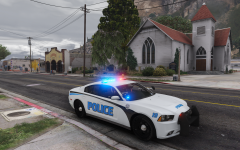
From the album: W.I.P 4K LSPD Skin Pack
A skin pack that I am currently working on, here's a look at the charger. Releasing soon. Plans: Tahoe CVPI Explorer Feedback is appreciated as I am new to creating skins. -
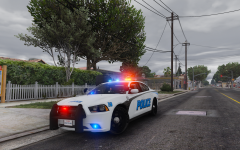
From the album: W.I.P 4K LSPD Skin Pack
A skin pack that I am currently working on, here's a look at the charger. Releasing soon. Plans: Tahoe CVPI Explorer Feedback is appreciated as I am new to creating skins. -
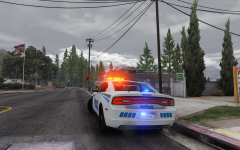
From the album: W.I.P 4K LSPD Skin Pack
A skin pack that I am currently working on, here's a look at the charger. Releasing soon. Plans: Tahoe CVPI Explorer Feedback is appreciated as I am new to creating skins. -
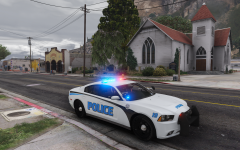
From the album: W.I.P 4K LSPD Skin Pack
A skin pack that I am currently working on, here's a look at the charger. Releasing soon. Plans: Tahoe CVPI Explorer Feedback is appreciated as I am new to creating skins. -
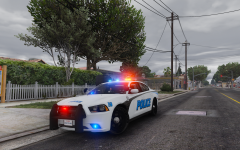
From the album: W.I.P 4K LSPD Skin Pack
A skin pack that I am currently working on, here's a look at the charger. Releasing soon. Plans: Tahoe CVPI Explorer Feedback is appreciated as I am new to creating skins. -
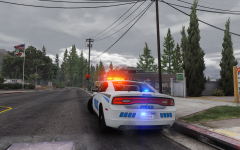
From the album: W.I.P 4K LSPD Skin Pack
A skin pack that I am currently working on, here's a look at the charger. Releasing soon. Plans: Tahoe CVPI Explorer Feedback is appreciated as I am new to creating skins. -
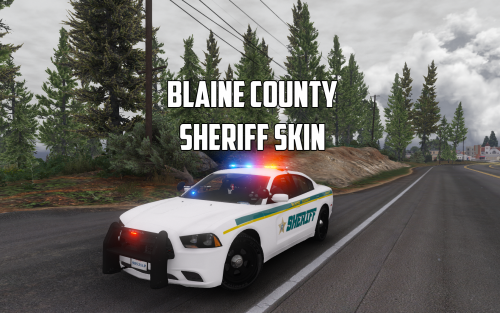 Awesome! Their livery is super nice, obviously this one isn't completely accurate.
 -
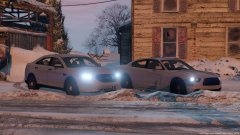 What year model is that taurus, very nice!
 -
-
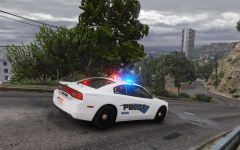
From the album: W.I.P 4K LSPD 2014 Charger Skin
4K LSPD Skin W.I.P. for Bxbugs123/Carperino's 2014 charger. Let me know your thoughts and if I should release a pack with more cars or not. Note that the skin is not finished, going to resize to fit better and add more detail. -
Blaine County Sheriff skin based on Brevard County Sheriff for Bxbug/Carperino's 2014 Dodge Charger. Model(Bxbugs123/Carperino): *Thanks to the authors of the model. Installation Guide: *I recommend all users to backup their files* 1.) Use OpenIV to locate the texture inside police2.ytd or where you installed the 2014 Dodge Charger to. police2.ytd - Grand Theft Auto V\update\x64\dlcpacks\patchday4ng\dlc.rpf\x64\levels\gta5\vehicles.rpf. 2.) Turn on edit mode and open police2.ytd. 3.) Replace 1 of the 4 skins or all with this skin. Usually labaled as "chr2_sign_1." 4.) Save and enjoy! *Please note that this is my first skin that I've attempted to create, I am considering on making a pack if users enjoy my work.
-
-
Awesome! Made that slicktop a unmarked and using the other one as well. Thanks!
-
So, I've been looking for a unmarked Taurus with the year model '11 to '14 and have came across 2. The first one [Link Below] doesn't work properly with ELS v8, the lights are off the car and float in the air and I don't know how to fix this my self sadly. http://www.gta4-mods.com/vehicles/ford-taurus-unmarked-f16977 The second one that I've seen in the past which looks stunning is no longer available because of the link being down. [Wish I would of downloaded it then. Lol, link below to a SS and dead link] '?do=embed' frameborder='0' data-embedContent>> If anyone can tell me how to fix the first one or a link to the second this would be greatly appreciated. Otherwise another unmarked Taurus would also be amazing! Thanks for stopping by.
-
As the title states, I have installed c++ redist 2012 and uninstalled it multiple times and the diagnostic tool does not pick it up showing that I have it. I have Windows 7 64 bit and I have never had this issue before until I re-installed the game. Mods used with LCPDFR: SMNT, CryENBv2, Road/Vegetation Textures` Also, when pressing the key '~' the menu that pops up in the top left corner does not pop up. I don't know why, as it did before, before I re-installed the game. GTA IV works fine, but because I apparently don't have Redist 2012, LCPDFR does not. Logs and screenshots of Redist 2012 and my game directory below. Well, I fixed my issue by installing the x86 versions of all the C++ redists.
-
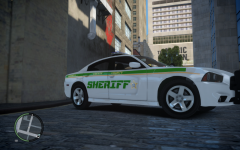 I was thinking the same thing, and thanks.
 -
Didn't mean to post this twice, the other one is another picture of the same car meant to be on this post. If a moderator could edit that it would be great.


