


Krynger
Members
-
Joined
-
Last visited
Everything posted by Krynger
-
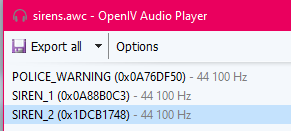
I think that I discovered why few strings are different. "VEHICLES_HORNS_SIREN_1" - Police Primary ("RESIDENT_VEHICLES_SIREN_PA20A_WAIL" doesn't work for some reason) "VEHICLES_HORNS_SIREN_2" - Police Secondary ("RESIDENT_VEHICLES_SIREN_2" doesn't work for some reason) "VEHICLES_HORNS_POLICE_WARNING" - Police Warning ("RESIDENT_VEHICLES_POLICE_WARNING" doesn't work for some reason) "SIRENS_AIRHORN" - Airhorn ("RESIDENT_VEHICLES_AIRHORN_EQD" doesn't work for some reason) As you can see, names for Primary and Secondary are SIREN_1 and SIREN_2. In sfx folder there is one more archive: SCRIPT.RPF where we can find SIRENS.awc file with this content: And from what I see, they have better quality then sirens from vehicles.awc. I have no clue where can "SIRENS" file be located with AIRHORN but maybe it's also a solution for POLICE4 strings 😉
-
 Hello @Thehurk ! I found a bug in your model. I don't know, if this is model or template issue, but at rear doors on both sides there's places without textures (marked on red). I hope, you'll repair it so my livery will be more awesome :D
- 427 comments
- 75 reviews
-
This car will definitely test the stability of ELS (I simply got headache after watching this :D):

