



OutCast
Members
-
Joined
-
Last visited
Everything posted by OutCast
-
 Yeah I can make an update fixing things I encountered plus LSPD livery, would come soon.
 -
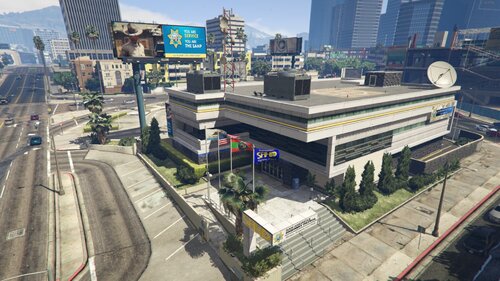
Thanks for the appreciation! You mean a LSSD livery for this station? IDK, I'd like to have a new station/office outside the city up north in that case, around Chumash or Vinewood Hills, for that I'd need to find a good place first along with a new building to revamp or copy then remodel. But things aside I'm having some issues IRL to attend too so we'll see.
-
 Not really, I'm more interested in fixing or doing things that are lacking and haven't been done like a Ranger Station around Chilliad or doing interiors (office + garage) for my stations, and there are already improved stations out there, like the one I got the graffiti from, I feel like it's duplicity.
 -
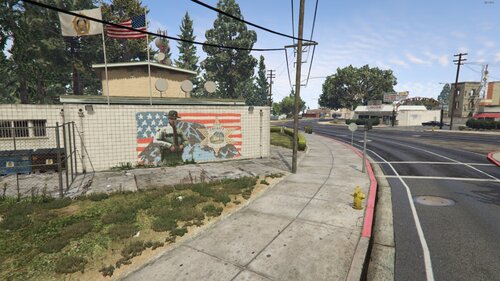
After doing the PB SAHP/CHP station, I’ve been driving around PB a lot more, and seeing a policeman in what’s supposed to be a sheriff mural on a sheriff station wall gives me anxiety attacks each time (xD). So, I did a quick edit in GIMP to remake it while also removing the ugly hater "pigs" graffiti. Just wanted to upload it and share it with anyone who might want to try it too. SUMMARY Two mural replacements to chose from, one done by me and another one by AlexVonShep. 1.1 UPDATE Added another sheriff mural I found on the internet while editing/removing the hater "pigs" graffiti. Credits AlexVonShep. INSTALL Replace: cs1_16_police_building.ydr cs1_16_police_building+hidr.ytd in mods/x64q.rpf/levels/gta5/_hills/country_01/cs1_16.rpf Replace: v_47_sheriff2_ext.ydr in mods/x64h.rpf/levels/gta5/interiors/v_int_47.rpf ALSO If you have a picture or something that can improve (replace) it, share it and I might do an update to add it.
-
I have the patron version which should be a version ahead to it. But anyways thanks for having a look at it, I know first hand that debugging is a headache more with unstandardized mods. Maybe next time comes clearer.
-
 The textures are embedded, but you still can. With OpenIV export the .ydr as open format (.odr) and just edit or replace the texture and import again.
 -
Hi there. Accepted a callout about a shooting in Chamberlain, called a backup unit to the point before reaching there, suspect fled and then opened fire, cops responded with fire and gangs joined, called more backup, after the shooting ended I called EMS, few secs later was entering my vehicle and crash happened just after finishing the animation. Thanks. RagePluginHook.log AdvancedHookV.log ScriptHookV.log
-
 If you changed <Item type="CAmbientModelSet"> <Name>ANIMAL_DOG_SHEPHERD</Name> to <Name>ANIMAL_DOG_RETRIEVER</Name> <Models> <Item> <Name>A_C_shepherd</Name> <Variations type="NULL" /> <Probability value="1.000000" /> </Item> Think like it as a box, the box is labeled shepherd and inside is a certain retriever dog model. If the game tries to find the shepherd box and it doesn't exist it will crash. Also, there is already a <Name>ANIMAL_DOG_RETRIEVER</Name> and there should be 2 now. To find the correct one you want to fix it's just above this line: <Item type="CAmbientModelSet"> <Name>ANIMAL_DOG_SMALL</Name> <Models> <Item> <Name>A_C_Poodle</Name> <Variations type="NULL"/> <Probability value="1.000000"/> </Item> <Item> <Name>A_C_Pug</Name> <Variations type="NULL"/> <Probability value="1.000000"/> </Item> <Item> <Name>a_c_westy</Name> <Variations type="NULL"/> <Probability value="1.000000"/> </Item> </Models> </Item>
 -
That's nice to hear that is working now, what was exactly the issue? because you are not the only one having this. What do you mean with removing the shepherd completely? in the meta file
-
That's strange, I've tried the same and works fine to me (I posted a pic at the mod introduction with the retriever without any vest), are you using the same k9 mod (German Shepherd / Malinois - K9 Dog by martinct) or another k9 model mod? Also looking at the mod files, the vest is a component that belongs to (is part of) the shepherd model only instead of being independent (like a hat, in another .rpf), which makes me think that there must be another k9 model mod ppl are using or a secondary mod that is customizing it. If reducing the prob to 0 is fine to you, I'm happy that is working.
-
In the end they are just calls, the game calls the label (thru the region .ymt) and inside the label is the model, problem is when the game tries to command the model to do stuff it hasn't been animated or have scripts around it, then it might crash, but in this case every dog is just a remodel from each other and some labels share multiple models being picked randomly, like: Lowering to 0 also works, and it's less invasive in case you have doubts. That's also been tested tho with a skater ambient spawn issue of another mod of mine.
-
Thanks! Great YT channel as well
-
I've had it changed to rottweiler for months now, shepherd dog is often seen in Sandy Shores with no crashes there whatsoever, you can check the dog replaced with no issues. I've been tweaking this .meta file for a while along with the .ymt to generate custom npcs (custom scenarios, like hwaycops for my custom stations) and when made correctly it causes no issues. Great YT channel!
-
You don't need to download anything, just modify a file with OpenIV. After installing martinct's German Shepherd / Malinois - K9 Dog (link below) I've noticed that this k9 model was spawning randomly around the world, so I made a fix: If you don't want to see this model being spawned in the world, used by peds as a pet, go to mods/update/update.rpf/common/data/ai/ambientpedmodelsets.meta: and search for <Name>ANIMAL_DOG_SHEPHERD</Name> You will see this: Two Options: 1. Replace the model (some people have issues having the new replaced dog model spawning still with the vest on, dunno why this issue is, I think due to be using another k9 model mod). ... <Item type="CAmbientModelSet"> <Name>ANIMAL_DOG_SHEPHERD</Name> <Models> <Item> <Name>A_C_shepherd</Name> REPLACE TO <Name>A_C_Rottweiler</Name> FOR EXAMPLE <Variations type="NULL" /> <Probability value="1.000000" /> </Item> ... or 2. Set to 0 the spawn probability to make it not spawn at all. Works for everyone. <Item type="CAmbientModelSet"> <Name>ANIMAL_DOG_SHEPHERD</Name> <Models> <Item> <Name>A_C_shepherd</Name> <Variations type="NULL" /> <Probability value="1.000000" /> SET TO <Probability value="0.000000" /> TO NOT SPAWN AT ALL </Item> Retriever. Using martinct mod I can replace the model without any issues, tried this with a fresh k9 mod install. Here is a list of the 6 dogs (excluding Chop and Border Collie) that you can also try to replace to.
-
Oh, yeah that's right, forgot the jail dropoff 😅. About the car, I don't know if I can do anything about that because that's LSPDFR. I'm already making interiors right now, maybe the new coords (inside) will change that.
-
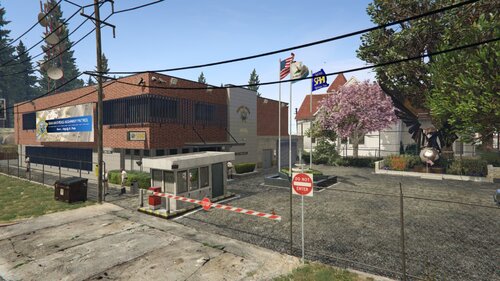
I'd like to replace the fountain, I know it bothers, but it's there to cover an even worse grass prop that I don't know how to remove yet (without having to copy 3gb into the players mod folder just for that). Once I find an efficient way to move/remove the original props around the lot I will move the fountain to where the eagle is. I can also release a without hut+barrier version next update. About the LSPDFR npc's spawn getting glitched/lost, I've not had that yet, other than when yourself spawn there into beetween the station and the fence, that's the LSPDFR plugin IDK if I can change that. About the said npc's I guess it has to do with navmeshes, have not done that yet, will have to take a look at that as well to add that.
-
Thanks for the appreciation! Although, the station I see is from an older version, haven't you updated yet?
-
Can you see the sahp peds spawn at day? What hour during night do you think that happens? Any other mods that you think can conflict with it? overhauling mods Edit: I managed to replicate it, Codewalker has corrupted the cluckin_bell.ymt when last edited it. I'm working on a fix.
-
 I'm installing GTA4, will do an update regarding that voiceline.
 -
A voiceline like that does not exist in GTA5, it can't be replaced. But, I think it existed back in GTA4 if I remember well, II might take a look at that.
-
It's already replaced inside, combined.
-
You mean when you start GTA5/LSPDFR? Because that can't be tweaked, hardcoded where it spawns, it's how automatically LSPDFR works round stations. It's a shame tho.
-
Hi, thanks! What do you mean with the car spawn? When exiting the garage it should spawn at the front of the garage gate.
-
I'd love to make interiors for the stations, but it will require too much time and effort for little use in singleplayer. It's something on the table tho, since it "should" mostly just be to copy paste from elsewhere, but as my station projects tend to improve and get more complex (wider structure-wise), the problems that come along with them unexpectedly would too, and worse when it's not for me but for mostly others since everyone has a different version/structure of the game, discouraging the work. FTM making exterior stuff work is hard enough, specially as a beginner. I'd love to. Lets see later on.
-
Added a compatibility fix. NVE is quite selfish-aggresive towards other dlc's. Has too much overwrite protection when it comes to lending their files. 'I let you coexist but don't touch me'. I suppose it's so wide that the devs fear that other modifications might cause it to go unstable and the rep goes over them instead, rather to the unknowledge of the user. Imagine LSPDR releasing an integrated NVE patch instead of the other way around.



