


mclovin109
Members
-
Joined
-
Last visited
Everything posted by mclovin109
-
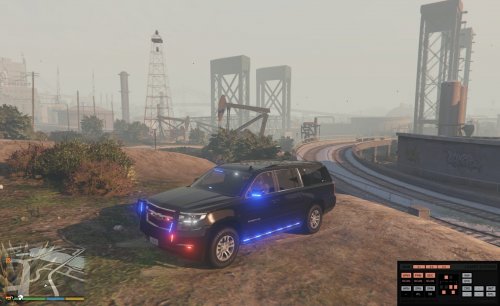 There is a version available for download without the push bar. It may not be as updated though
- 87 comments
- 22 reviews
-
-
It's still there. Download version 2.1. However it isn't as updated as the one with the rambar. Whatever changes I listed for 3.0 won't be there.
- 87 comments
- 22 reviews
-
no. its funny. i only added the console for other people. seems like most people want it. i couldnt care less about the interior. i can give unlocked if you want to edit yourself
- 87 comments
- 22 reviews
-
 when installing do you put the whole texture folder into the rpf or take the dds file out of the texture folder and put directly in the rpf? or something else entirely?
- 108 comments
- 19 reviews
-
-
this is the base model i used. i did edit a few things so ill try to find my unlocked file and send it to you
- 87 comments
- 22 reviews
-
-
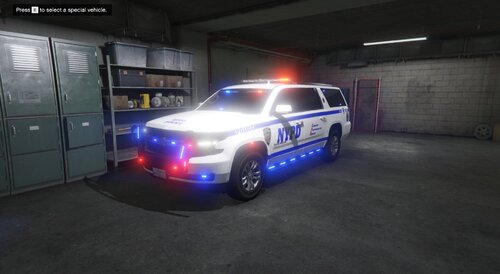 i already made a slicktop. there are people who make all blues on request. otherwise i might do it but wont be for a while
- 18 comments
- 1 review
-
i installed 2 vehicle packs yesterday. 1 was an addon (came in its own dlc) and 1 was regular. i installed that one as addons in albo's dlc. the other one i changed all the names in the dlc it came in. (for jurisdictions+). all vehicles have carvar and meta entries. in openiv they look fine but in game they all have serious texture issues. either no texture or shifting flickering textures. like the bump map for the tire will be the vehicle skin. the cars do spawn and drive etc without crashing the game. i have at least 1 other addon dlc that the cars are spawning properly.
-
Thanks. If you know how to edit the carvar and metas there is a simple fix which may not be the most correct but will work fine. Just copy the carvar from noose2 or any emergency vehicle that spawns white and paste it into whatever slot you have the vehicle in and just rename it.
- 18 comments
- 1 review
-
Sounds like a carvar issue. I'm not exactly sure what would need to be changed. I installed it in the noose2 slot from RDE. But you should be able to change the color using a trainer
- 18 comments
- 1 review
-
Even when close to the vehicle? I don't know what could be wrong. A lot of the lights do start to turn white as I get farther away. I don't know why. Might have something to do with the els settings. But up close they are definitely blue and red Like I wrote in big bold red letters on the top of the description "THIS IS NOT MEANT TO HAVE ANYTHING TO DO WITH NYPD It just was the only skin i had available." ThomasH33 made it for me a long time ago for an actual NYPD version I was working on. I just used it to showcase the vehicle. Someone did make a new skin for this so as soon as I get the proper permissions I will add it to the download. Thanks. Maybe.
- 18 comments
- 1 review
-
soon is not a very specific term but i hope to eventually release it. i just didnt release yet because got to lazy to finish it. i dont have a rav 4.
- 18 comments
- 1 review
-
-

- 1
-
-
I actually have one with an slr and none of these lights. Meant to be pretty close to actual nypd. (not that they have any suburbans). I hope to eventually release it. But needs a little more work and the custom carcols/metas is a pain so never got around to it. I do currently use it in my own game so hopefully soon. This is only skin I have though.
- 18 comments
- 1 review
-
-
THIS IS NOT MEANT TO HAVE ANYTHING TO DO WITH NYPD It just was the only skin i had available. Although i happen to think it looks pretty good like this. Now that we got that out of the way. Pretty simple. It is exactly the same as my unmarked/slicktop version just now with the addition of a Liberty 2 lightbar. I have included the template/unmarked skin in the file. Feel free to make a new skin or swap it for plain black (would make good secret service vehicle). Whatever. Use for whatever and wherever. Just don't steal please. Pm me for unlocked version. Installation is same as every model. There are tutorials that explain it very well. Els is set for scan. The pattern in the video is #123 for the primary lights. Skin by ThomasH33 (not in the credits in the download but listed here)
- 18 comments
- 1 review
-
-
- 2
-
-
-
 my takedowns are still shining backwards.
 -
try this
-
thanks for your help. it didnt work when i just used the rde without the eup. it must be a problem in the rde files. its not really meant for lspdfr 4. its just a fix until the new rde comes out. as far as i can tell everything is up to date. all my plugins are meant for lspdfr 4 or 4.1 this is what im using now to get the effect i wanted from rde. its actually better for my needs https://www.lcpdfr.com/files/file/22139-lspdfr-jurisdictions-more-options-for-lspdfr-eup-and-ultimate-backup/
-
the eup folder is there RagePluginHook.log
-
I think so. I'll check and post the new log tomorrow night
-
So I took out the rde files and installed jurisdictions+ (or whatever exactly it is called.) and not getting the error anymore. Although it seems to be lagging a little more than normal but I have to test that more.



