



OfcWel247
Members
-
Joined
-
Last visited
Everything posted by OfcWel247
-
-
 Awesome!!!!! Nice job. I have been waiting for someone to do something with the mercenary peds and black ops ped. This is great. Here are a few other ideas for textures if you plan on releasing more: "POLICE" on back in large letters and medium on front with "Street Crimes TF" in smaller letters under the police on back (this stands for Task Force) "POLICE" or "SHERIFF" in large letters on back and medium on front with smaller letters on back "Violent Crimes Task Force" (this is an actual combined local and county task force where I live) Also the hat could have different badges for city and county or it could simply say "POLICE" or "SHERIFF". Also, some plane clothes/tactical guys like your ped may simply sport a baseball cap with "NY" for the the New York Yankees or other baseball/sports Teams for a less conspicuous look while driving around until they have to exit the vehicles. Again this is a great texture change and I hope to see more of these peds from you. Thanks man will download this for sure
- 31 comments
- 4 reviews
-
 Nice! Ive been waiting for this. Is there a way to make just the Sheriff vehicles have all blue lights? (i havent downloaded yet but i will shortly)
- 11 comments
- 1 review
-
-
 Just curious....You say the Taser is lethal (This is true in GTA 5 apparently lol!!) but you say "unless you have a non-lethal mod" Where could i find said Mod??
- 342 comments
- 49 reviews
-
 :O Can you make somthing like this for the LSPD ped Models?!?!?!?! This is what I have been waiting for
- 15 comments
- 5 reviews
-
Domestic Dispute/Disturbance - you are dispatched to a domestic dispute between two people at a residential area (house, apartment, etc...) and it is up to you to determine who the aggressor is and arrest them. A second officer is dispatched as well due to the potentially violent nature of all domestic calls. Use witness statements and physical evidence to determine the aggressor. Loitering and Prowling (L&P) - a concerned neighbor has noticed somone in the neighborhood that just does not belong. It is up to you to find the subject and verify the nature of their business. Some subjects may flee and some may be valid residents of the area (which commonly happens at night) Public intox/Disturbance - Local drunk in a high pedestrian area ie..Vine wood blvd. Causing a disturbance and freaking out tourists trying to have a nice vacation. It's up to you to either find him a place to go and ride to get there in. He may be aggressive towards LEO or a peaceful annoyance. Taxi to home or squad car to jail cell let him decide. These are just a few ideas I had for some unique and common less critical call outs commonly seen by law enforcement across the country and I'm sure around the world. They may be difficult to accomplish but from what I have seen already from LSPDFR, G 17 and GTA 5 in general, I can see some of these coming to life in the near future.
-
That would be great to see! With the beaches in GTA 5 being much busier and more interactive than the beach in GTA IV, I think it would be a great idea
-
With the many miles of beautiful (and busy) sandy beaches in GTA 5, I think it would be a neat idea to incorporate/develope a beach specific police officer. For example: Where i live the officers assigned to the beach where black cargo shorts, a light blue (not baby blue) polo shirt with POLICE printed on the back, regular nylon duty belt and "all asigned equipment gun, radio, taser etc....", black underarmor running shoes, and a black flex fit baseball cap with embroidered agency badge. I noticed with the recent Highway Patrol vehicle mod which incorporates HWAYCAR and HWAYCAR2, there might be a way to create a new ped model for a beach police officer variation. Hopfully some texture guru's here can make this possible. Thoughts?
-
OK I believe I got it! thanks I must have missed the english version somehow
-
OK so i was able to create the mods folder but im not too sure where to go from here... Is there any way you could walk me through it? Im not insanely computer/modding savy (otherwise I would have figured it out by now) but I can navigate it if you could tell me what I need to copy, paste...etc into the mods folder and how to do it. Lets say I want to put the Police Bike Improvements [New in version 1.3] from Netman in my game through the mods folder, how do i go about doing this?? I know how to do it the original way by replacing. PS Feel free to dumb it down lol I wont be offended Thanks
-
Awsome thank you! I will try it out
-
OK i saw somone talking about this somwhere else too. Makes sense. Can i still do this with component peds, and vehicle replacements?
-
So i should just re download OpenIV? I think i have this version... I will try it though thanks
-
I wanted to see if anyone knows of a fix to this...... Everytime I turn off my computer or restart it I have to let GTA 5 update. By doing this I seem to loose any modded vehicle textures, ped textures or anything I have changed with open IV. Does anyone know of a work around so that I do not have to keep adding these files everytime I turn off and back on my computer??? I usually play the game through rage hook And offline mode. Thanks
-
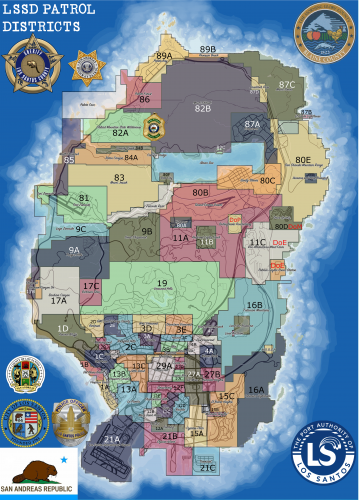 Ok thanks, great idea and layout btw
 -
Is there a way to make this an in game map like somone did for LCPDFR?
-
Does anyone know of a way to repair a corrupt file in OpenIV? When I try to go to " update/x64/dlcpacks/mpheist/dlc.rpf " it gives me an error saying that the file is corrupt!!! does anyone know a simple way to fix this???? I have tried to repair with install but no luck (Not full reinstall...I would like to avoid that if possible) thanks!!
-
Awsome thank you
-
A little off topic but..... is there anyway to add weapon attachments to weapons when I have changed my ped model via a trainer? For example playing as Michael and I use a trainer to change my model to say a cop, all my weapons dissappear. So then I use the trainer to pick the weapons I want but cannot get attachments ie..a flashlight on the combat pistol. Any suggestions thanks!!
-
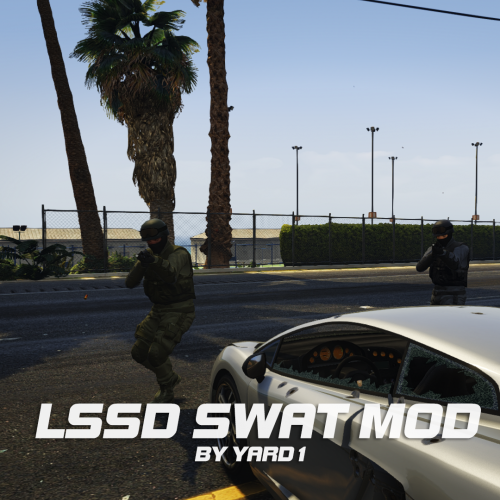 @Yard1 How do I change my ped model to this??? I tried using a trainer but didn't show up in any variation for SWAT. Really enjoy this otherwise (adds realism)
- 10 comments
- 2 reviews
-
Alittle off topic but....I was messing around with a trainer and spawned as a Black Ops ped with (Not the crappy one) the one that looks like black water "Beards, Baseball Caps, Droplegs and Plate Carriers" I dont think they fall in the "Law Enforcement" ped models persay but I think that would make a pretty good ped for a Narcotics raid team or like we have where i live VCTF "Violent Crimes Task Force" comprised of detectives that mainly respond to...well....violent crimes. Just a thought and wasnt sure if the relationships would jive or not.
-
The ELS also adds more realistic feel when conducting a traffic stop...most traffic stops are initiated using only the lights (no siren), obviously when running code or in a pursuit they are used. Also after a call LE may sit in their vehicles for a few with the lights on with no siren. I say ELS it up!!!! Lol....also I would love to see some CVPI's and other "real" police model vehicles and skins. Can't wait to see what's what with LSPDFR
-
Awsome!!! I'm really looking forward to the finished product. I don't know much about modding But I'm sure it's not easy. Keep up the good work Sam and Development team. Can't wait
-
Yea i was afraid of that....thank you


