Natatha
Members
-
Joined
-
Last visited
Everything posted by Natatha
-
-
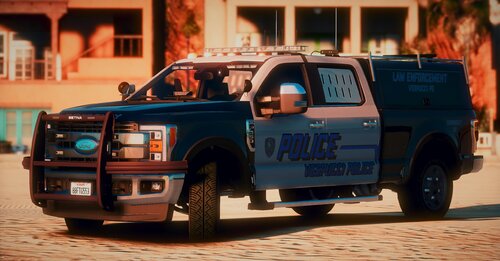 I have a custom visualsettings file to make lights brighter (copied mostly from RadianceV with some changes), and added this to my server. I'm wondering if it's just me, or if anyone else has the marker lights, and headlights, are super bright? Almost overpowering to the lightbar. Is there any way to dim those down without losing anything else?
- 15 comments
- 1 review
-
I've had ELS for as long as I can remember (Going back to LCPDFR) and always knew that there were issues with the lighting being dim. I've always had Radiance V installed with no issues until I started having some problems loading into the game this week. I did a complete reinstall, verified everything, got those crashes fixed. However, now I can't get my ELS lights to be brighter. I've installed (all separately) Radiance V, Visuals V, along with something else I can't remember, and none of them worked to brighten the lights. I even went into the visual settings file and tweaked the Day/Night numbers to 6k and 1500 respectively. Normally I like to think that I'm pretty good with things like this, or can find issues, but after multiple reinstallations of Radiance V and other visual mods, as well as manually tweaking the lights settings, nothing is working for me. Any help/suggestions would be greatly appreciated.
-
 I love this mod, it definitely adds realism. I'm wondering if you use a mod with street names, or districts. I know the point is to not have a blip for the BOLO. But, when it pops up and says, "X St. in X area" I have no idea where that is. So, I'm wondering if you (or anyone) uses something for this?
- 394 comments
- 30 reviews
-
It loaded back up just fine without the mods folder. I assume that means there's an issue with the mods themselves, and that the next bit is to reinstall them one by one and see what happens..?
-
So, up until yesterday everything was running smoothly with my installation of LSPDFR, cars, EUP, etc. Then, I attempted to install this mod: And now, my game won't load passed the initial loading screen. Since that happened, I have replaced the files I added, and deleted those that were added. I did a fresh install this morning, reinstalled all my mods, cars, etc. as well as tried to install the F&D mod. Same thing is happening. I have no problem doing a full reinstall with mods and cars, but if I can avoid it, I'd love to.
-
Lately I've been getting crashes on LSPDFR. Most of them seemed random, however, today I've been seeing it in a couple areas repeatedly: First is on vehicle pursuits. As the suspect exits the vehicle, as I try to pull my weapon it crashes. Next on a traffic stop, (2) peds exited the vehicle and I again pulled my weapon, it crashed as soon as I went to shoot one. Finally, the last one crashed as I attempted to take a robbery suspect down as he ran from me. Not sure if all connected as one, or if it's different issues... I saw another thread that claimed it was SmartRadio, and I removed those but that didn't help the situation. Attached is my log, if you notice something, lemme know... They aren't my specialty. RagePluginHook.log
-
Quite honestly this is the first time I'm seeing anyone say what they should be changed to. Most of the time I've changed them to Police3; Tahoe to FBI2; FPI to ... Police2 or 3 (can't remember)
-
I'm looking for some help with handling.... I'd like it so when I install new vehicles I can get the handling to stop the tires from spinning and the vehicle doing a burnout every time I try to accelerate from a stop. I changed the handling on one of my Tahoe's to be correct (though the top speed blows), but every time I try to change it for an FPIU or FPI I spin out when I try to accelerate. Any suggestions, kids?
-
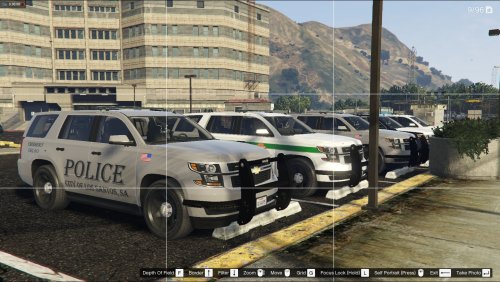 Just simply amazing. The last one was great, and so is this. Any chance of getting another dark skin though like in the K9 pack... The one with the dark grey lettering on the black Tahoe? Simply lovely.
- 11 comments
- 8 reviews
-
-
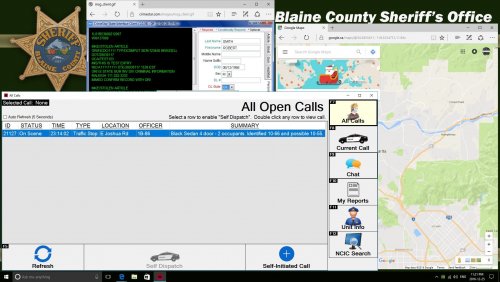 I doubt it's an actual script or program for the game; but looks like a random image found online or slightly edited. Most PDs (bigger ones anyway) have really customized their CAD and other patrol programs they use on their MDTs.
 -
 I have no idea what I'm possibly doing wrong. I have everything installed correctly (Assuming that the ease of drag and drop and following the read-me's to the letter are idiot proof) and yet, no matter what I do, I can't get ELS to load. All of my advancedhookV's are in the main GTA folder and are the ones that came with the pack. ELS just seems to fail to load every time. Any suggestions, kids? Any help would be greatly appreciated. Or, as I seem to not be able to locate a thread, perhaps a direction there if any other ideas?
- 2,699 comments
- 240 reviews
-
Just a really quick update -- After speaking with some friends of mine who are much more tech savvy than I am, I got my DEP issue to stop happening by disabling it in a somewhat round about way... However, I still have the "GTAIV has stopped working..." error.
-
It launches the Social Club window, I select the "Play Offline" option, and then GTAIV never actually launches, it just gives me the error message from my original post. Also, I completely reinstalled everything from GTAIV, to LCPDFR, and this time it seems that the logs (or what I assume are the logs) you guys wanted, so I'll post those below and maybe that will help as well.
-
No, No, No... I did, I just was making sure I wasn't missing a different Manual Installer. :) As for that, I did use the 1.0a Manual Installer, and install it as it said in the installation guide. Which is usually where my "GTAIV has stopped working..." error starts happening.
-
The only manual installer I see is the 1.0a, nothing for the actual 1.0LCPDFR manual installer, I'm just assuming that's correct? Also, yes, it's patched up to 1.7.0. And yes, I went into properties and set both GTAIVlauncher and GTAIV.exe to run as administrator, and then turned around and still right-click run as admin for GTAIVlauncher.
-
First off, I can't find any logs in my files to post, so I apologize for that. Secondly, I wind up with a couple problems, which I will try to describe here as best I can. My first problem could be extremely simple, but I want to clarify something. When I try and download LCPDFR 1.0, I only have the option to download 1.0 automatic installer, or 1.0a manual installer. (Along with the PDF files) Am I missing a download here? Or do I just need to install off of the 1.0a manual installer? Second problem, is I get a Data Execution Prevention error, which causes my GTAIV Has Stopped Working error. Which, I don't understand because I turned DEP off years ago. (And yes, I did go back and check to make sure it was off) I also attached a screenshot of the GTAIV folder. System Specs: CPU: Intel Core 2 Quad Q6600 @2.40GHz RAM: 4GB OS: Vista Home Premium 32bit SP2 Graphics Card: ATI Radeon 3800 series (Don't remember which one, but it's run GTAIV fine in the past) I hope this was what you guys are looking for as far as information, however, if my first problem is my main problem, I could very well have everything fixed. Also, I did do a quick search of the forum for my second problem, however I only came up with a couple threads, and they were older threads, and the posts didn't make much sense.