oresponsavel
Members
-
Joined
-
Last visited
Everything posted by oresponsavel
-
-
 Great mod! 😄 Just one question, in the car fire callout. What do i have to do? Is it just, call Fire Dep and then tow the vehicle or is there something else to be done? 🙂
- 1,032 comments
- 65 reviews
-
Situation Resolved. Turns out reshade was to blame.
-
Hello. I'm having some trouble installing some LML packages. When I install a new package I get an instant game crash. Like, nothing shows up and it simply just crashes. I tried the 2018 Unmarked Charger From CJ24 and the 2013 Unmarked Caprice also from CJ24 . For some reason, they install just fine, and then the game just CTD's without warning, and I just get the Rockstar Message that the game crashed. Please note that game doesn't even show the normal startup screen where it shows it's loading the plugins. I have a copy of my mods in a different folder, and if I restore that copy, everything works fine (the cars are uninstalled at this point). But as soon as I add either one, instant CTD when starting the game. So I tried something different. I Installed the LML GameConfig to get the latest game config, and the game still crashes. Restoring the folder like before, everything goes peachy. Can I get some help? I've Posted the log files, these relate to the launch with the gameconfig lml package. And also the details of folder structure in the backup folder (MODS GTA) main the main one. EDIT 6:56PM 19/05/2020 So it seems the whole thing is crashing now. I've added the logs of the last crash. See this file please. Logs With Crash.zip asiloader.log dxgi.log EasyHook.log ModManager.log OpenIV.log RagePluginHook.log ScriptHookV.log vfs.log Folder Structure.zip Logs With Crash.zip
-
Awesome man! 😄
-
Hello, this probably can be resolved by doing a manual installation of LSPDFR. Please delete the LSPDFR Folder and move the plugins folder from GTAV to the mods folder. Also, from the plugin folder delete LSPDFR First Responder.dll and LSPDFR First Responde.pdb. Extract the contents of LSPDFR manual install into the root GTAV folder, and DO NOT overwrite any files. Please make sure you have deleted the folders I mentioned or it will not work. Also when deleting the files make sure you also delete from the root folder the following files: Dds.Convert.dll discord-rpc.dll DiscordRpcNet.dll EasyHook.dll EasyHook64.dll EasyLoad64.dll System.ValueTuple.dll Please leave some feedback regarding the results.
-
okay dude! 🙂
-
Sorry after doing the steps i gave you can put the folders and files you moved to the mods folder back without overwritting should resolve the situation For EUP you have to install it via the openIV package manager. I'm not at home now, so i can't provide a tutorial. 😕
-
If you need help, just ask! 🙂
-
Hello, this can be resolved by doing a manual installation of LSPDFR. Please delete the LSPDFR Folder and move the plugins folder from GTAV to the mods folder. Also, from the plugin folder delete LSPDFR First Responder.dll and LSPDFR First Responde.pdb. Extract the contents of LSPDFR manual install into the root GTAV folder, and DO NOT overwrite any files. Please make sure you have deleted the folders I mentioned or it will not work. Also when deleting the files make sure you also delete from the root folder the following files: Dds.Convert.dll discord-rpc.dll DiscordRpcNet.dll EasyHook.dll EasyHook64.dll EasyLoad64.dll System.ValueTuple.dll Please leave some feedback regarding the results.
-
Please try to reinstall LSPDFR. And try to load it without any plugins. From the log, it seems the there is a broken addon. Please note that Addons that are from 0.3b may not be fully compatible with the current version and may lead to crashes and instability.
-
Awesome! Glad it was solved!
-
If it persists, just quote me again so that I can get notified of the topic to see if i can help out! 😄
-
You need to change the default key of stop the ped to another key. or the LSPDFR one. You Choose. I'm using STP with U key 🙂
-
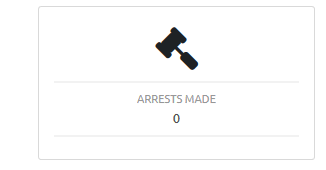
Hello, how are you guys! I need some assistance, I don't know if it is my install, or something, but LSPDFRSync or my profile. But I have made some arrests, but they are not getting counted on the system. (profile) Is it possible for someone to check? Probably a bug on my part. Uploaded the RPH log, so you can check! Things Installed: Stop The Ped, Compulite, UltimateBackup, Computer+, Police Smart Radio, Coastal Callouts, EUP, BetterEMS, PeterUCallouts, SearchWarrant, Wilderness Callouts, Assorted Callouts, Attempted Crime Callouts, Copper Callouts, Officer Status, Protection Squad Callouts, Security+, redcallouts, supercallouts, Traffic Policer, United Callouts, Variety Callouts. Other RPH Plugins : Automatic Siren Cutoff, Copholster, Enhanced Vehicle Actions, PoliceTape, Voice Menu Thanks in advance! EDIT - Arrests made using LSPDFR ( today) RagePluginHook.log

-
First of all sorry for the double post. I got it working, had to do the following: Reinstall GTA V Do a First Run of GTA V Install Latest RPH Do a First Run of RPH without any plugins (set plugin time out to 45000) Install LSPDFR 0.4.6 (or above) Do a run without any additional plugins Create your Character and see if LSPDFR Menu appears. Install mods/plugins. Hope it works for you!
-
I am also having this problem. I've done a complete installation of the game, clean install of LSPDFR and still no dice. Created a new character and all that too. Any assistance would be great! 🙂 Also here is the RPH log! If you need anything else just ask! 🙂 RagePluginHook.log
-
All these people need to calm down and wait. Even if it doesn't come in Feb, I will gladly wait for it to be released, relatively bug free, than released "as-is" just to keep a "deadline" and have it filled up with bugs! They are doing this for free, so show some respect for the devs and be grateful they are still doing their best for this mod!
-
-
-
 Please post the RHP log file in quotes please :) Also run LSPDFR Troubleshooter
- 3,646 comments
- 306 reviews
-
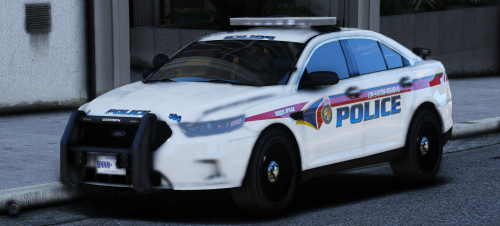 Looks quite sexy and I love it, Just one minor problem, the env lights are messed up xD i got red on the blue side, and blue on the red side. EDIT: Added Video to make it clear :) Video Here
- 8 comments
- 8 reviews
-
Hello Albo1125 First of all great work with all the mods! Excellent mods, immersive as heck! :D Love them, but I have a bit of a problem with Traffic Policer, I can't seem to pick up the drugs dropped in the Drug Runner event. I trolled the comments searching for an answer, but even after arresting the suspects, I can't pick up the evidence. I have the RPH Log here. I tried running the LSPDFR Troubleshooter but it says everything is fine. Can someone help me out please? Thank you! :
- 3,646 comments
- 306 reviews
-
It was a keybind conflict :) Thank you for your help.
-
Hello, I have a problem, I can't seem to get the Info Panel Working, I'm using Windows 8.1 x64. On another note, Thank you for creating an awesome mod.