




turbofandude
Members
-
Joined
-
Last visited
Everything posted by turbofandude
-
They would likely have to publish these events themselves.
-
 The immediate denial of listening seems to be because of an in-game issue with the story. Someone else reported that they hadn't completed the prologue and that was causing that issue. Regarding sound location changes, I'm not aware if it has, but I've been out of it for a while now, so it's distinctly possible I missed something. Please feel free to PM me if you have more info on this (comments/replies here I may not see, PMs I always answer).
- 587 comments
- 106 reviews
-
What is the error? It may be something easy like capitalization, etc. I've had iffy luck on getting these to work - it's a VERY touchy system.
-
Do you know which callout plugin it was?
-
What language is your PC set to? @IamN5 Hmm - if you install the English pack, does it work?
-
Can you post your .ini contents?
-
@BlazingFlames and @XanderVixon You both seem to be having a similar issue - yes, it's usually caused by the language on the PC not matching the ini file exactly.
- 587 comments
- 106 reviews
-
It looks like it's loading - what is the error?
-
@IAMISOBE Honestly, I've never heard of that. The first thing I could try suggesting is if you right click the speaker icon on the taskbar, click "Recording Devices", then select your microphone, click "Properties", click "Advanced", and uncheck "Allow applications to take exclusive control of this device". It may be a third party tool interfering (Skype can auto control mics, for example), or an onboard audio manager like RealTek software, etc.
-
I don't know when it stopped, but I've subscribed to this again properly and should be emailed if you post.
-
 No, I'm glad to see he's updated it - if I figure out the new format, I'll update this.
- 8 comments
- 2 reviews
-
Ok, first off, I take responsibility for the tow truck - that's fixed now. Shots fired does NOT cause a crash for me, or many other people. Something else is wrong. If you REALLY need support, please message me. Also, in case you didn't read it: https://gyazo.com/dc0720395fe9cc110c6fcd3b3a468bb9 On another note, 99% of these issues are user error and have been addressed over and over again, and I am not going to be a broken record and keep pasting the same answer. I have also just reenabled email notifications for the support forum (NOT the comments thread here). Please post in the support thread if you need me and I will answer.
- 587 comments
- 106 reviews
-
-

- 2
-
-
He apparently changed the format of the reports within two weeks of me releasing this. So, this is now only for legacy versions of it @CheckingOut
- 8 comments
- 2 reviews
-
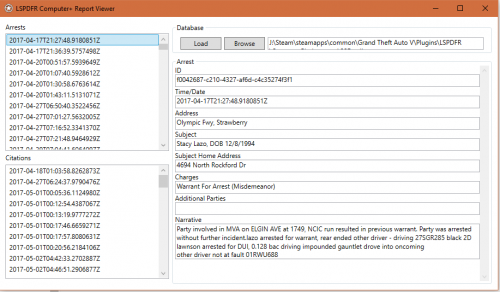
This is a simple tool created to read the reports created by LSPDFR Computer+ by PieRGud. LSPDFR Computer+ is required, and is available from the link below.
- 8 comments
- 2 reviews
-
-
- 3
-
-
If you Pm me, we can talk more about this and I can give you some more in-depth information. I always encourage new developers and it's exciting to see what they have in mind. @eaglemaster Hey - did you try the Speech Training in Windows? Is it hearing ANYTHING? (i.e. simple stuff - show me 10-8). @Sheriff CWF it should work - it's working for me. Do you have your mic/devices set properly? Everyone else - this topic is getting to the point that I can't maintain/personally respond to every post (like the download page for VD has, as well). Please continue to post and help each other, and if something comes up you absolutely can't answer, please PM me (as it emails me). That said, please use me as a last resort - if I start getting copious amounts of emails, it won't be pleasant... lol.
-
Yes, that is Police Smart Radio overriding the default behavior. VocalDispatch, by default, will say something to the effect of "Roger, showing you available." and end the call.
-
You should experience an improvement with the one I just uploaded - I renamed one of the events internally but forgot to update the script file. That'll fix the status messages that people aren't able to use anymore. Regarding crashing - nothing I changed should be causing crashes.
- 587 comments
- 106 reviews
-
-
- 1
-
-
It is not - I've been getting some weirdness with this last version's recognition. I'll be taking a look to see if I broke something (definitely possible).
-
You'd need a modified XML file for that language.
-
-
Anyone experiencing issues Please update to the latest version. I didn't realize how far behind I had gotten with it lol.
- 587 comments
- 106 reviews
-
What does the error say?
-
The speech training definitely helps with that a lot.
-
-
If you make your headset mic default, it should use it already. Sorry for the delay here! I'd have to see the folder structure, but it sounds like it could be a dependency thing. What does the RPH log say?

