




Lt.Caine
Friends of LSPDFR
-
Joined
-
Last visited
Everything posted by Lt.Caine
-
 Yup, you can use those. Though I noticed a few people have asked about where to get the keyboard key IDs, so I've updated the DEFAULT CONTROLS file (provided within the download) to include a table which lists them all (or almost all of them, anyway). @avsg1rl: Sorry, I cannot convert any of my mods to RageHook, as it does not support C++ (and it's the only coding language I'm familiar with). @luminouscarcass: Interesting idea, I might add that in the future. @FHOG: Indeed, there was a problem with that. Though, it has now been fixed as of V2.05. Make sure to set your vehicle enter/exit button in the .ini file.
- 220 comments
- 55 reviews
-
-

- 2
-
-
 Well, the default controls are listed in the DEFAULT CONTROLS (TSM).pdf file inside the DOCUMENTATION folder of the download package. I have just updated the file, though, to also include a table listing all the keyboard key IDs (and their corresponding buttons).
 -
Thanks Jeff! Hopefully you'll enjoy the changes in V2.00. As for the speed limits, I know they're still too high in many (or most) cases, but I need to work out a way to have them set dynamically based on the train's stats. That way, fast trains won't be held back and slower trains will have more appropriate limits based on their capabilities. Unfortunately, this can't be done manually, as it would take an eternity.
-
 I'm not sure if it'll be released, as that's the only model an LVMPD theme can be applied to--and there's not much use in model-centric/singular themes. And peanut, don't worry, I feel your pain too. You should expect to see an ELS for V, but for it to become possible, I first need to wait for some special coding resources to be ready. Also, greater access to GTA V vehicle models might be necessary (i.e. ability to extract and edit model files).
 -
-
 No, but that feature is also included. Park mode allows you to freeze the vehicle's position. At that point, the car will be saved and will not disappear. Also, a blip will indicate its location. A red icon will appear on the dashboard panel to signal when park mode is on. Think of toggling park mode as putting a car in park or in drive.
 -
No, those are created. There are no acronyms in the language files and using the default text would make the strings too long.
- 220 comments
- 55 reviews
-
From the album: Luxart V
PLD has been updated to include basic vehicle functions, such as: persistent brake lights, indicators, hazard lights, and a parking mode, so you never lose your vehicle. -
I'm afraid not, Titan, as Ragehook would require PLD to be entirely rewritten in a different (coding) language.
- 220 comments
- 55 reviews
-
From the album: Luxart V
-
Unfortunately trains will not derail in TSM; at least not as of V1.00. This might change in the future, depending on whether the feature can be implemented in a satisfactory manner. As for online use, all ASI mods can work online. All that is needed is a ScriptHook.dll file that has been modified to allow online mod use. That said, naturally, using mods online does expose you to the possibility of a temporary or permanent ban from the service. Therefore, it's up to every user to decide whether that risk is one that is worth taking or not.
-
It is possible to switch seat, but not while in control of (or to control) the train. That's because the driver's position is on the left side (as per the default freight model's configuration). Attempting to control a vehicle from a passenger seat could cause issues, particularly online. As for the horn, both train models have a horn feature available by default. Simply press your usual horn button (E by default on a keyboard).
-
@AShadowBox: No problem! Though it took a little time, luckily it wasn't too difficult of an issue to resolve. @Colis: You're welcome! I'm not sure Davis is the only independent city inside the LSM, though. I believe Rockford Hills is based on Beverley Hills which is a city. The Movie studio is probably based on Universal City, which is a special sort of independent jurisdiction. Furthermore, West Vinewood is probably based on West Hollywood--also independent from the city of Los Angeles. None of this is definitive, of course, but I guess its just best to play it safe with "LSM". This designator also helps differentiate between districts inside the metro/urban area and those still within Los Santos County, but that happen to be further out into the countryside--which might help those who are less familiar with San Andreas' districts categorize and, in turn, locate them more easily.
- 220 comments
- 55 reviews
-
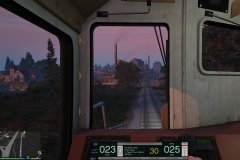
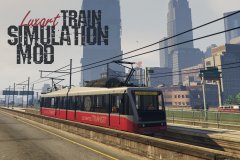 Take control of any train in San Andreas with the new Train Simulation Mod (TSM) by Luxart. Now available.
 -
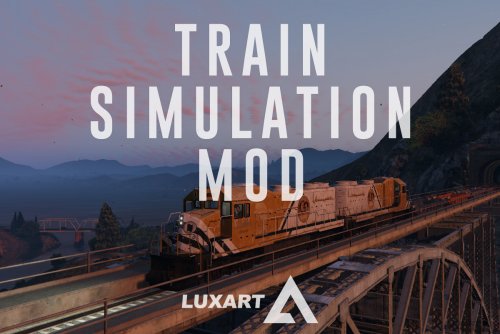
TSM–Train Simulation Mod is a script modification that allows the player to operate trains in San Andreas while offering unique features, such as custom GUIs, stops, and speed limits. DESCRIPTION − Take control of any train in San Andreas. − TSM attempts to strike a balance between realism and casual gameplay. − Features a unique custom GUI for both train types, stations/stops, speed limits, sounds, and a unique control scheme. − Features dynamic acceleration and braking values based on the actual layout of a given train. − TSM takes engine power, train mass, friction, and inclination into account. − Features an additional view mode (to look behind). − Online, players riding a train under the user’s control will be notified via game SMS of the next station or stop. NOTES − Consult the DEFAULT CONTROLS file to view the list of default TSM control keys. − Consult the FEATURE INFO file for some useful information regarding TSM. − Press Alt + F12 near any locomotive to enter it. Once inside, press F12 to take control. − Reverse the above process to exit the train. − If improper information is displayed in GUI, the train must be calibrated by approaching a station. − In single player, the metro train should be exited at a station rather than between stops. − Players using the PLD mod should temporarily disable it by pressing Alt + Ctrl + L. − Speed limits are still a WIP. INSTALLATION − A GTAV ScriptHook must be installed for any .asi modification to work. The original may be found here. − Using script modifications in GTA Online can result in a temporary or permanent ban from the service. − 1. Place the .asi file provided in the download inside your main GTAV game directory. − 2. Start your game. CREDITS − TSM is coded by Lt.Caine. − Thank you to Alexander Blade without whose work scripting for GTAV would not be possible.
-
Thank you for pointing out those issues, Colis! PLD has been updated accordingly. Rather than create new region acronyms for each independent jurisdiction within the Los Santos city area (i.e. Davis, Vinewood, Rockford Hills...), I opted to replace the Los Santos city acronym ("LS") with "LSM" for Los Santos Metropolitan region.
- 220 comments
- 55 reviews
-
From the album: Luxart V
-
I'm not sure, alpha. I might in the future but it's too early to tell at this point.
- 220 comments
- 55 reviews
-
I updated the description to include a proper hyperlink to the Scripthook for those who were looking for it. As for using mods online, although you do certainly expose yourself to the possibility of a ban, I think that so long as you don't do anything abusive, you should be okay. Also, sorry about the Windows 8 issue, guys. It has me perplexed, but I'm looking into it, and as soon as a solution is found, the mod will be updated.
- 220 comments
- 55 reviews
-
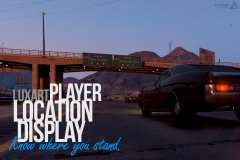
PLD–Player Location Display is a script modification that displays the player's current location (including street name or intersection, area name, and region) at the bottom-left corner of the user's screen. DESCRIPTION − PLD displays the player’s current in-game location on the screen. − Location includes street name or intersection, district name, and region. − PLD also displays the current in-game time. − PLD allows the user to toggle the size of the radar and provides some informative multiplayer** features. NOTES − Consult the FEATURE INFO file to learn more about PLD and its features. − It is recommended that you disable subtitles (PAUSE > SETTINGS > DISPLAY > SUBTITLES) when using PLD to prevent overlap. − **Multiplayer is understood to be a 3rd party multiplayer mod, such as FiveReborn. INSTALLATION − A GTAV ScriptHook must be installed for any .asi modification to work. The original may be found HERE. − Using script modifications in GTA Online can result in a temporary or permanent ban from the service. − 1. Place the .asi and .ini files provided in the download inside your main GTAV game directory. − 2. Modify the .ini file as you see fit. − 3. Start your game. CREDITS − PLD is coded by Lt.Caine. − Thank you to Alexander Blade without whose work scripting for GTAV would not be possible.
- 220 comments
- 55 reviews
-
-
-

-

- 110
-
-
From the album: Luxart V
Always know where you are with the new Player Location Display (PLD) by Luxart. Now available. -
From the album: Luxart IV
-
From the album: Luxart IV
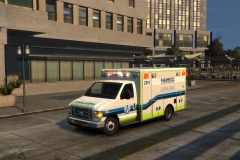
Features a DRO2 ELS type MX-7000 light bar. Requires ELS V8.5, available -
A Ford E-450 ambulance with a DRO2 ELS type Mx-7000 lightbar and multiple liveries. NOTES - The vehicle model is provided unlocked. If you wish to modify it with the intent to redistribute, the permission of the author is not required so long as proper credit is given. - This vehicle is ELS enabled (pro-ELS) and requires the Emergency Lighting System to work correctly. - Custom handling line and ELS VCF provided in the download. IMPORTANT - Requires ELS-IV V8.5 or higher. - Make sure to use the ELS vehicle configuration file (VCF) included in the download for optimal results. CREDITS - Original Ford E450 cutaway cab model procured from www.3dcadbrowser.com (and provided by Bxbgus123). - The cab model was converted to GTAIV by Lt.Caine. - The entire vehicle model was extensively optimized, modified, and templated by Lt.Caine. - Cab interior is default GTAIV vehicle “Speedo
- 9 comments
- 10 reviews
-
-
- 1
-
-
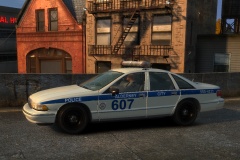
From the album: Luxart IV

