


Creators: Due to background reprocessing of files, approvals and file security checks may be delayed. Thanks for your patience.


propel
Members
-
Joined
-
Last visited
Everything posted by propel
-
Chicago Fire Department Engines -10 Different Textures for 10 different engines -Each texture is unique and realistic to its prototype -Includes the fictional Engine 51 from the TV show Chicago Fire -Recommended with the use of the Area Livery Mod https://www.lcpdfr.com/files/file/5629-area-livery-mod/ Engine Co. - Real assignment - Recommended Assignment in GTA4 Engine 4 - Cabrini Green - Northern Gardens Engine 8 - Chinatown (Symbol on the door is the number 8 in chinese) - Chinatown/Exchange Engine 18 - University Village - Vespucci University Engine 29 - Bridgeport - Dukes/Alderney Engine 30 - West Town - Suffolk Engine 34 - Archer Heights - Alderney Engine 43 - Logan Square - Alderney Engine 54 - Englewood - Bohan Engine 112 - North Center - Middle Park Engine - D598 SPARE FOR USE WITH YARD1's MTL firetruck https://www.lcpdfr.com/files/file/6281-mtl-firetruck-fdlc/ Do not claim as your own! Feel free to edit them to your heart's content
-
Game crashes before I even consider quitting which I take as a sign from nature to get off my lazy ass and do calc. homework.
-
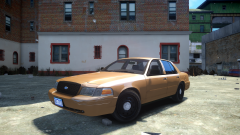 Please oh please make the door handles black... All of these beautifully made DSF cvpis on here yet they forget to change the door handles!
 -
Yes, that picture is of a police interceptor.
-
The 2011 model came with a badge that said FLEX FUEL next to the passenger side tail light Also, all CVPI's come with black door handles, the chrome handles were for the civilian crown vic and for street appearance package CVPI's, the chrome grill is also part of the street appearance package. This is an easy fix, the texture for the door handle is in the cv_stuff texture.
-
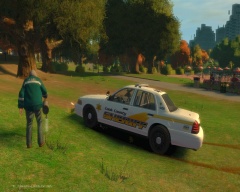
From the album: Out and about
Littering has become so rampant that even police cars are being dumped on the ground. Cook County Sheriff's Police Department CVPI in the new livery. -
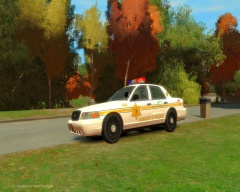
From the album: Out and about
No it wasn't the fourth of July. Cook County Sheriff's Police Department CVPI -
I assuming your going to fit this on top of tailgate right? If so you would want to select the outeredge and be in selected mode, then go to modify-> scale. (make sure the x and y axis are enabled at the top right) Now go to the rear view (click the upperhand left box to change one your windows). Now you can scale and move the part to the right dimensions and place. (switch to a side view to move the edge to be flush with the tailgate). Now go to create -> copy, MAKE SURE to turn the y axis off, then click and drag in the REAR VIEW the copy you have made to the other side of the tailgate. What turning off the y axis will do is assure both of your edges are perfectly parallel to each other when moving the copy. After this your going to need to attach the parts of the original and copy together (have the parts not selected and selected mode off). And after this move the heirarchy of the combined edges into part of the heirarchy that contains the tailgate. What this will do is make the lights move with the tailgate when you open it. Good luck, hope I wasn't vague or long winded. :)
-
2003-05 Ford CVPI Chicago Police Department, a representation of the quintessential Chicago Police Car. FEATURES: 10 unique and acuurate skins, with details and numbering consistent with CPD CVPI's from this period. Skins include 3 which represents beat up and abused cars. (Chipping paint) Red lenses on the lightbar are connected to the brakelights and are not used in the lighting sequence, per the prototype. Notes: The sign that shows the cars radio callsign on top of the lightbar (called a beat tag), is not included. In reality, a quarter of the CPD squads run around w/o one, as well as not including one solves the problem where all the cars in game would have the same beat tag as only one number can be used. ELS V8 is required to use the full functionality of the lighting setup. (corona) One of the textures has blank doors which are on purpose! The rear inner two lenses do not flash! This is also per the prototype. I left the alley lights in but I haven't used them in the lighting stages. 6 textures (4 already in the .wtd) are provided seperately, mix/match to your hearts content. This file contains: police.wft police.wtd ELS V8 VCF file (labeled as police) In game screenshots Additional Textures Folder Do not rerelease or claim as your own! Editing of the model is not allowed, feel free to edit the skins however. Sharing's caring
- 7 comments
- 2 reviews
-
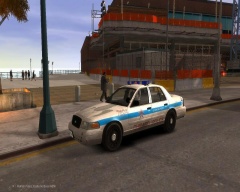
From the album: Out and about
A WIP, inspired by http://voices.suntimes.com/wp-content/uploads/2014/02/POLICE.jpg A strange phenomenon as the CPD CVPI's age : The white base paint have been chipping away on many of these cars, revealing the primer. -
-
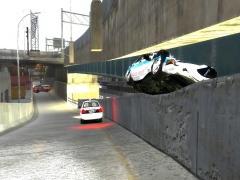
From the album: Out and about
How am I supposed to explain this to the sarge? -
-
CHICAGO POLICE TEXTURE PACK Comprehensive, hyperrealistic representation of Chicago Police CVPIs, Tahoes, and Impalas. All textures created by propel. Redistribution/Editing Allowed. For use with the following models: http://gtapolicemods.com/downloads.php?do=file&id=1440 http://gtapolicemods.com/downloads.php?do=file&id=1580 Contains README.TXT PHOTOS TEXTURES: 2479.png : 2007 CVPI Transit Detail 7580.png : 2006 CVPI 7616.png : 2006 CVPI Forensic Services 7727.png : 2007 CVPI worn/battered paint 7746.png : 2007 CVPI COPSHOT bumper sticker 7764.png : 2007 CVPI CANINE PATROL 7871.png : 2007 CVPI 7935.png : 2007 CVPI 8229.png : 2008 CVPI chicagopolice.org rear trunk 7489.png : 2006 Impala 7505.png : 2006 Impala Forensic Services 7508.png : 2006 Impala 7540.png : 2006 Impala 6583.png : 2009 Tahoe 8329.png : 2010 Tahoe 8352.png : 2010 Tahoe COPSHOT bumper sticker 8562.png : 2010 Tahoe CANINE PATROL
- 4 comments
- 1 review


