


metsrule08
Members
-
Joined
-
Last visited
Everything posted by metsrule08
-
I'm sure this question has been asked an answered before, but is there any information available on how to customize EUP skins for backup. For example, using the basic LSPDFR backup.xml, I would like to set a specific unit to respond using a specific vehicle (namely the LSPD motorcycle cop that EUP adds to the PoliceB vehicle). I know how to set specific peds to specific vehicles and I see that I can play around with the accessories of the specific responding Ped through customizable lines such as this one (for example: "<Ped comp_shirt="1" comp_decals="1" comp_pants="1" helmet="False">s_m_y_hwaycop_01</Ped>" ) but I was wondering if there was a streamlined location where it spells out what ped and what values to put on that line to get each EUP uniform (ie. LSPD motorcycle cop, LSSD motorcycle cop, State trooper winter uniform, etc.). Any help would be greatly appreciated! I really hope I made sense and did a good enough job spelling out the question I am trying to ask... Thanks guys!
-
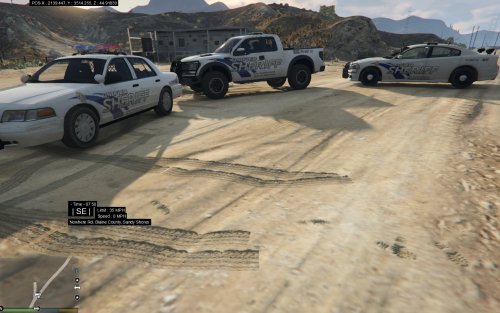 Howdy guys. Here is a skin I made, currently for 3 models with more to come, for a fictional department called the Unified Sheriff Department of Los Santos and Blaine Counties. The idea is to create as realistic a situation as possible without forcing users to install models for both Los Santos and Blaine County Sheriff Departments. Skins are based on the Unified Police Department of Greater Salt Lake County. For more information on this fictional department, read the history section below. 1. Department History The Unified Sheriff Department (USD) of Los Santos and Blaine Counties was formed in 1999 by the Los Santos County government, the Los Santos Sheriff Department, the Blaine County Sheriff Department, and several other contributing municipalities. It assumed the policing responsibilities and jurisdictions previously held by the Los Santos Sheriff Department, Blaine County Sheriff Department, Sandy Shores Police Department, Paleto Bay Police Department, and the Grapeseed PD beginning at midnight on Tuesday, February 29, 2000, once it was officially determined Y2K was a hoax. The organization is overseen by the elected sheriffs of Blaine and Los Santos county, as well as one representative from each of the four largest metropolitan areas within the jurisdiction, Grapeseed, Paleto Bay, Sandy Shores, and the City of Los Santos. Vinewoods exclusion and the resulting even number of delegates leads to most major issues remaining unresolved. Nonetheless, by combining a variety of police services such as SWAT, forensics, records, and dispatch under one organization, communities can share the costs with other communities, saving local governments and reducing the tax burden of the rich and powerful, most of whom are ironically policed by the LSPD anyway. 2. Future Plans These are my first textures, and they definitely could use some help. I hope that people are interested in the prospect of a department like this, that creates the most realistic environment possible without needing two separate departments for Los Santos County and Blaine County. If others would like to continue developing . I certainly plan on making a skin for some SUV, most likely the game’s default Sheriff2 model. If others would be interested in reskinning the Paleto Bay station, that would be awesome, I’m just afraid it is a little past me at this point… Comments, reviews, criticism, etc. greatly appreciated 3. Installation Instructions The three skins currently released are based on the following models: Dodge Charger: Ford Crown Victoria: Ford F-150 Raptor: Step 1) Download the model you plan on using from the link above, and install using the instructions provided and OpenIV Step 2) Open the vehicle.ytd or vehicle+hi.ytd file using openIV (make sure you’re in edit mode) and drag and drop the sign images. Step 3) As far as I can think of, that is it… P.S. Sorry for the nighttime photos
 -
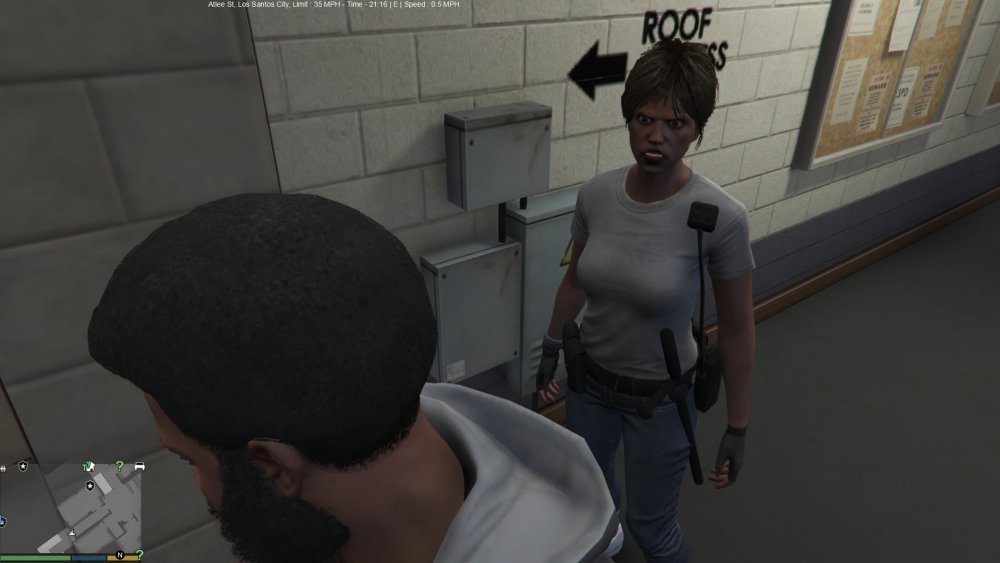
Sorry if this is a stupid question, I've been playing LSPDFR since the beginning (and LCPDFR for years before then), but I have never noticed this ped before, nor do I know her to be playable; I was just curious if she was, and if so under what department? Alternatively, is she somewhere in the scripthook (not rage) trainer? Similarly a character name could be enough? Either way, thanks in advance guys, already loving 0.3 so much!!!
-
okay not to be the noob (been here since 2011 but three posts lol) but what is the current recommendation given the ridiculously unlikely hypothetical that this timer ends with 1.0 release and not a dirty bomb going off near a North Korean Gulag...... will it be enough for me to uninstall .95 but keep my car, uniform, etc models? Do I really need a clean vanilla install with my save file copied over? Third option? Hopefully a mod with any 1.0beta testing experiencing will know *fingerscrossed*
-
wait why would we uninstall if its going to self destruct
-
bump, should we want to uninstall .95 before this timer hits zero?? bump, should we want to uninstall .95 before this timer hits zero??

