


FHOG
Members
-
Joined
-
Last visited
Everything posted by FHOG
-
-
 Fantastic work chadc78! Thank you. I'm just curious I cannot find open container in traffic violations. Not sure if I missed it or not.
- 202 comments
- 21 reviews
-
-

- 1
-
-
 i have an issue where any of the stolen vehicles cant be blipped for pursuit.
- 3,646 comments
- 306 reviews
-
I know how to cancel a traffic stop. the problem is if i use the control(A) on the xbox controller in order to use another menu for example stop the ped. The A button used to select an option in the menu will also cancel the traffic stop. I honestly in the many years I have played LCPDFR and LSPDFR I've never even had a reason to cancel a traffic stop to begin with. It would be nice to at least have a modifier key to cancel a traffic stop.
-
-
First off. Thanks again for such a fantastic job so far. Because of this GTAV is still my highest played game on steam. My question is in a future update would it be difficult to add a separate control to cancel a traffic stop?
-
Thanks. Ill try to use stop the ped.
-
Every now and then I will get a traffic stop where the vehicle will take off. But before then,the passenger will exit the vehicle and take off on foot. I do notice the red blip for the vehicle to initiate a pursuit. But the passenger on foot doesn't have a blip so I can not call in the foot pursuit. Is this a bug or something that isn't implemented at this time?
-
I've Been away from LSPDFR for awhile only to come back to see good and bad news. 0.4 to be released next month and one of the best modders out there retiring. I want to think you for all your hard work Albo! I wish you the best in life and all your endeavors.
-
 @BradM I have a question. When I have the shader quality turned up any more past normal the taillights of the explorer looks as if a white film is on them. The taillights look fine when the shader is set to normal but the emergency lights look as if the postfx is turned down. The red lights look yellow and the blue looks almost white. Is there anything I can do on my end to fix the issue? Edit: I figured it out. Seems one of visualV shader textures was causing it. Thanks again for such a great pack!
- 207 comments
- 94 reviews
-
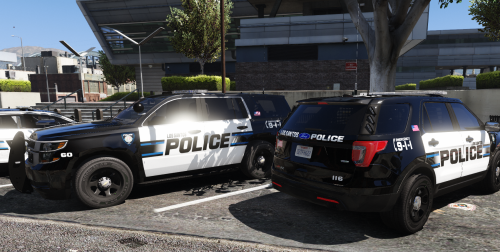 I absolutely love these. Thanks a lot. Any chance you can do the FPIU in BradM's Scottsdale pd pack? I believe the model is a 2013 by buggs.
- 41 comments
- 19 reviews
-
I can't wait till the day rockstar stops supporting gta online. Maybe once Red Dead 2 comes out(fingers crossed). In the mean time I would like to thank the RPH and LSPDFR teams for all their hard work. I'm sure its not easy keeping these scripts up to date, balancing all this with their real jobs and personal lives.
-
Oh ok, Thanks for the explanation Bejoljo.
-
 I'm not sure about the driving style issue. The modders made this script mainly for ambient patrols. I know they will join you if you are in a pursuit near by, but other than that I don't think will do much else.
- 270 comments
- 19 reviews
-
Looking at your ini and after some testing. The problem is the weapon description. in your ini you have it as stungun when it should be WEAPON_STUNGUN. In the L.E.J.S. folder you downloaded there should be a weapons link that has the correct names you should use for the weapons. The campus patrol I created is below so you can compare. [campus patrol] X=-1611.932 Y=172.8744 Z=59.44714 Heading=207.27 Patrol Area Size=200 Peds Spawned in Vehicle=True Patrolling=True Ped Model 2=S_F_Y_Cop_01 Officer1 Weapon=WEAPON_STUNGUN Officer1 Equip Weapon=True Officer2 Weapon=WEAPON_STUNGUN Officer2 Equip Weapon=True Officer1 Ambient Action=Phone Officer2 Ambient Action=Coffee Vehicle Invincible=True Keep Vehicle Clean=True Keep To Spawn Street=True Emergency Vehicle=POLICE Ped Model 1=S_M_Y_Cop_01 Sirens Active=False Vehicle Blip=True
- 270 comments
- 19 reviews
-
Any chance you could attach a screen shot of you ini editor with that patrol? I could probably find the issue by looking at that. Or at least the ini itself.
- 270 comments
- 19 reviews
-
That makes perfect sense. Thanks for explaining this.
-
I'm not sure where I should have posted this. But I'm curious why LSPDFR doesn't ever need to be updated for the latest RPH. I'm not asking for any new additions to the base mod, as others modders have that pretty much covered. It's just the base mod has some problems, like after a while you cant blip a vehicle for a traffic stop. Or cant stop a ped on the street sometimes, so the only way is to stop them at gunpoint. Not sure if this has anything to do with RPH at all. Please understand I'm not trying to start some type of complaining thread. I was just curious as other RPH mods needs to be updated as a new version of RPH comes out. Thanks again Sam for your hard work and all the other modders out there. Without you guys there would be no reason I have hundreds of hours logged playing GTA V.
-
-
-
your coordinates are wrong for some reason. Instead of commas they should be periods. they should look like this. X=-1610.652Y=170.1925Z=59.36016Heading=206.0
- 270 comments
- 19 reviews
-
-
 will not let me download..... Guess it's everything right now. Looks like the site is messed up right now.
- 168 comments
- 29 reviews
-
-
I'm not sure what i missed. But after reinstalling it and setting it up as Albo showed in the tutorial,other than not being able to get the ambient animations to work. Everything else works as advertised.
- 270 comments
- 19 reviews


