TAD18
Members
-
Joined
-
Last visited
-
I have tried everything, But it still doesn't work. But to make sure, it should be able to run on a win10 pc right? It is just so incredibly strange that it doesn't work....... Thanks for the help so far, hopefully someone knows a working solution to the problem.
-
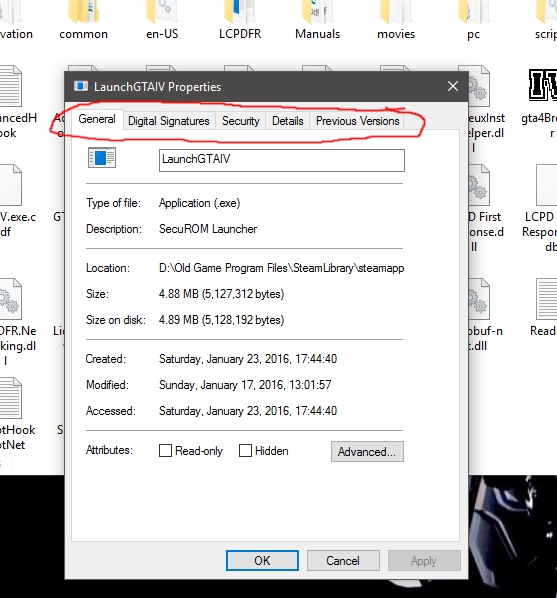
It is a clean install, I installed it multiple times....... IT still isn't working and I diddn't update to Win10 it is a completely new system. I'm going to try that too, but I don't think it is a virus protection issue, I tried to copy the launcher from my win7 pc (where I DO get the compatibility tab) to my win10 pc to see if it was something install or app related but I just don't get the compatibility options, I think it is just some strange new safety feature Microsoft put into win10
-
nope, it doesn't give me the option for the launcher only for the three other exe files, but they do nothing when I change them and if I change to XP mode on the other ones it gives me a seculauncher error on startup. look I only have this with launcher:
-
I have the steam version, it doesn't give me the compatibility option. Is there another way to fix this for steam users?
-
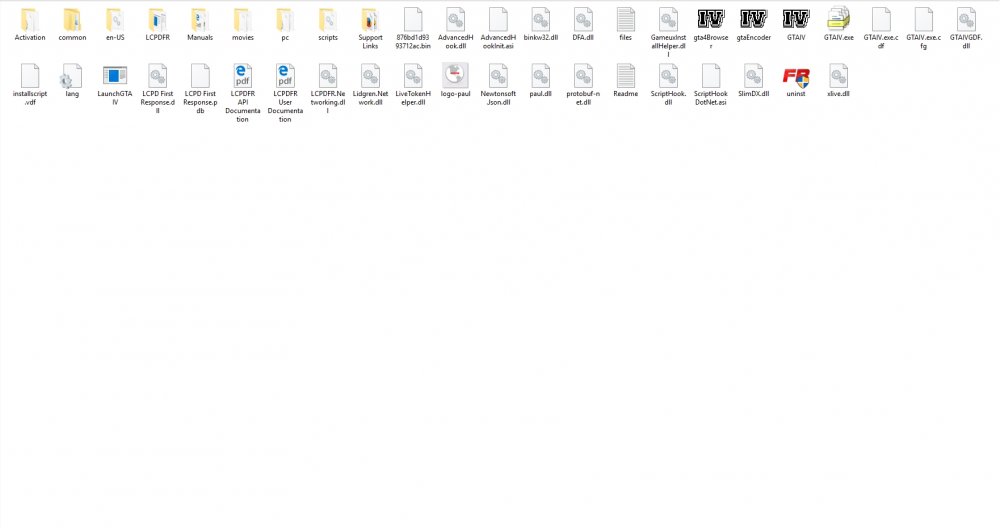
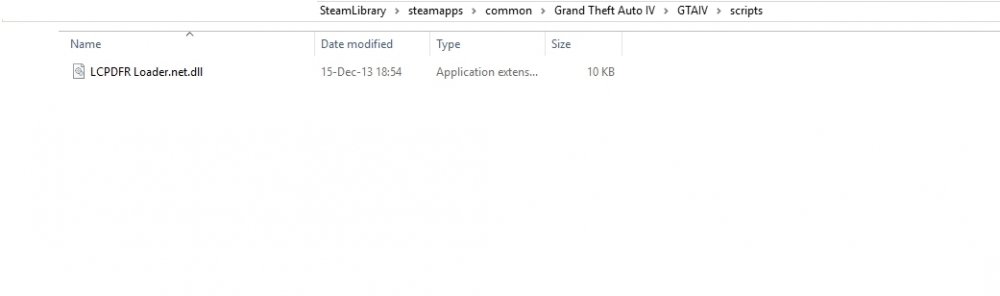
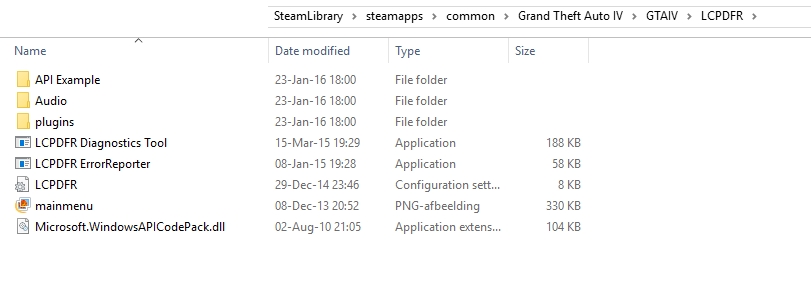
These are some screenshots from my gta folder, the root folder, the scripts folder and the lcpdfr folder. I hope you can help me.
-
Can someone please help me? it also doesn't work in compatibility mode. I litereally tried everything now and stiill I'm getting the SlimDX error, please someone help me.
-
Hello everyone, I get an error whenever I try to start GTA IV. It says LCPDFR has encountered a critical error and has been shut down, I have tried everything, manual install, automatic install even a clean new GTA install but to no avail. I keep getting this error: [ERROR - 17:18:02] [AssemblyHelper] GetTypesInheritingFromTypeInAssembly: Inner exception: Could not load file or assembly 'SlimDX.dll' or one of its dependencies. is not a valid Win32 application. (Exception from HRESULT: 0x800700C1) I have all the necessary things installed on my computer, directx, visual c++, .net everything. I Am on a Windows 10 64Bit system and don't know what is causing the problem, I do use XLive.dll because otherwise GTA IV won't even run on my system but yeah, I don't understand why I keep getting this error. I tried searching for the error on forums but whatever they say works for them, doesn't seem to be a solution to my problem. please help me, thanks in advance, TAD18
-
Nevermind, someone posted another post about the same problem and somehow someone DID reply to that post. It is resolved, the server is not existing anymore, I get it.
-
 Unfortunately not so good, I get way to many crashes with ELS and I have Only two ELS cars installed, I'm on a high end computer with 12GB Ram and 2Gigs of GPU memory. What is the point of a mod that makes EMS and Police vehicle lights realistic if the AI can't use them ? I thought ELS would be stable and usable by now, but unfortunately version 8.51 and still unusable.
- 534 comments
- 206 reviews
-
Hi everyone, I have a problem I installed LCPDFR version 1.1. manually following the instructions, everything seems to be okay when I run the diagnostics tool (everything is green no problems) but in the log file it says this: [WARNING - 3:11:52 PM] [Settings] ReadSettings: Invalid entry [INFO - 3:11:52 PM] [Settings] ReadSettings: Suspect transporter PSTOCKADE [WARNING - 3:11:52 PM] [Settings] ReadSettings: Invalid entry [INFO - 3:11:52 PM] [Plugin.Main] Changing language to en-US Also whenever I try to link my account in the LCPDFR configuration application I get an error saying it can't connect or something, than in game I get this error in the log file: [WARNING - 15:11:57] [ServerCommunication] InitializeConnection: Failed to connect to the LCPDFR server (De externe server heeft een fout geretourneerd: (502) Ongeldige gateway.). Multiplayer is deactivated (Sorry, I'm Dutch the line above translates to: The External Server has returned an error (502) Invalid Gateway.). [INFO - 15:11:57] [NetworkManager] NetworkManager: In network session: False Is host: False [INFO - 15:11:57] [Authentication] Authentication: Server not available, trying to authenticate offline [ERROR - 15:11:57] [Authentication] Authentication: Authentication failed. Couldn't reach server or no valid lease available [INFO - 15:11:57] [Authentication] Authentication: User is in offline mode Does someone know how to resolve these errors? I Included my Log file, I hope someone can help. Thanks in advance, Thierry (TAD18) LCPDFR.log
-
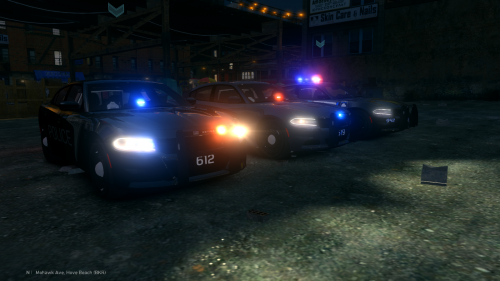 My toplights stay white, can someone tell me how to make them blue and red? thanks
- 4 comments
- 2 reviews
-
It is a great car model but my top lights stay white, I have the latest ELS (8.5) how to fix this?
- 4 comments
- 2 reviews
-
Inever knew that it cause such problems too, but here is some proof: BEGIN *SIGNED* LCPD First Response Issue Report Diagnostics Tool Version: 0.4.3 Operating system: Windows7 HomePremium (6.1.0.0 Build: 7600) Service Pack: System RAM (GB): 5,98 CPU cores: 8 NET Framework 4.0 installed: True Visual C++ 2010 Redistributable installed: True GTA IV - Installed: True GTA IV - Install folder: D:Program FilesRockstar GamesGrand Theft Auto IV GTA IV - Version: 1, 0, 7, 0 GTA IV - Asi loader installed: True GTA IV - Asi loader: XLiveLess GTA IV - Asi loader valid: True GTA IV - C++ ScriptHook installed: True GTA IV - C++ ScriptHook valid: True GTA IV - C++ ScriptHook version: 0, 5, 1, 0 GTA IV - ScriptHookDotNet installed: True GTA IV - ScriptHookDotNet valid: True ===============BEGIN .NET SCRIPTHOOK LOG=============== 2012-01-02 21:33:14 - Initializing ScriptHookDotNet v1.7.1.4 BETA (GTA IV version 1.0.7.0) 2012-01-02 21:34:18 - Direct3D device created! 2012-01-02 21:34:19 - SEARCHING FOR SCRIPTS... 2012-01-02 21:34:19 - Loading scripts in Assembly 'scriptsFirstResponse.net.dll' ... 2012-01-02 21:34:19 - ...found script 'FirstResponse.Main.EmergencyLights'! 2012-01-02 21:34:19 - ...found script 'FirstResponse.Main.Start'! 2012-01-02 21:34:19 - ...found script 'CSharp.Engine.Core'! 2012-01-02 21:34:19 - ...found script 'FirstResponse.Debugging'! 2012-01-02 21:34:19 - ...found script 'FirstResponse.DeletionList'! 2012-01-02 21:34:19 - ...found script 'FirstResponse.Hardcore'! 2012-01-02 21:34:19 - ...found script 'FirstResponse.TextDraw'! 2012-01-02 21:34:19 - ...found script 'FirstResponse.LCMD.Main'! 2012-01-02 21:34:19 - ...found script 'FirstResponse.LCMD.Functions'! 2012-01-02 21:34:19 - ...found script 'FirstResponse.LCPD.Carboot'! 2012-01-02 21:34:19 - ...found script 'FirstResponse.LCPD.Disarm'! 2012-01-02 21:34:19 - ...found script 'FirstResponse.LCPD.Frisk'! 2012-01-02 21:34:19 - ...found script 'FirstResponse.LCPD.PullOver'! 2012-01-02 21:34:19 - ...found script 'FirstResponse.LCPD.Actions'! 2012-01-02 21:34:19 - ...found script 'FirstResponse.LCPD.Debug'! 2012-01-02 21:34:19 - ...found script 'FirstResponse.LCPD.Flashlight'! 2012-01-02 21:34:19 - ...found script 'FirstResponse.LCPD.Functions'! 2012-01-02 21:34:19 - ...found script 'FirstResponse.LCPD.Partner'! 2012-01-02 21:34:19 - ...found script 'FirstResponse.LCPD.inputSimulator'! 2012-01-02 21:34:19 - ...found script 'FirstResponse.LCPD.Start'! 2012-01-02 21:34:19 - ...found script 'FirstResponse.LCPD.Various'! 2012-01-02 21:34:19 - Loading scripts in Assembly 'scriptsindicator.net.dll' ... 2012-01-02 21:34:19 - ...found script 'indicatorClass'! 2012-01-02 21:34:19 - Loading scripts in Assembly 'scriptsIVDashCamV2.net.dll' ... 2012-01-02 21:34:19 - ...found script 'IVDashCamV2.Core'! 2012-01-02 21:34:19 - ...found script 'IVDashCamV2.Extra'! 2012-01-02 21:34:19 - Loading scripts in Assembly 'scriptsTrafficFix.net.dll' ... 2012-01-02 21:34:19 - ...found script 'TrainerMenuScript.TrafficCorrect'! 2012-01-02 21:34:19 - DONE! 25 valid scripts found! 2012-01-02 21:34:19 - STARTING SCRIPTS... 2012-01-02 21:34:19 - Error during GetPhoneNumber (Phone checks will be disabled): System.Exception: Accessing Globals failed! Invalid Memory Address! at unmanaged.MemoryAccess.GetGlobalAddress(Int32 index) at unmanaged.MemoryAccess.GetPhoneNumber() at GTA.NetHook.CheckPhone() 2012-01-02 21:34:19 - ...successfully started script 'TrainerMenuScript.TrafficCorrect'! 2012-01-02 21:34:21 - ...successfully started script 'IVDashCamV2.Extra'! 2012-01-02 21:34:21 - ...successfully started script 'IVDashCamV2.Core'! 2012-01-02 21:34:21 - ...successfully started script 'indicatorClass'! 2012-01-02 21:34:21 - ...successfully started script 'FirstResponse.LCPD.Various'! 2012-01-02 21:34:21 - ...successfully started script 'FirstResponse.LCPD.Start'! 2012-01-02 21:34:21 - ...successfully started script 'FirstResponse.LCPD.inputSimulator'! 2012-01-02 21:34:21 - ...successfully started script 'FirstResponse.LCPD.Partner'! 2012-01-02 21:34:21 - ...successfully started script 'FirstResponse.LCPD.Functions'! 2012-01-02 21:34:21 - ...successfully started script 'FirstResponse.LCPD.Flashlight'! 2012-01-02 21:34:21 - ...successfully started script 'FirstResponse.LCPD.Debug'! 2012-01-02 21:34:21 - ...successfully started script 'FirstResponse.LCPD.Actions'! 2012-01-02 21:34:21 - ...successfully started script 'FirstResponse.LCPD.PullOver'! 2012-01-02 21:34:21 - ...successfully started script 'FirstResponse.LCPD.Frisk'! 2012-01-02 21:34:21 - ...successfully started script 'FirstResponse.LCPD.Disarm'! 2012-01-02 21:34:22 - ...successfully started script 'FirstResponse.LCPD.Carboot'! 2012-01-02 21:34:22 - ...successfully started script 'FirstResponse.LCMD.Functions'! 2012-01-02 21:34:22 - ...successfully started script 'FirstResponse.LCMD.Main'! 2012-01-02 21:34:22 - ...successfully started script 'FirstResponse.TextDraw'! 2012-01-02 21:34:22 - ...successfully started script 'FirstResponse.Hardcore'! 2012-01-02 21:34:22 - ...successfully started script 'FirstResponse.DeletionList'! 2012-01-02 21:34:22 - ...successfully started script 'FirstResponse.Debugging'! 2012-01-02 21:34:22 - ...successfully started script 'CSharp.Engine.Core'! 2012-01-02 21:34:22 - ...successfully started script 'FirstResponse.Main.Start'! 2012-01-02 21:34:22 - ...successfully started script 'FirstResponse.Main.EmergencyLights'! 2012-01-02 21:34:24 - Error during NetHook.Tick: System.AccessViolationException: Attempted to read or write protected memory. This is often an indication that other memory is corrupt. at unmanaged.NativeContext3.Invoke(Int32 nameptr, Byte[] args, Int32 argnum, NativeContext3* cxt) at GTA.ScriptDomain.RemoteEvent(RemoteEventArgs ev) at GTA.ScriptDomain.ProcessRemoteEvents() at GTA.ScriptDomain.Tick() at GTA.NetHook.Tick() 2012-01-02 21:34:24 - Error during NetHook.Tick: System.AccessViolationException: Attempted to read or write protected memory. This is often an indication that other memory is corrupt. at unmanaged.NativeContext3.Invoke(Int32 nameptr, Byte[] args, Int32 argnum, NativeContext3* cxt) at GTA.ScriptDomain.RemoteEvent(RemoteEventArgs ev) at GTA.ScriptDomain.ProcessRemoteEvents() at GTA.ScriptDomain.Tick() at GTA.NetHook.Tick() 2012-01-02 21:34:25 - Error during NetHook.Tick: System.AccessViolationException: Attempted to read or write protected memory. This is often an indication that other memory is corrupt. at unmanaged.NativeContext3.Invoke(Int32 nameptr, Byte[] args, Int32 argnum, NativeContext3* cxt) at GTA.ScriptDomain.RemoteEvent(RemoteEventArgs ev) at GTA.ScriptDomain.ProcessRemoteEvents() at GTA.ScriptDomain.Tick() at GTA.NetHook.Tick() 2012-01-02 21:47:12 - Direct3D device lost! 2012-01-02 21:47:12 - SCRIPTS TERMINATED! ===============END .NET SCRIPTHOOK LOG=============== ===============BEGIN LCPD FIRST RESPONSE LOG=============== [2-1-2012 20:43:40] [ASTATS] Sending: {"CPUCount":8,"GTAVersion":16779008,"LCPDGUID":"9da2e803-0fb7-478e-b857-19305b17f38b","LCPDVersion":"0.91","RAMCount":0,"WinVersion":"Microsoft Windows NT 6.1.7600.0"} [2-1-2012 20:43:40] [ASTATS] Anonymous usage stats not sent: possible server failure or no connectivity. [2-1-2012 21:34:22] [ASTATS] Sending: {"CPUCount":8,"GTAVersion":16779008,"LCPDGUID":"9da2e803-0fb7-478e-b857-19305b17f38b","LCPDVersion":"0.91","RAMCount":0,"WinVersion":"Microsoft Windows NT 6.1.7600.0"} [2-1-2012 21:34:22] [ASTATS] Anonymous usage stats not sent: possible server failure or no connectivity. ===============END LCPD FIRST RESPONSE LOG=============== End of *SIGNED* LCPD First Response Issue Report Digital signature: VLVX6VNV+qqfwY4Td85FFA== still some errors but a lot less then with ELS installed
-
I'm running as administrator and I think I have the solution and the cause of the problem: ELS. Uninstalled ELS and Imported my backed up standard police cars and it seems to do the trick. shame because ELS makes it much more realistic, but on the other side uses a lot of both RAM and VideoCard Memory
-
the strange part is, sometimes it actually works and sometimes my game crashes :S I tried to run it a moment ago and no problems, strange that it gives all those errors. maybe it is because I run it in offline mode and have LCPDFR linked to my account ? because it also tells me that it can't make contact with the server, I'm going to try to run it online now see what happens