rcsd2007
Members
-
Joined
-
Last visited
Files posted by rcsd2007
-
This is a W.I.P. so yes there will be minor issues here and there. The pack is constantly being worked on and improved when I have time.
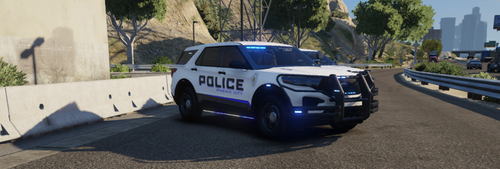
Mega Pack BASED on the Phenix City Police Dept in Phenix City AL. I completely redone this back from the ground up. See below for a tutorial on how to install the .dlc portion by GAMING4LIFE. Obviously the car pack in the video isn't mine, but the steps are the same. There is a readme included. READ IT.... There is information in it that will help with the install as well as a few tips to improve gameplay quality. Due to the number of cars in this pack I suggest using ultimate backup as well as something like Jurisdiction+ so you can use the pack to its full potential (like the ability to have all cars included patrolling and responding to backup). It can be a process but you can have more than just police, police2, and police3 patrolling randomly.
This pack will require a Custom Game config and pack file/heap adjuster. They are available on gta5-mods. Google will take you right to them
Templates to make your own liveries are included.
This is an ELS pack and will not work with fivem. ELS files are included.
Cars in PACK
PCPD1: 2023 Ford FPIU (Fedsignal-New Lighting Package-New Livery)
PCPD2: 2022 Ford FPIU (Fedsignal)
PCPD3: 2022 Ford FPIU (Fedsignal-Old Livery)
PCPD4: 2020-2021 Ford FPIU (Fedsignal-Old Livery)
PCPD5: 2023 Dodge Charger (Fedsignal-New Livery)
PCPD6: 2020-22 Dodge Charger (Fedsignal-New Livery)
PCPD7: 2015-2021 Dodge Charger (Tomar/Whelen-Old Livery)
PCPD8: 2020 Chevy Tahoe (Fedsinal-Old Silver Livery)
PCPD9: 2015-2019 Chevy Tahoe (Fedsignal-Old Silver Livery)
PCPD10: 2016-2019 Ford FPIU (Whelen-Old Livery)
PCPD11: 2011-2014 Dodge Charger (Tomar, Whelen- 2011 Livery[1], 2012-2013 Livery[2], 2014 Livery[3])
PCPD12: 2007-2014 Chevy Tahoe (Whelen, Old Silver Livery)
PCPD13: 2020 Ford F150 Animal Control/Traffic (Code3-Old Silver Livery)
PCPD14: 2005-2010 Dodge Charger (Whelen-Older Silver Livery)
PCPD15: 2010-2011 Ford CVPI (Tomar- Older Silver Livery, Older Dark Blue Livery)
PCPD16: 2021+ Dodge Durango (Fedsignal-New Livery and Old Livery[This vehicle doesnt exist, its a what if].
PCPDk9: 2007-2014 Chevy Tahoe K9 (Tomar/Whelen- Old Silver Livery)
Self explanatory.
- 16,121 Downloads
- 52 Comments
Updated -
Includes both real and lore friendly 2k and 4k liveries, Updates are below....... Added the Red/Blue Valor texture in the description. I forgot to include that in the pack.
Vehicles Included
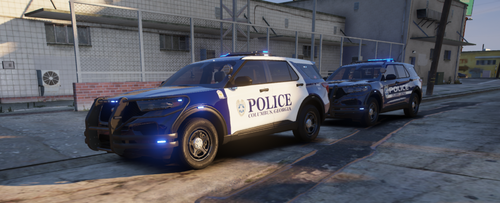
CPD1: 2020-2021 Ford FPIU New Livery W/ Fedsignal Integrity
CPD2: 2022-2024 Ford FPIU New Livery/ New-Retro?? Livery w/ Valor
CPD3: 2020-23 Dodge Charger RWD PPV W/ Intgrity
CPD4: 2020-23 Dodge Charger AWD PPV W/ Integrity
CPD5: 2015-2019 Dodge Charger W/ Tomar Scorpion
CPD6: 2020 Chevy Tahoe PPV w/ Integrity
CPD7:2011-2014 Dodge Charger PPV w/ Tomar Scorpion
CPD8: 2007-14 Chevy Tahoe PPV W/ Tomar Scorpion
CPD9: 2011 Ford CVPI w/ Tomar Scorpion
CPD10: 2010 Ford CVPI w/ Tomar Heliobe
CPDk9: 2020 F150 K9 w/ Tomar Scorpion
For the replace versions, simply just rename them. And install in whatever patch day you are using for replacement vehicles.
Example: CPD1 rename to Police
CPD2: rename to Police2
Addon is the preferred method due to the number of cars. If you need help with adding the .dlc I have added a video below that will help. I think Benzo and Georffry Gamer also have one, but this was the first one that popped up on google for me.
- 8,523 Downloads
- 35 Comments
Updated -
This pack is still a W.I.P. The lighting is not 100% accurate. I could not find much resource material that showed the rear lights lit up, so I just went with a guess. There is still a few vehicles I want to add to the pack, (Silverado, FPIS, and Slicktop Tahoe) but I just haven't had time to do anything recently. This is an ELS pack and is not compatible with fivem.
- 1,789 Downloads
- 4 Comments
Updated -
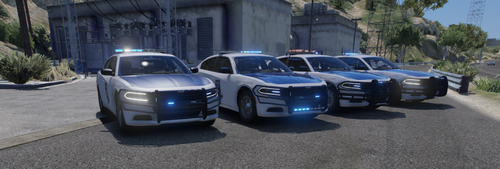
Mega Pack inspired by the Alabama Law Enforcement Agency. All vehicles are based either on images from google or ones that I have seen in person that patrol in my area. There is a "readme" file. Please read it, it has install instructions. Since this is a highway patrol DLC you will need ultimate backup as well as a mod like jurisdiction+ to fully utilize it. No the liveries are not 100% accurate. Some text and logos are bigger in order to make it readable.
Pack includes vehicles listed below, templates to make your own liveries, and red-blue files. There might be some files in the red-blue folder you dont need. I have a standard folder I use. Has both real and lore friendly liveries.
There is now a separate file that contains just the vehicle files/
There is 29 vehicles in this pack, some are same vehicle with different configs, so it might be hard on some lower end systems.
Vehicles in pack
⦁ alea1: 2019-2022 Charger w/valor
⦁ alea1l1: 2019-2022 Charger w/Legacy
⦁ alea1L2: 2015-2018 Charger w/legacy
⦁ alea1l3: 2015-2018 Charger w/liberty
⦁ alea1s1: 2019-2022 Charger slicktop
⦁ alea1s2: 2015-2018 Charger slicktop
⦁ alea2: 2020 Tahoe w/ Legacy
⦁ alea2L1: 2015-2019 Tahoe w/liberty
⦁ alea2l2: 2015-2019 Tahoe/w libery-No push bar
⦁ alea2s1: 2020 Tahoe Slicktop w/ westin
⦁ alea2s2: 2020 Tahoe w/gorhino wrap
⦁ alea2s3: 2015-2019 Tahoe w/o wrap
⦁ alea2s4: 2015-2019 Tahoe w/o push bar
⦁ alea3: 2021-2023 Tahoe 1
⦁ alea4: 2016-2019 FPIU w/legacy
⦁ alea4L: 2016-2019 FPIU w/ liberty
⦁ alea5: 2020 Dodge Durango
⦁ alea6: 2008-2014 Tahoe w/pushbar
⦁ alea6L: 2008-2014 Tahoe w/o pushbar
⦁ alea6s1: 2008-2014 Tahoe slicktop w/ pushbar
⦁ alea6s2: 2008-2014 Tahoe slicktop w/o pushbar
⦁ alea7: 2016 FPIS
⦁ alea8: Caprice
⦁ alea9: 2021-2023 F150
⦁ alea10: 2011 CVPI
⦁ alea11: 2021-2023 F250
⦁ alea12: 2011-2014 Dodge Charger
⦁ alea13: 2005-2010 Dodge Charger
⦁ aleak9: 2020 Tahoe K9 Unit
There is many youtube videos on adding DLC packs. I have some linked in my other files. Either check them out, or google is your friend.
You will need a custom Game Config, as well as Pack file/heap adjuster. Google will help you find both.
- 12,041 Downloads
- 33 Comments
Updated -
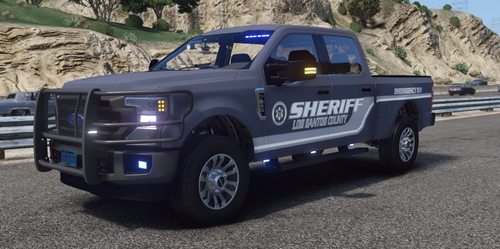
Includes Real and BCSO, LCSO Lore friendly liveries. All liveries come in both 4k and 2k. Lighting is 90% realistic. Its a small department and deputies are allowed to add their own lights, I went with the configurations I see most of the time. Ive included the templates for you to make your own liveries. Come default all blue. I have included red/blue files. Also comes default with the BCSO2k Liveries. The K9 unit has the names of the actual K9's on the side.
Instructions are included for how to have more than just sheriff and sheriff2 patrolling.
This is both a DLC and a Replace pack. Sheriff and sheriff2 just require a drag and drop but for the dlc the following line needs to be added to the dclist.xml file
<Item>dlcpacks:/rcsopack/</Item>
There is a readme included. READ IT... There is install instructions as well as suggestions on how to fix some issues you may run into, and also how to make more than just sheriff and sheriff2 show up in game. Also there are a lot of youtube tutorials out there.
Vehicles included are:
⦁ Sheriff: 2020-22 Dodge Durango
⦁ Sheriff2: 2020 Chevy Tahoe
⦁ Sheriff3: 2016-2020 Dodge Charger
⦁ Sheriff4: 2016-2019 FPIU
⦁ Sheriff5: 2007-2014 Chevy Tahoe
⦁ Sheriff6: 2005-2010 Dodge Charger
⦁ Sheriff7: 2011-2014 Charger
⦁ Sheriff8: 2017 Dodge Ram
⦁ Sheriff9: 2011 CVPI
⦁ Sheriffk9: 2020 Chevy Tahoe K9 unit (featuring the names of the real k9's)
This pack is optimized to use with this siren mod. I will also be adding the default els files soon. I have also added a separate download if you wish to use the default els files
For those having trouble with the DLC addon part of the pack, here is a great tutorial from the amazing Benzo. Its obviously not my pack, but exact same principle.
- 26,604 Downloads
- 47 Comments
Updated -
Removed my Opelika PD pack and combined it with this. This is just the start of the pack. Will soon be adding Auburn AL Police, and different variations of the cars already in the pack.
The OPD portion of this pack is a complete overhaul. The Liveries, Lighting, and Equipment was all completely redone.
This is an ELS pack, and will not work with fiveM. For now this is a replace pack. As more vehicles are added it will move to a DLC.
Included extras are:
Files for Red/Blue lights. (Note: This will require YOU to edit the ELS files and change extra1,2, and 7 to from Blue to Red)
Templates to create your own liveries
Includes both 4k and 2k versions of both real and lore friendly textures. 2k/real liveries are on by default.
Note: If you experience issues with the 21 Tahoe wanting to rollover, it is set for the police3 handling line. You will have to open up your vehicle meta file and change the handling line to police3.
- 6,910 Downloads
- 20 Comments
Updated