Ofc. Vic
Members
-
Joined
-
Last visited
Everything posted by Ofc. Vic
-
When you say 'a' it means one, and together with station not in plural I have to say you're wrong. There is actually a lot of Sheriffs stations in LA. Every red thing is a LASD station, so yeah.
-
 Ah Finland, swedens better brother.
 -
 FTFY.
FTFY. -
-
I don'y like the "L.S.P.D Los Santos County" text. LSPD is a city PD, it would say "LSPD City of Los Santos", if it now is "Los Santos County" it would be "L.S.S.D Los Santos County". But AFAIK that text is from that mission where you control T in that heli to steal that car, and if you made it it's okay since Rockstar fucked up all the police logos/emblems/structure/Vehicle design/patches and badges in the first place. Like these two mighty examples:
-
 Haha, what's a calofornian?
 -
A cup with the LCPD/NLPD emblem would be awesome, I might just make one myself, lol.
-
You just proved yourself wrong. The Alameda Sheriff have all blue, and they can conduct traffic stops. I know I told myself off there, but still, your argument is invalid.
-
@Schecter004 Your argument is invalid. Only "Standard Traffic Enforcement" vehicles are forced to have white doors, that means, for example, that SWAT vans can be all black/blue, because they're not for traffic enforcement. So this car could be used in CA/SA as long it's not used for traffic enforcement purposes.
-
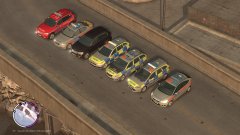 One thing that bugs me out is that the Met has like 3 different liveries (Battenburg, orange stripe/grey and orange stripe/red.) It's an eyesore for me. I guess it's for different divisions and such but it's an eyesore as I stated.
 -
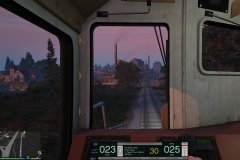 With your 81 hours on Train Sim I'm not surprised you're writing witty-one liners that makes one think you're in love with trains. And trams for that matter.
 -
Well, me and Phill calls Liberty City "New Liberty City", and therefor calling the PD "NLPD", and bleeter is GTA's version of Twitter.
-
I will :)
-
Yeah, except that's my first attempt and I didn't like it at all. I'm more satisfied with my current version.
-
Thanks! It's my 2nd attempt at making a NYPD skin pack, and these textures was my first. (Ignore the wraparound, ALPR and lightbars colors, I just used that model for one time use) So, as you can see alot of improvement happened since 2nd of January when I made that one.
-
Read this and you'll see :) http://www.nydailynews.com/new-york/nypd-vehicles-feature-twitter-logo-precents-handle-article-1.2177105
-
Well, got bored of making lore-friendly skins (Haven't posted any of that stuff here :p) and decided to start on a small NYPD pack. Current progress: CVPI (80% done), Charger (0%), Altima (0%) So I've just started but here's some screens.
-
This is gonna be december of '13 all over again. I can smell it. I went apeshit back then and I'm probably gonna do the same now.
-
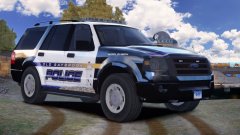 Holy f*ck that's a sexy beast.
 -
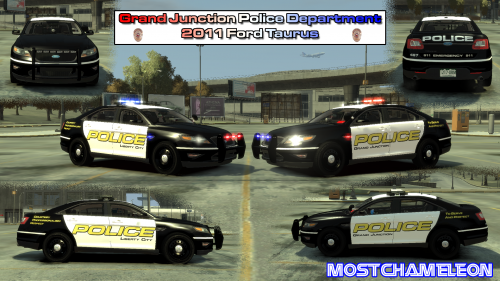 Yeah, I also gotta say it's a really nice skin.
 -
Well, I've reported some files in the past days, and it bugs me out that I don't know if there's been taking action against the file. I remember on the old site you got a notification whenever you reported something and it was removed, but not here. Could this be done?
-
You should release them in a pack instead of one-by-one.Well, ya know, some apparently haven't got that cheating in MP is not allowed. But my GTA O character mysteriously got 4mil, so weep-de-doo. I shouldn't complain.Uhm, well, the AI and the Handling is two different things. The AI in LCPDFR 1.1 is vastly better then the original one, but the handling don't have much impact. They can reach a higher top speed and accelerate faster, but they are still as MVA happy as usually.