




opus49
Insiders
-
Joined
-
Last visited
Everything posted by opus49
-
You have this in your log: [6/26/2020 7:22:42 PM.584] Error while loading plugin C:\Program Files\Rockstar Games\Grand Theft Auto V\Plugins\GrammarPolice.dll. Plugin is skipped during reload. Exception: System.IO.FileNotFoundException: Could not load file or assembly 'GrammarPolice, Version=1.2.3.0, Culture=neutral, PublicKeyToken=null' or one of its dependencies. The system cannot find the file specified. This tells me you installed Grammar Police in the wrong place. You simply need to drag all of the contents of the "Grand Theft Auto V" folder from the archive into your "Grand Theft Auto V" folder.
-
 Probably. Use the support thread or discord server, include a description and your RagePluginHook.log
- 1,357 comments
- 85 reviews
-
-
Thanks for the feedback. I'm going to send you a PM. I don't think there is an overload to RespondToLocation in BetterEMS that accepts a Ped, but there is a PickUpPatient method that takes either a Ped or a Location and Ped. Either way I am willing to put this in. Any chance you could reach out to me through Discord to discuss? I need more clarification on your second request as I'm not 100% sure I understand.
- 1,357 comments
- 85 reviews
-
I think the only languages left that Microsoft's System.Speech supports is Japanese and Mandarin.
- 1,357 comments
- 85 reviews
-
No, there is no interplay between GP and VD. However, it's pretty easy to add actions to GP. The tutorial video uses Better EMS as an example.
- 1,357 comments
- 85 reviews
-
-

- 1
-
-
This already exists. If you give just the preface it will prompt you to go ahead. Immersive Dispatch expands on this and is probably just what you're looking for.
- 1,357 comments
- 85 reviews
-
-
- 1
-
-
This log ends before you go on duty
-
RagePluginHook.log please
-
-
Yes you can install U.S. English speech recognition. Go to Settings > Time & Language > Language > Add a preferred language Make sure you select "Speech recognition" and Install.
- 1,357 comments
- 85 reviews
-
-
- 1
-
-
The Microsoft System.Speech engine does not support Polish, unfortunately.
- 1,357 comments
- 85 reviews
-
"What the hell is this?" This is rude. Your issue is a problem with your computer, not Grammar Police. Internal error means something on your PC is interfering with your audio, usually a driver or some kind of extra audio service.
- 1,357 comments
- 85 reviews
-
-
- 1
-
-
-
If you consistently get "Say again?" that means it doesn't understand you. Just because another application records your voice doesn't mean there isn't an audio configuration issue. If you could please post your RagePluginHook.log in the support thread or (more preferably) Discord I'd be happy to help.
- 1,357 comments
- 85 reviews
-
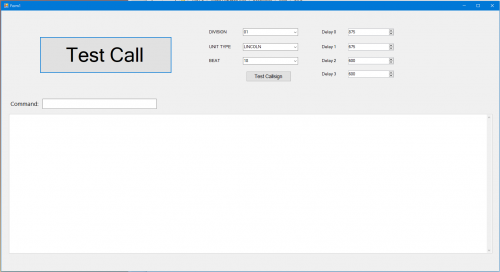 Just to make sure, this isn't Grammar Police, just a standalone application for testing out the speech engine. You do not need this. It does not do anything with LSPDFR. If after all that you still want to mess with it, you just extract it to a folder and run it.
- 46 comments
- 1 review
-
In case anyone else reads this, there are multiple options for support: Discord: https://discord.gg/AuJCUag
-
@PO M. From the FAQ in the support thread: Grammar Police says it could not initialize a SpeechRecognitionEngine. What gives? The Microsoft Speech Recognition Engine requires the correct language pack to be installed and configured. If this is English (U.S.) then this does not apply to you. Otherwise, you will need to make sure that your language is supported for speech recognition in Windows, that your language pack is installed, and that you configure Grammar Police to use it. Instructions for this are in the documentation that came with Grammar Police.
- 1,357 comments
- 85 reviews
-
-
Please look at the log you posted. You have multiple errors for LSPDFR+ and Traffic Policer.
- 1,357 comments
- 85 reviews
-
That's a new one. Sounds like an audio device configuration issue. I'm happy to look at your Rage plugin hook.log, but I doubt I'll find anything. I would check your default audio input/output settings.
-
I would need to see your RagePluginHook.log file. I suspect there's an error in your XML files. If possible, please join and post in the #support channel on the discord server. It's much easier to communicate there. Otherwise, feel free to post it here and I will do my best to help.
-
I have thus far been unable to find the animation codes for that. So I would say it's doubtful but not impossible. Thanks for the positive feedback! I think that status is a little long. But I could definitely add an "investigating" status that marks you unavailable and turns your status orange. Would that work for you?
- 1,357 comments
- 85 reviews
-
-
- 1
-
-
Thank you for the positive feedback. To use BetterEMS, drop this file into your GrammarPolice/grammar/en-US/custom/actions folder: ems.xml You can also watch the tutorial where I walk through customization here:
- 1,357 comments
- 85 reviews
-

