




opus49
Members
-
Joined
-
Last visited
Everything posted by opus49
-
Post your RagePluginHook.log
-
That is correct. I recommend that you read the documentation that came with Grammar Police or watch the video that explains how to install and configure it.
-
 The animation appears to be bugged. In the next update I'll just not play the animation when in first person mode.
- 1,366 comments
- 87 reviews
-
-

- 1
-
-
-
This log just has a couple of crashes caused by Chill Callouts. The log also shows the keybind is the default (Right Alt).
-
-
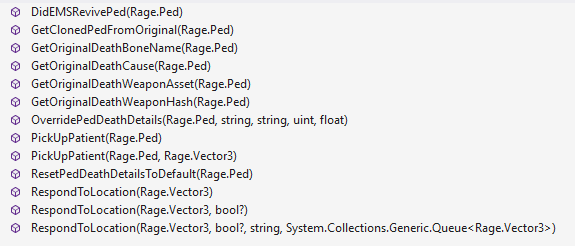
Surely not. Here are the public functions available:
-
There would need to be a public, static function in Better EMS. I do not remember such a function for standing down backup in Better EMS, but it's possible I missed it.
-
@Ofcr Mahony Hi! The "letter" you missed from the instructions was that I was showing how to add a new action. If you want to *replace* EMS, you need to use the same <Name> as the existing ems (which is "ems"). Add this XML file to your custom/actions folder: ems (7).xml
-
-
-
-
So what is the name of your custom ini file and where is it located? Also, do you not have // in front of the first line?
-
Can you upload your RagePluginHook.log and your custom.ini?
-
When you request backup while on a pursuit it is automatically pursuit backup, if you have UB installed.
- 1,366 comments
- 87 reviews
-
-
- 1
-
-
Can you post the RagePluginHook.log? It's in your Grand Theft Auto V folder.
- 1,366 comments
- 87 reviews
-
As far as I know, nobody else is having this specific problem. But that doesn't necessarily mean it's a "you" problem. Unfortunately, from my experience, getting support from BejoIjo is hit or miss. There is one user who cannot request a tow truck and his staff refuse to even look at it and just keep sending them back to me. It's really frustrating.
- 1,366 comments
- 87 reviews
-
I'm not sure what "ne" problem means. UltimateBackup has public static methods in its API such as UltimateBackup.API.Functions.callCode2Backup and UltimateBackup.API.Functions.callCode3Backup. Grammar Police calls these when UB is installed. If the API completely failed, nothing would show up at all. So UB is responding (which you can even see in the log). If it's malfunctioning (e.g. not showing blips, not wearing the correct unis), it's completely within UB. Grammar Police literally just calls the UB API and that's it:
- 1,366 comments
- 87 reviews
-
So I'm sad to say that it has to be an issue with Ultimate Backup. As you can see, Grammar Police is calling Ultimate Backup: Note that SWAT does not have a public static function in Ultimate Backup, so that's going to be standard uniforms. But if Code 2/3 backup are incorrect, then I'm afraid you're going to have to take that up with BejoIjo.
- 1,366 comments
- 87 reviews
-
-
-
Just because the XML file references grammar police doesn't mean it's not using ultimate backup. The functions being called in grammar police will automatically check for ultimate backup and call it when it's available. You do not need to change any XML files for it to use ultimate backup. You should restore your XML files to how they were before you messed with them.
- 1,366 comments
- 87 reviews
-
-
It's not a bug, it's Immersive Dispatch which is not my plugin. Delete the numbers.xml file in your custom/commands folder.
-
Gotcha. I was about to release an update but I will take a few minutes to put some exception handling around this code to prevent future crashes. Thanks very much for bringing it to my attention!
- 1,366 comments
- 87 reviews

