


john925
Members
-
Joined
-
Last visited
Everything posted by john925
-
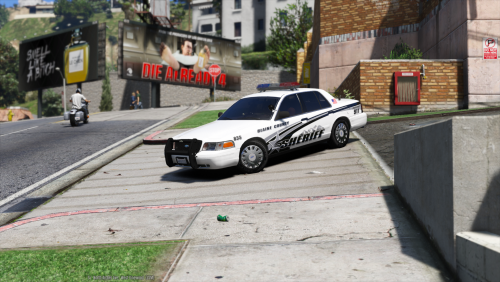 You have the EVL mod? I have a couple CVPI's that use it but the lights don't work without it.
- 21 comments
- 10 reviews
-
You can't have 2010 and 2012 both installed. It told me i had a newer version installed on the 2010 one.
-
I seems like there's no support on this anymore There's no reason this shouldn't work. It ran just fine on my other computer which was lesser than the one i'm using now. Clean installation of game and mod multiple times with the same error. I've installed all the necessary files and they're all in the correct places yet i'm still getting the loader error as soon as the game boots up. In the diagnosis everything is green except for the log files which won't even tell me what's wrong. This makes absolutely no sense and is extremely frustrating. The whole reason i even reinstalled this game is for this mod which used to be excellent but is completely unplayable now. I've seen plenty of other people with the same issue who haven't had anything resolved, the most they would get is the copy and pasted reply like i got and that's it.
-
It's a legit disc version not cracked. Latest title update, always runs as Admin, I've tried to uncheck the "read-only" box but it always checks itself back. Advancedhook.dll, ScriptHookDotNet.asi, and Xive.dll are all in the root folder. There is an LCPDFR folder in the GTAIV root folder. I've tried uninstalling and reinstalling multiple different versions of LCPDFR and uninstalling and reinstalling GTAIV multiple times. Every time i run the game, it still gives the same errors. Either it encountered a critical error, or it failed to initialize. There's always an error in the SlimDX file. Diagnostics_7.12.2015_16_40_46.log ScriptHookDotNet.log LCPDFR.log AdvancedHook.log AdvancedHookInit.log ScriptHook.log
-
I know this has been a running issue for people but i haven't found a solution and it seems like the other posts were just left alone half solved. I keep getting an LCPDFR critical error any time i load my game. I tried version 1.1 and 1.0d. I ran into the MSVCP100 problem in the diagnostics tool but i managed to fix it. I'm still getting the log check problem but it won't open. I don't know but it seems to be mainly in the SlimDX file that's causing problems. If any additional info is needed just let me know. It's the only mod i have on a fresh install. Diagnostics_10.12.2015_18_29_2.log
-
I was looking at what he has and unless i was looking in the wrong spot, i could only find one for the 2003 CVPI. Not sure if there's much of a difference between the '03 and '11 though.
- 154 comments
- 86 reviews
-
-
-
