AtomicFlood
Members
-
Joined
-
Last visited
Everything posted by AtomicFlood
-
Yes. It's a very nice ENB and it literally does run as smooth as a Nutt.. Get it? haha ;)
-
This is without the Traffic Flow. Just ENB, 2 cop cars and patch 1070.
-
Installed 2 cop cars, now I have the taxi bug. God damn it! Hahaha
-
Problem solved - It looks very nice! Also removed commandline.txt "Go into the iceconfig.ini file and set ForceAntialiasing=false As seen here..." Quote [ENGINE] ForceDisplaySize=false ForceAntialiasing=false ForceDisplayRefreshRate=false ForceAnisotropicFiltering=true MaxAnisotropy=16 AntialiasingQuality=1 DisplayRefreshRateHz=60 DisplayWidth=1920 DisplayHeight=1080 ReflectionsForceHighPrecision=true ReflectionsExtremePrecision=true AntialiasingUpScale=1.0
-
Baha ok so the game loaded, yay! But the ENB doesn't look like it's working :( Anyway, now that it's working I have the taxi bug and I only have 2 police cars installed haha. I'll install another ENB tomorrow or remove it and get back to you. Thanks :)
-
I have the latest drivers, it's happened since I installed this ENB. Looks amazing from the image just it seems to hate me! Haha
-
GTA was working fine until I installed someone's ENB mixture. It wasn't booting before but I installed Scripthoodotnet and it booted, sort of. It now gives me this error and doesn't boot at all. Thankfully I backed up. I am on 1.0.7.0 and have all scripthooks, dsound.dll ect. I have turnt down my res as low as it can go 800x600 but that still doesn't work. Any ideas? Intel i7 2600k GTX 580 8GB Ram
-
Thanks bud :)
-
Give it a try. If it doesn't, it might just be the models of your particular cars. Were they very high detail?
-
But there is no fix for the other police cars driving around is there?
-
SparkIV> Models > cdimages (at the bottom) > Vehicles.img > edit Select Police.wtd, Police.wft, Police2.wtd and Police2.wft and replace them with the original ones You will need to run SparkIV as administrator
-
Right so I see cop cars driving around with their lights partially on like this: Any fix?
-
Ok, so you installed 2 new cars, the rest are the orignal, un-modified cars right? So, just take the files that you backed up and install them. That's it.
-
Cool, just get the original police.wtd/wft and police2.wtd/wft and install them
-
Hopefully, when you installed those 2 cars, did you backup (export) the car files first? If you did, just replace them the same way you did with the new ones
-
Give it a try mate, I'm pretty sure that is your problem. If it doesn't work, well then I suck! Haha. Let us know how it goes :)
-
I believe it's usually the cars causing the problem. I've never had a problem with my mods before and I have had the taxi bug. Solved by re-installing all the old cars, which I made a backup of. If you only have 2 cars, it will take you a minute at the most.
-
Only 2 cars? That sounds a bit strange to me, I can usually get a few more than 2 cars before I get that problem. Try un-installing those 2 cars and replacing them with 2 different cars. If it still happens, try re-installing all the original cars. Then you can hopefully determine whether it's the cars or not. Some cars are higher polly (I think that's the name) than other cars and they need a lot more resources because of the amount of detail.
-
Install the newest version of SparkIV
-
Install TrafficLoad. It works better than Traffic Flow but it doesn't completely solve your problem. I think it's because you have too many modded cars so uninstall a few of your cars and try again. Apparently Taxi's and police cars cannot be reloaded whilst other cars can.
-
Guess so but with Fraps, a minute or 2 would cost me 3gb+ - Surely there has to be something better than that?
-
What programs are there out there that I can record in full 1080p without the game lagging and doesn't use lots of space ? I use FRAPS but that takes up a bucket load of memory and there is the in-game recording too but that is kinda useless when I want to record LCPD:FR. Any ideas?
-
If they still don't work, go to ELS.INI in your directory (C:Program Files (x86)Rockstar GamesGrand Theft Auto IV) and make sure you have selected made Active=1. Example: Active = 1 Halogen_Only = 0 Color_Light1L = 0 Color_Light2L = 0 Color_Light3R = 0 Color_Light4R = 0 Color_Light7L = 3 Color_Light8C = 3 Color_Light9R = 3 Offst_SLights = 0 [ POLICE2 ] Active = 1 Halogen_Only = 0 Color_Light1L = 0 Color_Light2L = 0 Color_Light3R = 0 Color_Light4R = 0 Color_Light7L = 3 Color_Light8C = 3 Color_Light9R = 3 Offst_SLights = 0 Active = 1 > Lights are activated for that car Active = 0 > Lights are not activated for that car Ignore the numbers underneath, they are just to choose the colours. If you car DOES have ELS, make sure you have Active = 1 If you car DOESN'T have ELS, make sure you have got Active = 0 otherwise parts on the car will disappear when you turn the lights on. Basically the file that you add, whether it be police.wtd or fbi.wtd ect, ect will be listed in this file. You can also add cars to this file too!
-
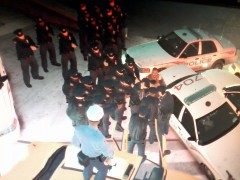
From the album: Every cop in the city
I had the taxi and cop car glitch so all I saw was taxis and cop cars, hence the very quick response. Made me lag like hell! -
Every cop in the city attends within a few seconds to a routine traffic stop on a taxi