



Al Capone
Members
-
Joined
-
Last visited
Everything posted by Al Capone
-
Thanks Lenny I was just going to look into that. Cheers mate
-
Okay I will try it out. Something I did forget to mention is that ComPuLite loads fine and then I get a message saying ComPuLite failed to load restart LSPDFR. Could that be a issue?
-
Hi guys, Just need some help in identifying what is causing LSPDFR to crash These are the scripts I use: Ambient FX Brain Blast CustomEnviromentalLighting Fast draw LemonUI. More Gore Player Euphoria Speed Radar Plugins active going into the game: LSPDFR AND EUPMenu Crash Report is attached More Gore Settings.xml RagePluginHook.log
-
Hey Enterprise, Just to be on safe side I would delete the current version from main folder and then copy and paste the 0.47 version. Just keep checking on Bejol mod page for the update and also check out some of his other mods. If you need help installing them check out YouTube videos there are plenty out there to get your LSPDFR up and running. 👍 Hi, Reason I mention this is because he seems to keep his mods up to date. Ultimate backup is a good mod to go with STP 👍
-
Hey Byron, What Jeff told you helps with texture loss also lowering some of your graphic settings might help. Converting your police cars textures from 4K to 2K can help. I’ve been playing around with new configuration file I downloaded from GTA 5 mods plus heap adjuster and Limit Adjuster to be honest they didn’t do much for me. I’m still getting between 50-61 FPS. Weirdly I had a pursuit that jumped my FPS from 52 back to 61 so go figure Lol.
-
Hi, if you want to use Stop the aped you will have to install LSPDFR version 0.47 (Build 7259) only until STP is updated. If you go to LSPDFR download page it should give you an option to download the 0.47 build 7259 version if the version is older than that I would just stick to the new version buts that entirely up to you. With STP you can call out tow trucks, coroner’s etc. If you pull suspects over who have drugs on them u can test what drugs they r by going to your trunk and pressing G and going down the option menu to narcotics test kit. Scroll left to examine weapons you find on a suspect as well. It’s a fun mod to play with.
-
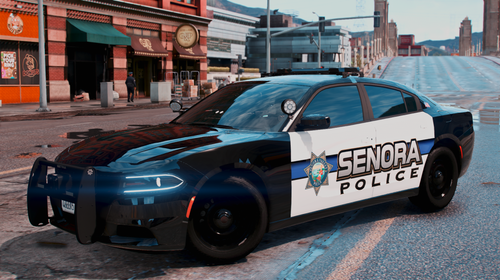 Wow they look fantastic textures great work 👍
 -
Yeah it adds more realism to the mod. Glad your sorted out 👍
-
Hi, Yeah I went on Bejoljo discord and a member of his team said the guy was aware of the update and when he can get some time he will update it. So, in the meantime if you want to use Stop The Ped you have to use the last version of LSPDFR.
-
Hi, I updated LSPDFR to the latest version and I got a box flag up saying Stop the Ped is not enabled for this version of LSPDFR. I'm wondering if anyone else is having this issue? I'm wondering if I need to enable something to get it working. Thanks Al
-
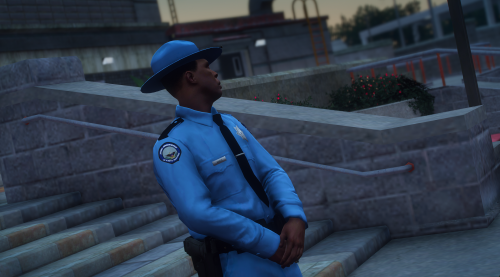 Some more Photos of this awesome uniform
 -
Hey, Fantastic work I've been looking for something like this for last couple of weeks. You helped a lot 👍
-
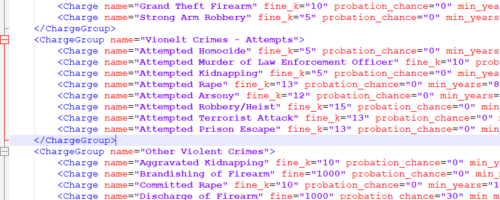 Hey Mikkerix, Thanks buddy 👍
 -
Hey, I will be giving this a try out. One suggestion is when you find pics Of a pervert nature (upskirting) found on a suspect There be a charge associated with it. I Was patting a guy down and it stated he had pics of women looking up their skirts in a supermarket. I tried to find a charge but couldn’t. I’m sure there are laws against that stuff you could put it under deviant headline.
-
Hey, GOT IT WORKING!!!!!! Bloody Yes 👍 5 hours. So these were the steps I carried out. Verified Game files on Steam. They all came back correct. Updated "Update" and x64 to the Mod-folder and any of the other x64 files in MOD-Folder (example x64a, x64b, x64c etc). I deleted my Commandline file from my main directory. Also in lspdfr folder and (don't pay attention to this just a mistake lol) Finally what I think was tripping out the game was--the mod--Field of Vision (fov). When I deleted that it loaded up. Drewster just have a look in your main GTA 5 folder and take out any mods you might think might be conflicting with LSPDFR. Mine as I say was Field of Vision or Field of View mob whatever its called. It took me ages because I was taking out scripts, ELS, car mods, graphic mods, and all that good stuff. Luckily I didn't delete them from my recycle bin so just had to restore them. Hope it helps you out buddy or anyone else!! Al Drewster, One final idea in case that don't work. In your lspdf folder in your main directory go your configuration and in "Advanced Settings" under Disable DirectX Hook tick that on. Because I ticked that box and then started up Rageplugin in "Administration" that's when it started working but when I've just shut it down to double check its un-ticked so I might have forgot to save and close.
-
Hey Drew, How do you update the Gameconfig again. Yeah I noticed your post. If you match your log to mine its more or less similar. Have you taken out all your scripts and just left LSPDFR in?
-
Hey Black, No doing, it still crashes. I will upload latest log but it reflects the others. I'm not jumping to conclusions but could it be Ragehhookplugin does need updating? Anti Virus is turned off so I know its not that. I guess I could do a fresh install of LSPDFR. I've verified the files 4 times now and there were no corrupt files found. I've already updated the Mob folder in OPENIV. I've taken all my police cars out of patchday22. My RageNativeUL.dll is up-to-date. Scripthookdotnet is not installed. So I am running out of Ideas lol 😂 RagePluginHook.log
-
Ok I'm just verifying the files again. I'll keep you posted.
-
Hey Black, While I'm waiting I will explain what I'm doing. I opened up OPENIV and just looked to see my patchday folders. I noticed the new Pathday23 wasn't there so I'm copying the update and x64 folders from my main GTA 5 directory and updating the mod-folder update and x64 and see if that is causing the crashes.
-
Ok I think I've got a solution. If it works I will explain how 👍
-
Thanks Black, I'm just going to verify my game logs first and see how that stands. Does my ragehook logs indicate anything that might be going wrong?
-
Hey Black, Sorry to say it didn't. I will upload my RageHook Log in. Maybe take all scripts out apart from LSPDFR and see if that affects it. RagePluginHook.log
-
Hi BlackAditum, Thanks for getting back to me. I thought I was on the newest version. I will install it now and let you know 👍
-
Hi guys, I've just updated to the new ScriptHookV and went to launch the game and while on the loading screen it crashed. At first thought it was just a hiccup. Anyhow, I've tried updating the mods folder in OpenIV deleted my police cars from Patchday22 and taken out my graphics mod and it keeps crashing. I will add my RageHook Log to see if you guys can see what is going on. I can't think of anymore options apart from reinstalling LSPDFR latest version. Thanks Al RagePluginHook.log
-
Hey Lexuz, a few pics to show off your State Trooper Pack I love them!

