


echo04
Members
-
Joined
-
Last visited
Everything posted by echo04
-
From the album: Echo04
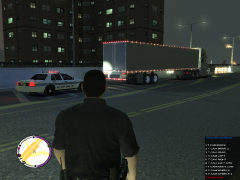
FDOT Officer stops a Tractor Trailer for failing to stop at an inspection station. -
lol ok, no lights, no sirens, no else. I put a police vehicle in its slot and replaced the default, wrecked car, and it acts as a normal car, not a police car.
-
Anyone know how to make the "PoliceW" car in EFLC act as a normal police car?
-
Anyone able to help me out on a Skin for Gfxle's F350? Looking to have the attached skin made. FWC. It has already been made for the F150, just looking for the bigger one. I can supply the original
-
how about a ram quad cab? or just a newer ram in general lol. nice work man
-
fantastic, hahaha
-
*tear, thanks for the news nickieb lol
-
yeah i have that one, someone made a slicktop, apparently it hasnt been released by the lack of responses lol
-
Has anyone been able to get their hands on the Slicktop Dodge Magnum thats been floating around on here as well as on youtube? Please share if you do. Looking for a great Traffic Unit
-
Hera ya go Jorge, what you asked for: I havent messed with it too much because im still trying to get the main police vehicle to work. Again, police, noose, police3 and police4 do not work at all (they are vics) police2 and fbi do work with no problems (they are impalas) I have played around with peoples settings they have sent in and still nothing. "Michael Carley" submitted the config to a specific vehicle, i am using that specific vehicle and still nothing. Not inside the car, nor on any surrounding buildings ect. ******************************************************* [Keys] // Default: Insert - 161 on-off=161 // Default: Numpad1 - 100 sp-left=100 // Default: Numpad3 - 102 sp-right=102 // Default: Numpad5 - 104 sp-up=104 // Default: Numpad2 - 98 sp-down=98 ******************************************************* **The following are the position of the spotlight in relation to the center of the vehicle.** Spot-x: Left(-) & right(+) spot-y: Forward(+) & Backward(-) spot-z: Higher(+) & Lower(-) ******************************************************* [Police] spot-x=-0.9 spot-y=+1.0 spot-z=0.5 ******************************************************* [Police2] spot-x=-0.8 spot-y=+1.0 spot-z=+0.7 ******************************************************* *EFLC ONLY* [Police3] spot-x=-0.9 spot-y=+1.0 spot-z=+0.5 ******************************************************* *EFLC ONLY* [Police4] spot-x=-0.9 spot-y=+1.0 spot-z=+0.5 ******************************************************* *EFLC ONLY* [PoliceB] spot-x=0 spot-y=0 spot-z=0 ******************************************************* [FBI] spot-x=0 spot-y=0 spot-z=0 ******************************************************* [PolPatriot] spot-x=0 spot-y=0 spot-z=0 ******************************************************* [PSTOCKADE] spot-x=0 spot-y=0 spot-z=+2.0 ******************************************************* [NSTOCKADE] spot-x=0 spot-y=0 spot-z=+2.0 ******************************************************* [Noose] spot-x=0 spot-y=0 spot-z=+2.0 ******************************************************* [Ambulance] spot-x=0 spot-y=0 spot-z=0 ******************************************************* [Firetruck] spot-x=0 spot-y=0 spot-z=0 ******************************************************* [polmaverick] spot-x=-0.2 spot-y=+3.7 spot-z=-0.7
-
Im not sure why but the mod does not work on any crown vics i have, just the impalas. I have been using configurations people have submitted for the vics and still nothing. nothing for my police, noose, police3, or police4 (all vics) Jorge? Any help?
-
just save it to your desktop, then copy the file into where it needs to be
-
I didnt change the name you had on there so i guess it reads "police". The light does not come on at all that I can tell. I cannot even see it on the surrounding environment
-
For some reason, I cannot get the spotlight to work on "Police1" no matter what I try. Any suggestions?
-
awesome idea!
-
just make them different keys in the configuration file
-
This has mad potential, right now im doing my best to figure out settings. i can only seem to get it to work on police2 and fbi. it does not want to appear at all for police1
-
Does anyone have any accident scenes they have made using SNT they would like to share with the rest of us?? I.e sharing your objects.ini file
-
mine crashes when prisoner transport is called? does yours do that too?
-
Hello all, yes another "crash" topic. My game crashes after leaving the main island in the center, over the bridge towards the toll booths on my way to the airport only when im driving. i can take a taxi or even spawn to the airport with no issues. it only crashes while driving and literally just before i make it to the toll booth. literally every time i drive that direction. Also, Whenever I call for prisoner transport, my game immediately crashed before the blue blip even appears. Any reason or solutions for either?
-
let me know if you still need them
-
yeah i have noticed that as well, at the time the shots were going off, he was on the radio.... still gives me chills watching this...
-
good work, might i suggest somehow allowing them to work once you exit the vehicle
- 54 comments
- 39 reviews
-
It wont even allow me to create a new account, "could not find part of the path...." ect. ect.
- 82 comments
- 26 reviews
-
like everyone else has asked, will this work in game? Will the names and plates exist in game? or will the names and plates be fictional and not really exist at all in game?

