Skip to content
View in the app

A better way to browse. Learn more.

LCPDFR.com

A full-screen app on your home screen with push notifications, badges and more.

To install this app on iOS and iPadOS
  1. Tap the Share icon in Safari
  2. Scroll the menu and tap Add to Home Screen.
  3. Tap Add in the top-right corner.
To install this app on Android
  1. Tap the 3-dot menu (⋮) in the top-right corner of the browser.
  2. Tap Add to Home screen or Install app.
  3. Confirm by tapping Install.

Community Staff Favorites No. 1

Greetings everyone and welcome to the first instalment of the Community Staff Favorites.  I hope you all enjoy the images featured this week.  I’d  also like to express a big thank you to all of the individuals who decided to submit their work for this series, and now without further ado (in no particular order) the Community Staff’s chosen Favorites.


The first image on our list is by MikoFiticus. (This vintage styled image really strikes my fancy)

QYBHGIL.jpg

Our second image is by community member Lundy. (TheUniT really liked this one)

8vuT24v.jpg

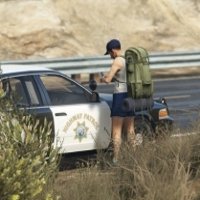
The third image in this installment was taken by Bxbugs123. (Not much was said although the word brony came across someone's mind)

o8XCHw1.jpg

Our fourth chosen submission was by a member by the name of Army1257. (making use of the animations and all) 

PfIMu1T.jpg

Finally, our last image was taken by community member Sniper296. (10/10 - Would beat again)

qEdEonF.gif

That's all for this week's Installment of the Community Staff Favorites.  I truly hope you all enjoyed this premiere article of the CSF.  I'd also like to apologize to those of you who submitted videos for the first installment of the series.  Ultimately I decided to keep videos out of the initial installment in order to give the CSF a simple start.  Furthermore, I've decided based upon the initial response in regard to the CSF announcement and it's submissions to make the article bi-weekly.  This will give members more time to submit more content as well as give the staff more time to look over them.  Don't forget to submit your images and videos for the next CSF here .

Until next time!

User Feedback

Recommended Comments

Aston

Members

Woooow! Really nice...

85tromby

Members

Nice images. The last one... the jail cell where is that in-game or is it a mod or something. 

ineseri

Friends of LSPDFR

Nice images. The last one... the jail cell where is that in-game or is it a mod or something. 

It's the Downtown Police Station, basement. 

PhillBellic

Members

Hmm, that Third Image has a really strong Dukes of Hazzard Vibe to it.

Slushy

Members

It's the Downtown Police Station, basement. 

I think he means the camera trick, is it a mod?

Deactivated Member

Deactivated

Ooh great article! All these photos are awesome! Can't wait 'till videos are included too. 

ineseri

Friends of LSPDFR

I think he means the camera trick, is it a mod?

He asked where it was, not how it was done. 

CSF has started out great! Can't wait till the next one!

Alexander195

Members

Really great job, Prophet! :D

Sniper296

Friends of LSPDFR

Nice images. The last one... the jail cell where is that in-game or is it a mod or something. 

You can load the MP map (in SP) and teleport to it using Simple Trainer.

Join the conversation

You can post now and register later. If you have an account, sign in now to post with your account.

Guest
Add a comment...

Account

Navigation

Search

Search

Configure browser push notifications

Chrome (Android)
  1. Tap the lock icon next to the address bar.
  2. Tap Permissions → Notifications.
  3. Adjust your preference.
Chrome (Desktop)
  1. Click the padlock icon in the address bar.
  2. Select Site settings.
  3. Find Notifications and adjust your preference.