


Liberty City. Where it all began.
In 2009, the game changed. The LCPD First Response mod (LCPDFR), was the first police mod ever created. Developed over a number of years, LCPDFR set the foundation for what we've all come to know and love today.
Download LCPDFR 1.1 (Legacy Edition)

This is a page about the original LCPDFR modification for GTA IV, which was discontinued in 2015.
-

Thanks to some community efforts and continued interest in keeping LCPDFR alive, we are happy to announce that LCPDFR, the mod which started it all, is now on GitHub. If you ever wanted to see how things worked back in the IV days (or just trash-talk the work of a few 14-year kids writing code), you have come to the right place.
Please find the repo below: https://github.com/LMSDev/lcpdfr_public
- 6,277 views
- 8 8 comments
-

In light of the Grand Theft Auto IV: Complete Edition being released on PC via the Rockstar Launcher, we have recently revisited Liberty City ourselves to update some of the old, broken modding tools. As a result of this, LCPD First Response (LCPDFR), the original police mod for GTA IV is now available to download and easier to play again.
LCPDFR 1.1 (Legacy Edition) is the final release of LCPDFR 1.1 from 2015, but updated with the new Compatibility Patch by @LMS so that it's now far easier to hop back in time and relive our original classic.
- 40,258 views
- 0 0 comments




LCPDFR 1.1 Features

Quick Action Menu
Use the Quick Action Menu (QAM) to easily perform common tasks like requesting backup or issuing instructions to your partners.

Multiple Partners
Up to three partners can now be recruited in LSPDFR 1.1, who are automatically divided up into two groups for easier control.
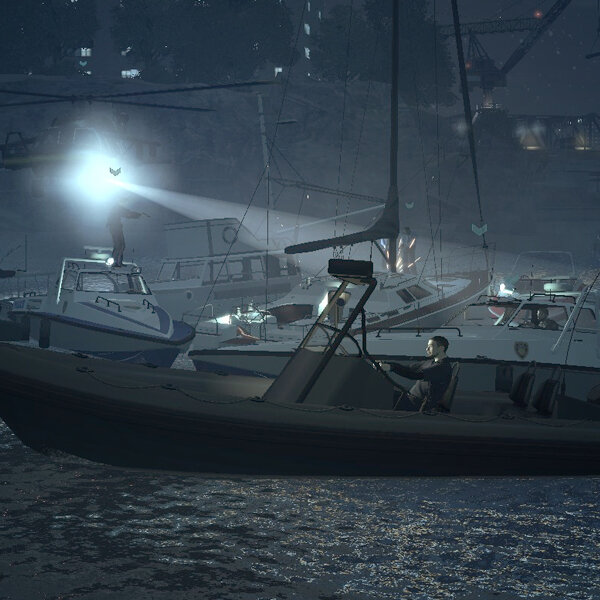
River Pursuits
Dotted around the map, players can now find LCPD Patrol Boats which can be used to conduct maritime patrols and pursuits.
Original Documentation
We have preserved the original documentation for LCPDFR 1.1, which you can view here.