




It's Been A Great Year

By Hullian111
- 859 views
- View Hullian111's images
Wow...the 24th of August 2016 felt like ages ago. We've had new Presidents, parliaments, and even a total solar eclipse since then.
On the 24th of August 2016, I was on my school holiday from the end of Year 10 to my last year of school - Year 11. A year on, today is my results day. And I can tell you now that I have excelled in all the subjects I wanted to.
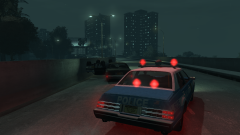
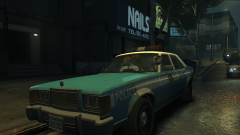
But today's special for another reason, too - I released my first proper mods for GTA IV, the first of which was the Humberside Police Vincent (left), then after a viewing of Finding Dory, I released the Metropolitan Police Stanier (right), the start of a staple of the early months of my modding career. If you want to download them, here they are down below.
My main thanks must go to the creator of the UK Policing Template Pack, @Razor792. Without your pack, I wouldn't have been inspired to make liveries, and I wouldn't be where I am today.
Another thanks goes to @HomerS, an unofficial friend who I keep bumping into now and then. You were the first to comment on my mod, and someone great to talk to online.
Another thanks goes to 'based' @ThatOneHick. You make great mods, and best of all, you make great templates. If it's true that you are soon retiring, I wish you well.
Finally, thanks to the LCPDFR community for keeping me coming back. I know GTA IV modding has reached end-of-life, but I feel like I'm keeping it going. And you know what the magic of modding is? Good or bad, you're putting your name out there. And I will leave you on that.
Here's to another year!
Recommended Comments
Join the conversation
You can post now and register later. If you have an account, sign in now to post with your account.