






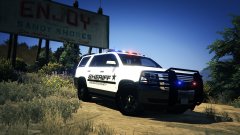
2014 L4 Marked FPIU

By J.J Dawkins
- 2,385 views
- View J.J Dawkins's images
This 2014 Explorer base model From @jasonct203 Totally getting redid, i still would not take any credit away from him nor give myself credit for any work that i'm doing to the model. I thank you for this model that you have converted for us..
This model now is L4 with proper LODS Done correctly by me.
Persons i would like to say thank you to First is
#1). @Kane104 for making the tutorial on how to do proper LODS. thank you so so much for that. I have spend hours just looking, reading and understanding how to do this right. So i owe you the Biggest Thank you
#2). @Izick for showing me what i was doing wrong, damn i thank you so much for that help you gave me you are the best thank you
this Sexy Ass Skins is by By @Ackra holy shit 
Recommended Comments
Join the conversation
You can post now and register later. If you have an account, sign in now to post with your account.