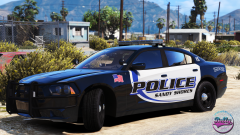
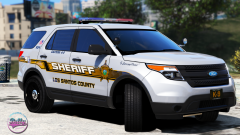
is it pack worthy tho Share https://www.lcpdfr.com/gallery/image/84142-is-it-pack-worthy-tho/ Share on Facebook Share on X {lang="reddit_text" More sharing options... Followers planned vehicles include -2014 Charger (frickin duh) -2015 Charger(select templates) -2010 Era Tahoe (select templates) -2016FPIU (select templates) -CVPI -FPIS -2016 Tahoe
Getinmybelly Members May 5, 20178 yr Author stats 9 minutes ago, Scuderio said: Are you talking about Skins or Cars? Both, the number of cars and the skin choice
Riley24 Members May 5, 20178 yr Author stats Dude, almost every skin you make is worthy of being a pack lol.
2Sierra16 Members May 5, 20178 yr Author stats I would change all my cars around to models compatible with these skins, damn
BritishGamer88 Members May 5, 20178 yr Author stats Amazing work mate!. How would you like to add the new mondeo/fusion to your list?.
Getinmybelly Members May 5, 20178 yr (edited) Author stats 42 minutes ago, BritishGamer88 said: Amazing work mate!. How would you like to add the new mondeo/fusion to your list?. Not familiar with which specific model you're referring to Edited May 5, 20178 yr by getinmybelly0627
BritishGamer88 Members May 5, 20178 yr Author stats 6 minutes ago, getinmybelly0627 said: Not familiar with which specific model you're referring to this
Getinmybelly Members May 5, 20178 yr Author stats 4 minutes ago, BritishGamer88 said: this Unfortunately it wasn't on my list. I'm not certain as to what models are released with that template, as well as the fact I don't have a template for it.
BritishGamer88 Members May 5, 20178 yr Author stats Just now, getinmybelly0627 said: Unfortunately it wasn't on my list. I'm not certain as to what models are released with that template, as well as the fact I don't have a template for it. haha no no im asking would you like to use it it's my model i'm currently working on :p.
FRGamer Members May 5, 20178 yr (edited) Author stats mmmmmmmmmmm yyyeeeeees Edited May 5, 20178 yr by FRGamer
sixium Friends of LSPDFR May 6, 20178 yr Author stats 9 hours ago, Riley24 said: Dude, almost every skin you make is worthy of being a pack lol. What he said





Recommended Comments
Join the conversation
You can post now and register later. If you have an account, sign in now to post with your account.