Skip to content
View in the app

A better way to browse. Learn more.

LCPDFR.com

A full-screen app on your home screen with push notifications, badges and more.

To install this app on iOS and iPadOS
  1. Tap the Share icon in Safari
  2. Scroll the menu and tap Add to Home Screen.
  3. Tap Add in the top-right corner.
To install this app on Android
  1. Tap the 3-dot menu (⋮) in the top-right corner of the browser.
  2. Tap Add to Home screen or Install app.
  3. Confirm by tapping Install.

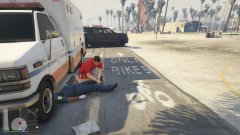
The deceased suspect

Responded to a road rage incident in progress near West Vinewood.  The victim was blocked between the suspect's car and a wall.  When the suspect saw me, he attempted to flee from the incident, hitting an innocent bystander in the process. When I tried to get him out of the vehicle, he drove straight towards me, causing me to open fire. The bystander, identified as Julia Harper, is fortunately alive and is currently being treated at Mt.Zonah Medical Center.

  • From the album:

    LSPDFR Patrols

    · 18 images

    Account

    Navigation

    Search

    Search

    Configure browser push notifications

    Chrome (Android)
    1. Tap the lock icon next to the address bar.
    2. Tap Permissions → Notifications.
    3. Adjust your preference.
    Chrome (Desktop)
    1. Click the padlock icon in the address bar.
    2. Select Site settings.
    3. Find Notifications and adjust your preference.