


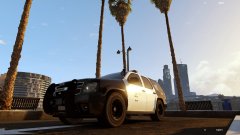


LSPD Tahoe Upfit

By HankVoight
- 618 views
- View HankVoight's images
After a recent poll inside the Police Department it was decided to up fit the existing 2008-10 Tahoe's instead of scrapping them and buying the new 2015 version which would see only a handful of the original vehicles replaced and officers still using out dated equipment anyway. This way all existing Tahoe's will have the old equipment replaced with newer more up to date and much needed equipment. It has also been decided they will be trialling the newer Liberty 2 lightbar in replacement of the Arjent.
Recommended Comments
Join the conversation
You can post now and register later. If you have an account, sign in now to post with your account.