Due to overzealous filtering on Microsoft’s side, some emails to Outlook and Hotmail addresses may not be delivered. If you’re affected, please use a different email address or try again later.
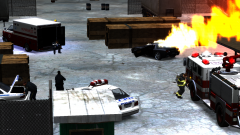
All three emergency services arrive on scene to a car fire only to find they have no knowledge of how to deal with the situation, one medic is seen sitting in the back of his ambulance while the firefighter has decided it'd be a great time to clean the truck


![[W.I.P] Brute Heavshit](http://s3-gallery.int-cdn.lcpdfrusercontent.com/gallery/album_285/sml_gallery_3182_285_689640.png)




Recommended Comments
Join the conversation
You can post now and register later. If you have an account, sign in now to post with your account.