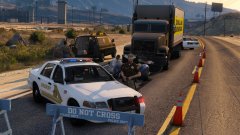
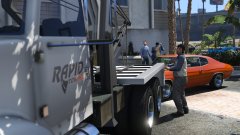
LAPD investigating a murder scene Share https://www.lcpdfr.com/gallery/image/57167-lapd-investigating-a-murder-scene/ Share on Facebook Share on X {lang="reddit_text" More sharing options... Followers
NickTaylor Members January 5, 201610 yr Author stats Hey man, I was just curious what steps you take to setting up your screenshots? I love 'em and would love to make some for my RP purposes.
Carrythxd Members January 5, 201610 yr Author stats 1 hour ago, NickTaylor said: Hey man, I was just curious what steps you take to setting up your screenshots? I love 'em and would love to make some for my RP purposes. Well, first I think of a police situation/any situation that could happen in real life/ingame (like the murder scene, in this one), then after that I find the location where I want to take the screenshot in (such as the house) and then just spawn the peds, make them do some sort of animations so that they're not just standing there like a bunch of sticks. And after that I usually add the vehicles (coroner/EMS/FD/PD), possible props (police barriers, cones, etc) and then just go to R* Editor and take the screenshot. However, all of this require a Trainer (Simple Trainer by sjaak327 is what I use and can easily recommend it, as it the best Trainer (in my opinion) for GTA V since it has everything that you could ask for). Simple Trainer doesn't work in GTA Online though, so stuff like this, is only possible in singleplayer. Although, one thing that I have to mention is that depending on what you're going for, these can take a long time to create. As sometimes you might accidently just delete every ped/vehicle you've added and then have to start from the beginning or you might just get extremely unlucky and have an NPC just ruin everything by shoving their car into the area that you're trying to build in. And finally, if you are just going for the screenshot style scenes (or a single video) the Trainer works fine but if you're planning on saving/loading the same scene after restarting the game, I would recommend using Map Editor by Guadmaz as that allows you to save the scene and load it again at a later date 51 minutes ago, purplepotatoes14 said: Nice screenshot ;) Thank you! :)
Carrythxd Members January 6, 201610 yr (edited) Author stats ^ A friend of mine already fixed that, just didn't have the livery installed back when I did this screen :) It still needs a little bit of work, but it looks good even as it is right now! (Forgot the quote, no idea have to add it back :P) Spoiler Edited January 6, 201610 yr by Carrythxd
NickTaylor Members January 7, 201610 yr Author stats On 1/5/2016 at 5:07 PM, Carrythxd said: Well, first I think of a police situation/any situation that could happen in real life/ingame (like the murder scene, in this one), then after that I find the location where I want to take the screenshot in (such as the house) and then just spawn the peds, make them do some sort of animations so that they're not just standing there like a bunch of sticks. And after that I usually add the vehicles (coroner/EMS/FD/PD), possible props (police barriers, cones, etc) and then just go to R* Editor and take the screenshot. However, all of this require a Trainer (Simple Trainer by sjaak327 is what I use and can easily recommend it, as it the best Trainer (in my opinion) for GTA V since it has everything that you could ask for). Simple Trainer doesn't work in GTA Online though, so stuff like this, is only possible in singleplayer. Although, one thing that I have to mention is that depending on what you're going for, these can take a long time to create. As sometimes you might accidently just delete every ped/vehicle you've added and then have to start from the beginning or you might just get extremely unlucky and have an NPC just ruin everything by shoving their car into the area that you're trying to build in. And finally, if you are just going for the screenshot style scenes (or a single video) the Trainer works fine but if you're planning on saving/loading the same scene after restarting the game, I would recommend using Map Editor by Guadmaz as that allows you to save the scene and load it again at a later date Thank you! :) Thanks so much man! I appreciate that!



Recommended Comments
Join the conversation
You can post now and register later. If you have an account, sign in now to post with your account.