




By Effegi88
- 806 views
- View Effegi88's images
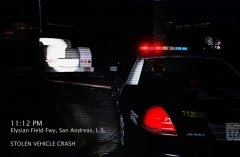
11:01 PM - Traffic Officer 1Adam12 is stationary at red light in an Elysian Freeway intersection.
11:02 PM - A white truck runs the light, makes a turn and crash against a street lamp, then pushes off a fence.
11:02 PM - TO 1A12 requests an additional unit. Code 2.
11:03 PM - Ocean1 responds.
11:04 PM - TO 1A12 apprehends the suspect without any resistance.
11:05 PM - Suspect in custody, Code 4.
11:07 PM - DMV information requested: the truck results possible stolen.
11:08 PM - The vehicle is searched: shaved keys and forged ID Cards are found.
11:12 PM - The suspect is placed under arrest with the following charges: reckless driving, vehicle steal, possess of illegal material and possess of false IDs.
Recommended Comments
Join the conversation
You can post now and register later. If you have an account, sign in now to post with your account.