Skip to content
View in the app

A better way to browse. Learn more.

LCPDFR.com

A full-screen app on your home screen with push notifications, badges and more.

To install this app on iOS and iPadOS
  1. Tap the Share icon in Safari
  2. Scroll the menu and tap Add to Home Screen.
  3. Tap Add in the top-right corner.
To install this app on Android
  1. Tap the 3-dot menu (⋮) in the top-right corner of the browser.
  2. Tap Add to Home screen or Install app.
  3. Confirm by tapping Install.

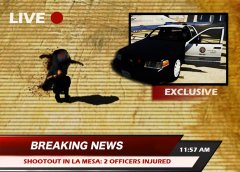
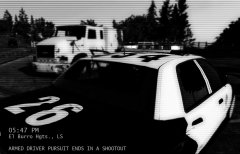
Shootout.jpg

This morning, at about 11:30 AM, men at work in La Mesa Canal noticed a suspicious person.

Accordingly to the LSPD, as a unit arrived on scene, the suspect started to shoot at the officers with a pistol. Officers were both injured. Additional units were dispatched. 

At the time, the conditions of the two injured officers are unknown. The suspect was shot down and declared dead by EMS. His identity is still unknown.

Credit

Special Thanks to: CVPI LSPD Mx7000/Arjent by F5544 and Crazy Callouts! by TitanSloth
  • From the album:

    Los Santos Real TV

    · 29 images

    Account

    Navigation

    Search

    Search

    Configure browser push notifications

    Chrome (Android)
    1. Tap the lock icon next to the address bar.
    2. Tap Permissions → Notifications.
    3. Adjust your preference.
    Chrome (Desktop)
    1. Click the padlock icon in the address bar.
    2. Select Site settings.
    3. Find Notifications and adjust your preference.