




A Sad, Rainy Day for Silverlake Police

By DukSezQuak
- 4,311 views
- View DukSezQuak's images
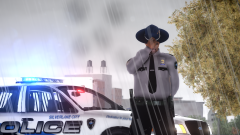
An Officer of the Silverlake Police Department dips his hat in remorse while standing at his traffic control post at a fatal Motor Vehicle Collision that occurred just behind him.
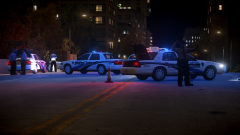
A Silverlake Police vehicle was involved in a T-Bone collision, after a vehicle ran a red light, and slammed into the drivers side of the police vehicle at a high rate of speed. The driver of the other vehicle fled the scene on foot, and a search is now underway for the driver of that vehicle.
Unfortunately despite the best efforts of the Fire and EMS personnel on scene, the officer in the police vehicle involved, who has yet to be named, passed away on the scene.
This incident is just one of two tragic incidents that happened in Silverlake today, as just earlier this morning, a suspect was shot and killed by police during a pursuit. Police do not believe these two incidents are connected, and do believe speed and alcohol were a factor in the collision.
Recommended Comments
Join the conversation
You can post now and register later. If you have an account, sign in now to post with your account.