







Fatal Crash in Silverlake on Sunday Morning

By DukSezQuak
- 853 views
- View DukSezQuak's images
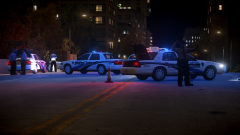
It was a sunny morning in Silverlake on Sunday, but it certainly was a dark day for First Responders as they received a 911 call shortly after 6 AM, stating that a vehicle had crashed on Highway 64. When Police Officers arrived on the scene, they located a single female approximately 65 feet from the crashed vehicle. Police do believe the female was the driver of the vehicle, and they stated that it's evident that she was ejected from the vehicle as it lost control, and eventually crashed. Police are unsure as to the cause of the crash, but they do believe speed was a factor, and are not ruling out alcohol.
Fire and EMS Crews started working on the Female, and she was eventually transported to Timberwolfe Memorial Hospital in Lower Silverlake, where she succumbed to her injuries. Police and Fire officials remain on the scene, and Silverlake City Police have called in their Elite Collision Reconstruction Team to investigate the collision further.
It's believed the vehicle was travelling Westbound on Highway 64 when it lost control, and ended up in the Eastbound lanes. Fortunately, there were not many vehicles on the roadway and no other individuals have been harmed.
Police are not releasing the identity of the female until family have been notified, and police say there will be an update on the situation later tonight.
Full Album: http://imgur.com/a/YLYx6
Recommended Comments
Join the conversation
You can post now and register later. If you have an account, sign in now to post with your account.