Skip to content
View in the app

A better way to browse. Learn more.

LCPDFR.com

A full-screen app on your home screen with push notifications, badges and more.

To install this app on iOS and iPadOS
  1. Tap the Share icon in Safari
  2. Scroll the menu and tap Add to Home Screen.
  3. Tap Add in the top-right corner.
To install this app on Android
  1. Tap the 3-dot menu (⋮) in the top-right corner of the browser.
  2. Tap Add to Home screen or Install app.
  3. Confirm by tapping Install.
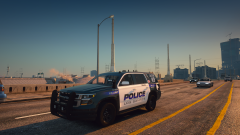
NaturalVision Evolved

NaturalVision Evolved

Album created by LoneAmerican · Updated

SgtThiel

Members

How did you get this to work? My game chrashes everytime I‘m trying to start it(LSPDFR)

Jeffjohnson547

Members

Are we able to still use the lspdfr mod, or will it mess the game up when there is another beta update for NVE?

Walmarrt

Members

I currently have the beta NVE mod. However, it keeps crashing when I start ragehook. It works in regular gta v mode, but not with LSPDFR. Any solutions? 

VanishingTacos

Members

On 6/28/2020 at 8:06 PM, Sgt And3rson said:

Start up regular gta. During the NVE loading screen, Alt-Tab out and load up Rage. After Rage loads in, go back to GTA and it should work fine.

Thank you for this!

Killsfreebabe

Members

On 6/29/2020 at 5:36 AM, Sgt And3rson said:

Start up regular gta. During the NVE loading screen, Alt-Tab out and load up Rage. After Rage loads in, go back to GTA and it should work fine.

i tried it bro but not working

Sgt And3rson

Members

9 hours ago, Killsfreebabe said:

i tried it bro but not working

Then there might be something else causing your game to crash.I would uninstall NVE (there should be a uninstaller that came with the rest of the files) and see if your game loads up.

5kY1iN3

Members

The issue with the Rage start up is the 

d3dll.dll

d3dcompiler_46e.dll


files. If you download the older ENB version 0.275 NVE and LSPDFR will work again with RageHook starting everything.

Still working personally on getting WoV, NVE, and LSPDFR all working together though...

phoenixpolice

Members

(edited)

Dumb question but where did you get the livery?

EDIT* nvm I thought this was a paid release.

Edited by phoenixpolice

On 7/3/2021 at 7:09 AM, 5kY1iN3 said:

Hi, did you manage to get them all working together? In regards to your comment 'Still working personally on getting WoV, NVE, and LSPDFR all working'. It's been a nightmare for me and I am interested in your method/Install order. Thanks

Trax713

Members

Hey guys! Hope you are not having this problem anymore. For those who still do, follow these super easy steps! (No ALT+TAB is required!)
Go to files, and go to your NVE WinRAR package. Go inside, and click "Optional add-ons", and find "LSPDFR Compatibility", and click it. You should see a install file. Drag it into OpenIV just like you installed NVE. After installing, go open GTA 5 and Rage Plugin Hook normally, and enjoy!

Carsen21

Members

On 2/28/2023 at 5:29 AM, Trax713 said:

Hey guys! Hope you are not having this problem anymore. For those who still do, follow these super easy steps! (No ALT+TAB is required!)
Go to files, and go to your NVE WinRAR package. Go inside, and click "Optional add-ons", and find "LSPDFR Compatibility", and click it. You should see a install file. Drag it into OpenIV just like you installed NVE. After installing, go open GTA 5 and Rage Plugin Hook normally, and enjoy!

is this the Early Access paid version? the one that from Razed's Patreon?

Xkadoodle

Members

On 3/4/2023 at 8:43 AM, Carsen21 said:

is this the Early Access paid version? the one that from Razed's Patreon?

yeah bro i found that LSDPFR Compability patch in optional add-on folder on NVE March update 2023

Join the conversation

You can post now and register later. If you have an account, sign in now to post with your account.

Guest
Add a comment...

Recently Browsing 0

  • No registered users viewing this page.

Account

Navigation

Search

Search

Configure browser push notifications

Chrome (Android)
  1. Tap the lock icon next to the address bar.
  2. Tap Permissions → Notifications.
  3. Adjust your preference.
Chrome (Desktop)
  1. Click the padlock icon in the address bar.
  2. Select Site settings.
  3. Find Notifications and adjust your preference.