Skip to content
View in the app

A better way to browse. Learn more.

LCPDFR.com

A full-screen app on your home screen with push notifications, badges and more.

To install this app on iOS and iPadOS
  1. Tap the Share icon in Safari
  2. Scroll the menu and tap Add to Home Screen.
  3. Tap Add in the top-right corner.
To install this app on Android
  1. Tap the 3-dot menu (⋮) in the top-right corner of the browser.
  2. Tap Add to Home screen or Install app.
  3. Confirm by tapping Install.
The latest updated version of RAGE Plugin Hook, required to play LSPDFR, can be found inside the LSPDFR download. It is not currently available on the RAGE Plugin Hook website.

Police4 issues since 0.4 update
Featured Replies

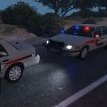
Ever since I did the 0.4 update my police4 slot is messed up. When close to the car it looks like parts of the original unmarked cruiser and then when I'm a few feet away it looks like the model it is suppose to be. Any help would be greatly appreciated.. thanks!!    P.S. this is the only slot I'm having issues with and I even made sure it was in the newest patchday

20190225195148_1.jpg

20190225195202_1.jpg

Edited by chnnls823

  • Author
Just now, RHefo96 said:

Try putting the replacement vehicle files into Patchday19

I just tried police4 in 19 yesterday and then moved onto 20 and still no change.. worked great before this update. Also noticed it doesn't even show up in the police garage as a spawn option.. just the motorbike for HP

 install this. it will show up then once you follow the guidelines. If problem persists with vehicle try changing to a different model I am currently using this pack here and Police4 works perfect no bugs. I also have changed a couple of the vehicles to make them an addon by watching Albos videos if you have got the time to spare and mess around with things. Also note when you install the EUP settings any vehicles you want certain Agencies to use follow this file path and edit the Agency.xml file in here E:\Steam\steamapps\common\Grand Theft Auto V\lspdfr\data\custom


Shlapper - Trooper SHlapp HLRP

3 minutes ago, chnnls823 said:

Thanks so much.. I got it working. Just redownloaded the caprice and reinstalled and all is good now. Appreciate the help though!

No problem 🙂 Glad it all worked itself out for you.

Shlapper - Trooper SHlapp HLRP

  • Author
11 minutes ago, RHefo96 said:

No problem 🙂 Glad it all worked itself out for you.

Yes.. it's weird that it was the only one that did that as every other one worked perfect. Almost like the file got messed up during the update or something.

This is a support topic.
Only reply here to offer help or assistance to chnnls823. Off-topic or "me too" replies will be removed.

Need support yourself? Make a new topic instead.

Join the conversation

You can post now and register later. If you have an account, sign in now to post with your account.

Guest
Reply to this topic...

Recently Browsing 0

  • No registered users viewing this page.

Account

Navigation

Search

Search

Configure browser push notifications

Chrome (Android)
  1. Tap the lock icon next to the address bar.
  2. Tap Permissions → Notifications.
  3. Adjust your preference.
Chrome (Desktop)
  1. Click the padlock icon in the address bar.
  2. Select Site settings.
  3. Find Notifications and adjust your preference.