Skip to content
View in the app

A better way to browse. Learn more.

LCPDFR.com

A full-screen app on your home screen with push notifications, badges and more.

To install this app on iOS and iPadOS
  1. Tap the Share icon in Safari
  2. Scroll the menu and tap Add to Home Screen.
  3. Tap Add in the top-right corner.
To install this app on Android
  1. Tap the 3-dot menu (⋮) in the top-right corner of the browser.
  2. Tap Add to Home screen or Install app.
  3. Confirm by tapping Install.

How to call N.O.O.S.E air support?
Featured Replies

How to call this kind of support from the air? " I so understood to fly annihilator with the special forces on Board (as in the original game) and hover over врагом.Но I always displays one and the same phrase - "not available"!Why Can? I need it cause in some special situation? I tried to chase shootout...what's up?!

I See It All.I Know It All.

There are two ways to call for air support. When not in a chase, you can press alt+v to have a NOOSE 'copter follow you around and shoot at enemies. If you are in a pursuit, you can press the F10 key to call in a general helicopter team, though it usually is not NOOSE. The alt+v command should still work in a pursuit. There shouldn't be a time when it would say "not available," that's never happened to me and I've called in a lot of helicopter support.

de816a4fa5.png

LMAO!

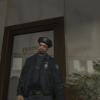
Camera angle 1: (OP's pic)*Newbie recruit standing in the police station premises asking the question*

Camera angle 2: (Iconography's pic) *Fellow cop with a kalashnikov in arms replies while standing on the other side*

Join the conversation

You can post now and register later. If you have an account, sign in now to post with your account.

Guest
Reply to this topic...

Recently Browsing 0

  • No registered users viewing this page.

Account

Navigation

Search

Search

Configure browser push notifications

Chrome (Android)
  1. Tap the lock icon next to the address bar.
  2. Tap Permissions → Notifications.
  3. Adjust your preference.
Chrome (Desktop)
  1. Click the padlock icon in the address bar.
  2. Select Site settings.
  3. Find Notifications and adjust your preference.
