Skip to content
View in the app

A better way to browse. Learn more.

LCPDFR.com

A full-screen app on your home screen with push notifications, badges and more.

To install this app on iOS and iPadOS
  1. Tap the Share icon in Safari
  2. Scroll the menu and tap Add to Home Screen.
  3. Tap Add in the top-right corner.
To install this app on Android
  1. Tap the 3-dot menu (⋮) in the top-right corner of the browser.
  2. Tap Add to Home screen or Install app.
  3. Confirm by tapping Install.

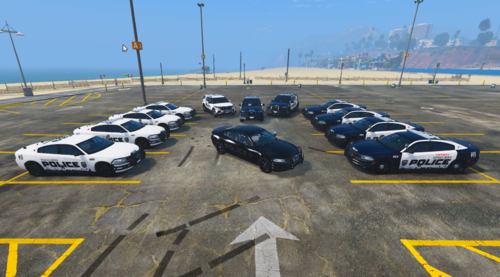
2015 Dodge Charger LS RCMP 1.0

(1 review)

7 Screenshots


 Hey guys this is a LS RCMP skin for KAMELKFB 2015 Dodge Cgarger RT Police 2.0. http://www.lcpdfr.com/files/file/8466-2015-dodge-charger-rt-police/

I know there are a few little things that need to be done to the texture (the reflective tape in the rear quarter needs to be adjusted), I do have a supervisor car in development along with an IRSU CVPI and Charger, along with a SUV sheriff.

=======================================

HOW TO INSTALL

=======================================

TEXTURES - update/ x64/ dlcpacks/ patchday3ng/ dlc/ x64/ levels/ gta5/ vehicals/

then go to police2 and police2 hi and replace the sign file in both of them. (replacing just the police2 doesnt work for some reason)


VEHICLE - update/ x64/ dlcpacks/ patchday3ng/ dlc/ x64/ levels/ gta5/ vehicals.

then inport all the vehicle file directly in there and your done!  

=======================================

FILES

=======================================

- texture file : sign_1


DO NOT REUPLOAD THE FILE TO ANOTHER SITE


User Feedback

Recommended Comments

BeetleBeast72

Members

(edited)

Where do i import the file? 


Edited by BeetleBeast72

TugBoat

Members Author

Where do i import the file? 


You use OpenIV! update/ x64/ dlcpacks/ patchday3ng/ dlc/ x64/ levels/ gta5/ vehicals.   Then open police2 and replace the sign file. (Remeber this is only forKAMELKFB 2015 Dodge Cgarger RT Police 2.0. (wont work for the original))

BeetleBeast72

Members

Yeah 

You use OpenIV! update/ x64/ dlcpacks/ patchday3ng/ dlc/ x64/ levels/ gta5/ vehicals.   Then open police2 and replace the sign file. (Remeber this is only forKAMELKFB 2015 Dodge Cgarger RT Police 2.0. (wont work for the original))

Yeah, I tried that. Weird, I can't get it to work, when I look at the sign1 file in OpenIV it is the RCMP texture but when i am in game it is the normal police texture.

TugBoat

Members Author

Yeah 

Yeah, I tried that. Weird, I can't get it to work, when I look at the sign1 file in OpenIV it is the RCMP texture but when i am in game it is the normal police texture.

ohh you'll have to replace the sign in police2 hi as well


BeetleBeast72

Members

ohh you'll have to replace the sign in police2 hi as well


damn it, that's right thank's dude!

TugBoat

Members Author

damn it, that's right thank's dude!

NO PROBLEM! hahaha i put it in the description for everybody to know now!

Create an account or sign in to comment

Account

Navigation

Search

Search

Configure browser push notifications

Chrome (Android)
  1. Tap the lock icon next to the address bar.
  2. Tap Permissions → Notifications.
  3. Adjust your preference.
Chrome (Desktop)
  1. Click the padlock icon in the address bar.
  2. Select Site settings.
  3. Find Notifications and adjust your preference.